138 X75HD/X75SD Installation and Operation Manual
Chapter 7: Web Server Software Control
Monitoring Alarms
Click Monitoring from the Home page to open the Leitch X75 Alarms
page. On this page, you can view or change the status of the active and
disabled alarms (see Figure 7-9 on page 139). For a complete list of all
of the possible alarms, see page 323.
Thumbnail Streaming
All X75HD/X75SD units provide a “thumbnail” streaming video output
that originates from the Ctrl/Strm Ethernet port and is displayed both
in the Alarms page of the X75 Web Server and in the Control window
of CCS Pilot and Navigator. To activate the streaming in the Web
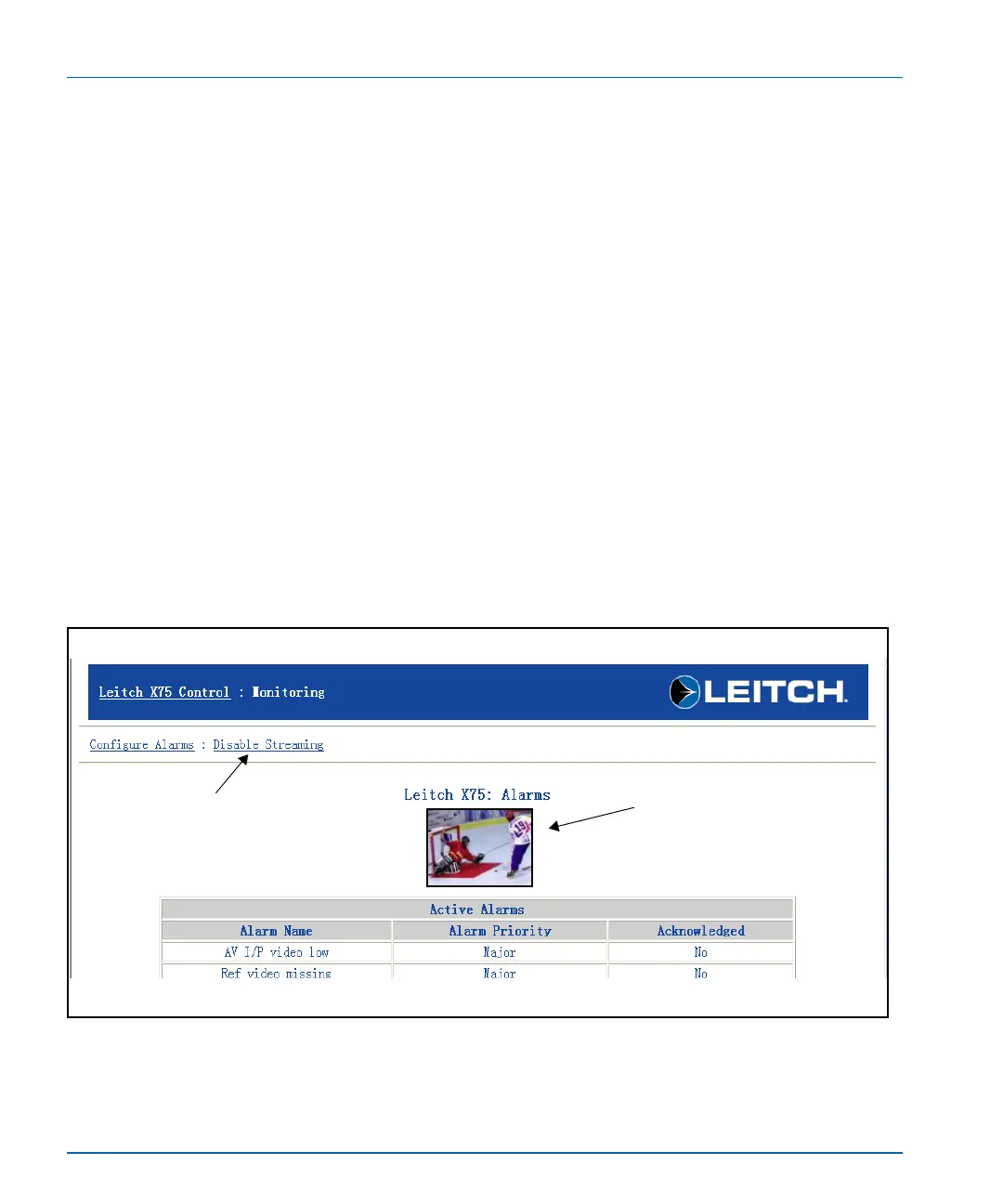
Server, click Enable Streaming at the top left corner of the Alarms
page (see Figure 7-8).
The frame size of the thumbnail image is 128 x 96 pixels. On the
X75HD/X75SD Web server, the default refresh rate is once every 10
seconds, but you can adjust it to a rate of between 5 and 300 seconds. (It
can also be turned off entirely.) The control for the refresh rate is
located at the bottom of the Alarms page.
Figure 7-8. Monitoring Page with Streaming Enabled
Enable/Disable thumbnail
streaming option
Click here to enable or disable
the option
Thumbnail streaming
option enabled


 To Next Page