Colortran Encore Control Console
Software Version 3.05
104
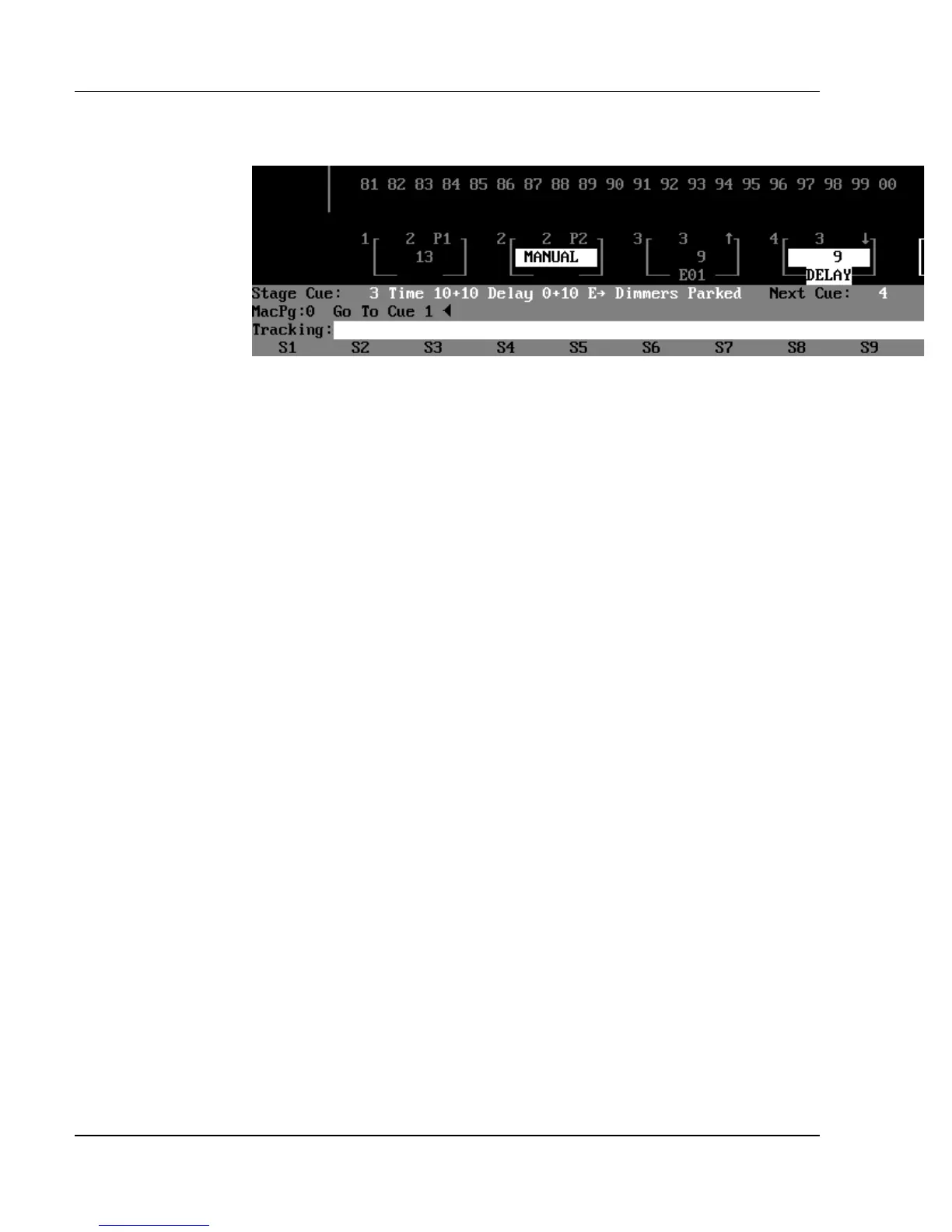
Figure 9.3, Playback Fader Boxes
Playback Fader Boxes
In the Stage and Playback displays (the two "live" displays), the four Playback
Fader Boxes show you the current status of the four playback faders. Four fades
may be monitored at a time in the Playback Fader Boxes. Additional timed
fades run "in the background" and appear on the screen automatically when
shorter timed fades run out (this is called fader hierarchy). In each Playback
Fader Box, the cue number is shown on the first line, and the cue fade time is
shown on the second line. If the cue fade time is manual, the time is shown as
"MANUAL" in reverse video. When an effect is running on the playback
fader, the effect number is shown at the bottom of the Playback Fader Box.
?
ADVANCED TOPICS: See Chapter 15, Effects.
Grandmaster Fader Box
To the right of the Playback Fader Boxes is the Grandmaster Fader Box that
shows you the current level of the Grandmaster Fader. Whenever the
Grandmaster level drops below Full, the level indicated in this box flashes. If
the Grandmaster reaches zero, the level changes to the flashing red letters
"B.O.", to indicate a blackout condition on the stage. The flashing red "B.O."
also shows when the Blackout switch is in the Blackout position.



 To Next Page