Chapter 19: Advanced Cues
Software Version 3.05
207
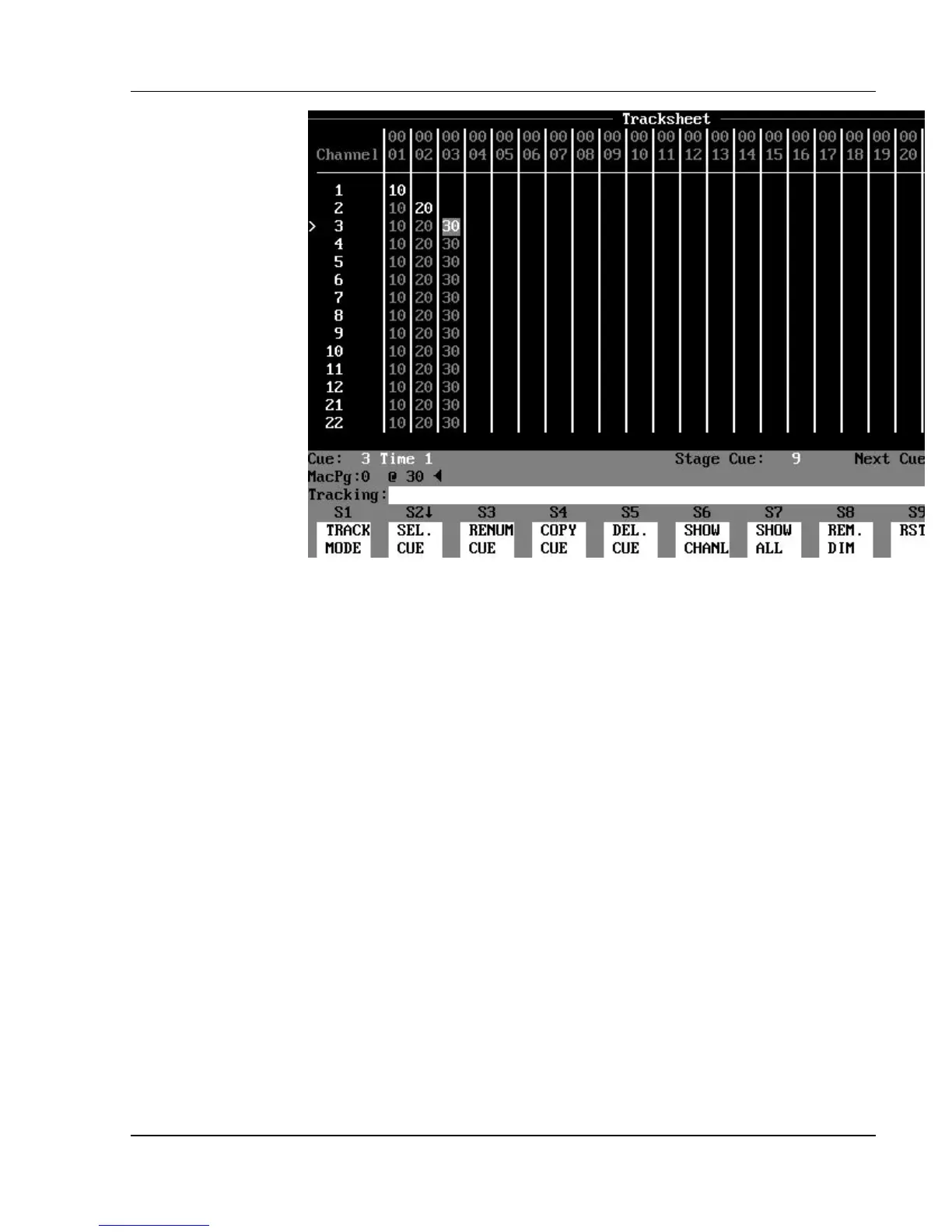
Figure 19.7, Tracking Levels in Link Commands
Tracking Levels in Link Commands
When you are using a link to a cue that has tracking "soft" levels, a special
condition occurs. The stage "look" created by a cue in a sequence is usually
made up of a combination of hard levels (those changes assigned in that
specific cue) and soft levels (those levels that track in from a previous cue).
When the link is executed, only hard (non-tracking) channel levels are affected.
The tracking soft level assignments remain at their current levels when a link
occurs. This causes the stage "look" to be different when a cue is reached by a
link instead of by the normal numeric cue sequence progression.
? EXAMPLE: Refer to Figure 19.7. In the Tracksheet display:
1. Assign a level of 10 % to channel 1 in cue 1.
2. Take channel 2 in cue 2 to 20%. (Channel 1 tracks at
10%.).
3. Take channel 3 in cue 3 to 30%. (Channel 2 tracks at 20%,
channel 1 tracks at 10%.)
4. Link cue 1 to cue 3.
5. Starting at cue 0, press Go. (Cue 1 runs.) (Stage display shows
channel 1 at 10% in red.)
6. Press Go. (Cue 3 runs) (Stage display shows
channel 1 at 10% in gray, and
channel 3 at 30%. Channel 2 does not read on stage.)



 To Next Page