Colortran Encore Control Console
Software Version 3.05
E-4
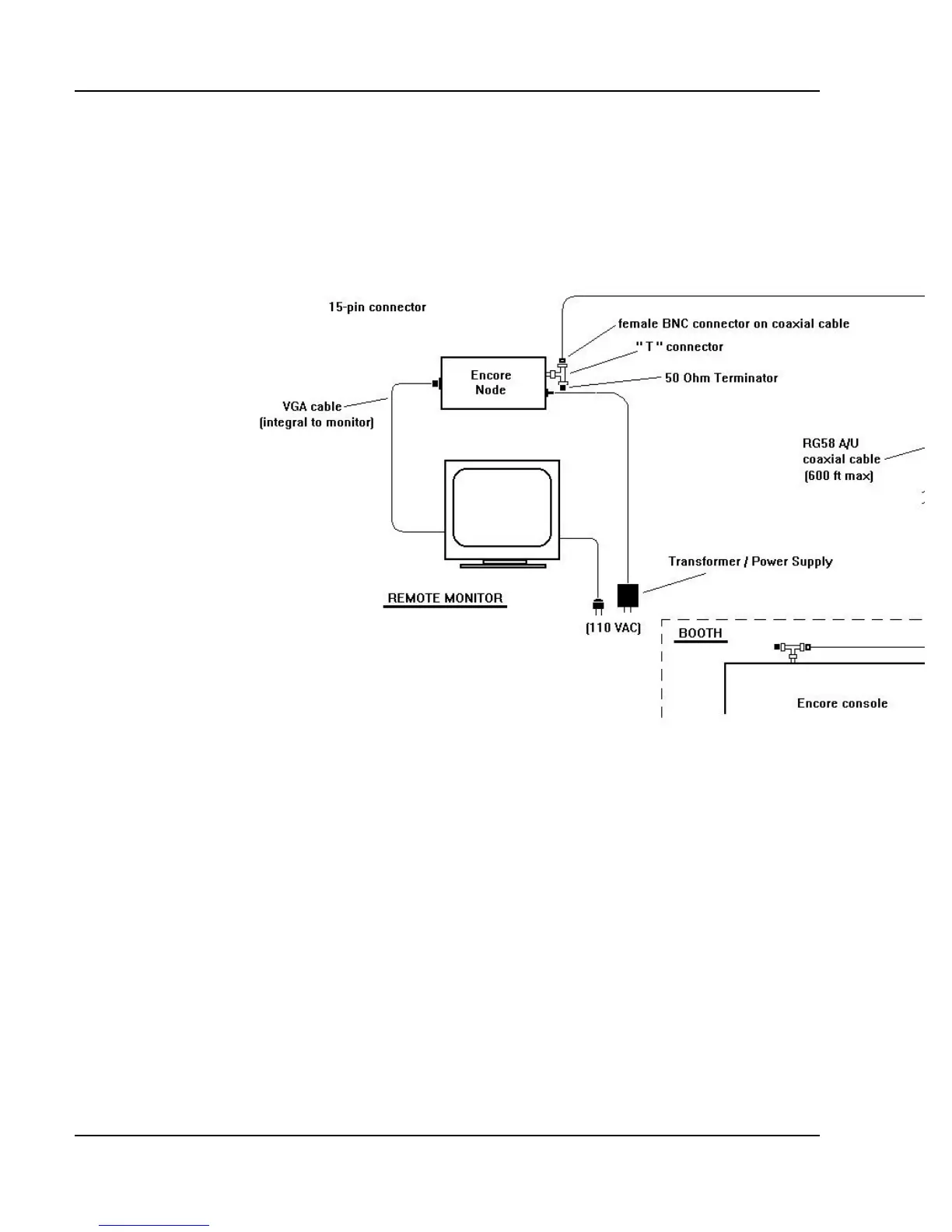
Temporary Systems. One or more temporary Remote Video locations can
be set up using a length of RG58/U 50? coaxial cable (approved for Ethernet
applications) less than 607 feet long. This cable must be properly
Figure E-2 Temporary Encore Remote Video System
terminated and all connections must use “T”-connectors and conform to the
rules of an Ethernet Local Area Network (LAN). The console and all nodes
must be connected to the cable with “T” connectors. Both ends of the cable
must have 50? BNC terminators connected to it. For a sample system, see
Figure E-2.
Functions
The Encore Remote Video display is your primary information source when
you are away from the main console. The Remote Video display mirrors the
information that is shown on the monitor(s) at the console. You can choose to
show a copy of either the display on the Main monitor, or the display on the
Auxiliary monitor.



 To Next Page