Colortran Encore Control Console
Software Version 3.05
32
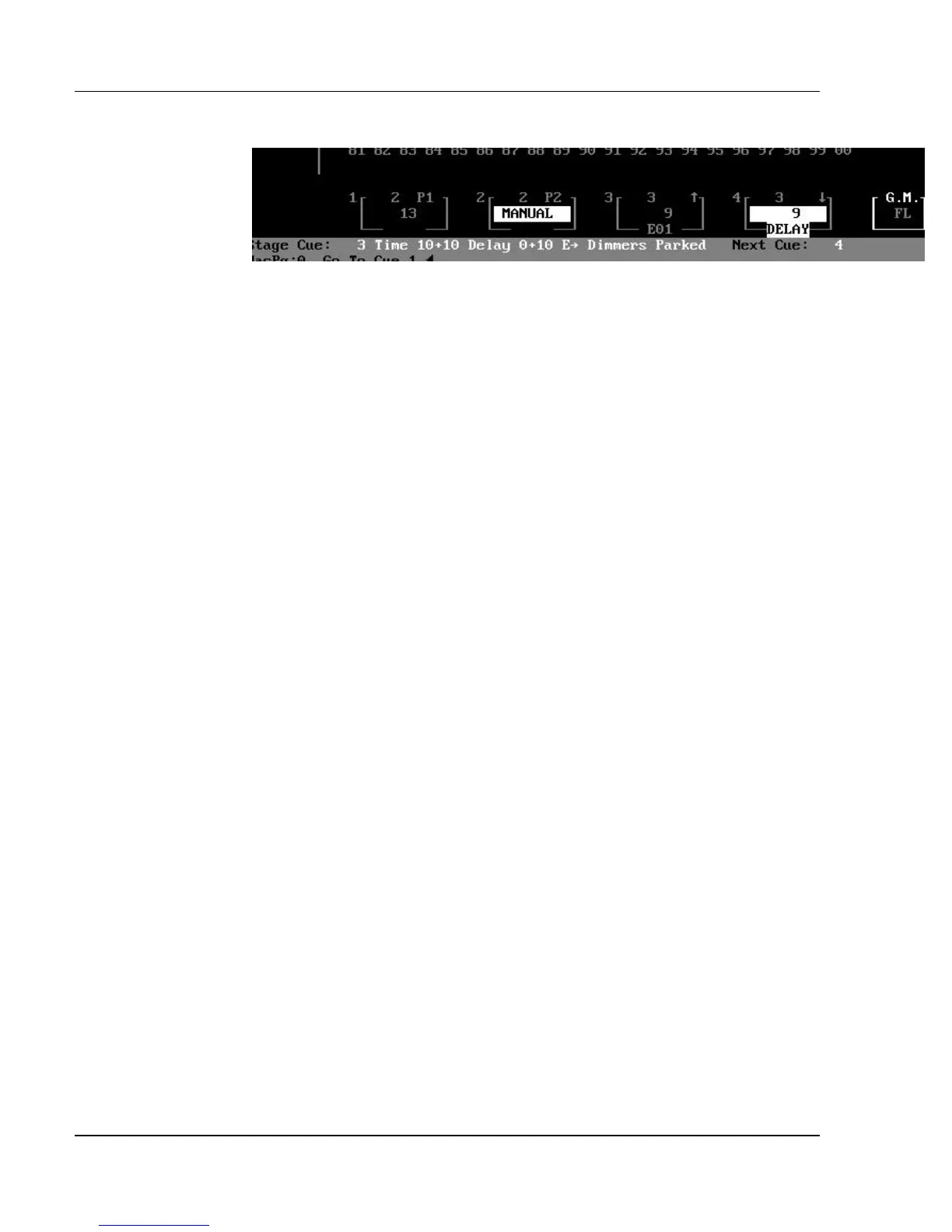
Figure 3.5, Playback Fader Boxes
Playback Fader Boxes: The four Playback Fader Boxes numbered 1 -
4 are located above the Status Bar on the Stage display screen. The Playback
Fader Boxes indicate the current status of any cues actively fading, or any
running cue effects. When a cue is executed by pressing the GO button or
using the [GO TO CUE] key, it is automatically loaded onto the lowest
available Playback Fader.
The Playback Fader Boxes contain the following information:
?? Cue number (the number on the top line of the box).
?? Cue Part number represented by the letter “P” before a number.
?? "?" indicates the up fade of a split fade cue.
?? "?" indicates the down fade of a split fade cue.
?? Fade time remaining is shown on the middle line of the box
- or-
"MANUAL" appears in reverse video when the fade is manually
controlled.
?? Delay time of the fade on the playback fader. ("DELAY" appears in
reverse video when the fade is
in the process of counting down its delay time.)
?? Effect number of the fade on the playback fader
?? "?" next to the effect number indicates a fade effect (no arrow indicates
a cue effect).
? NOTE: For manual cues, the word "MANUAL" starts to blink when
you move the fader handle from the zero position.



 To Next Page