Procedures for Testing with the DX Host
100 Baker DX 71-030 User Guide EN V10 www.megger.com
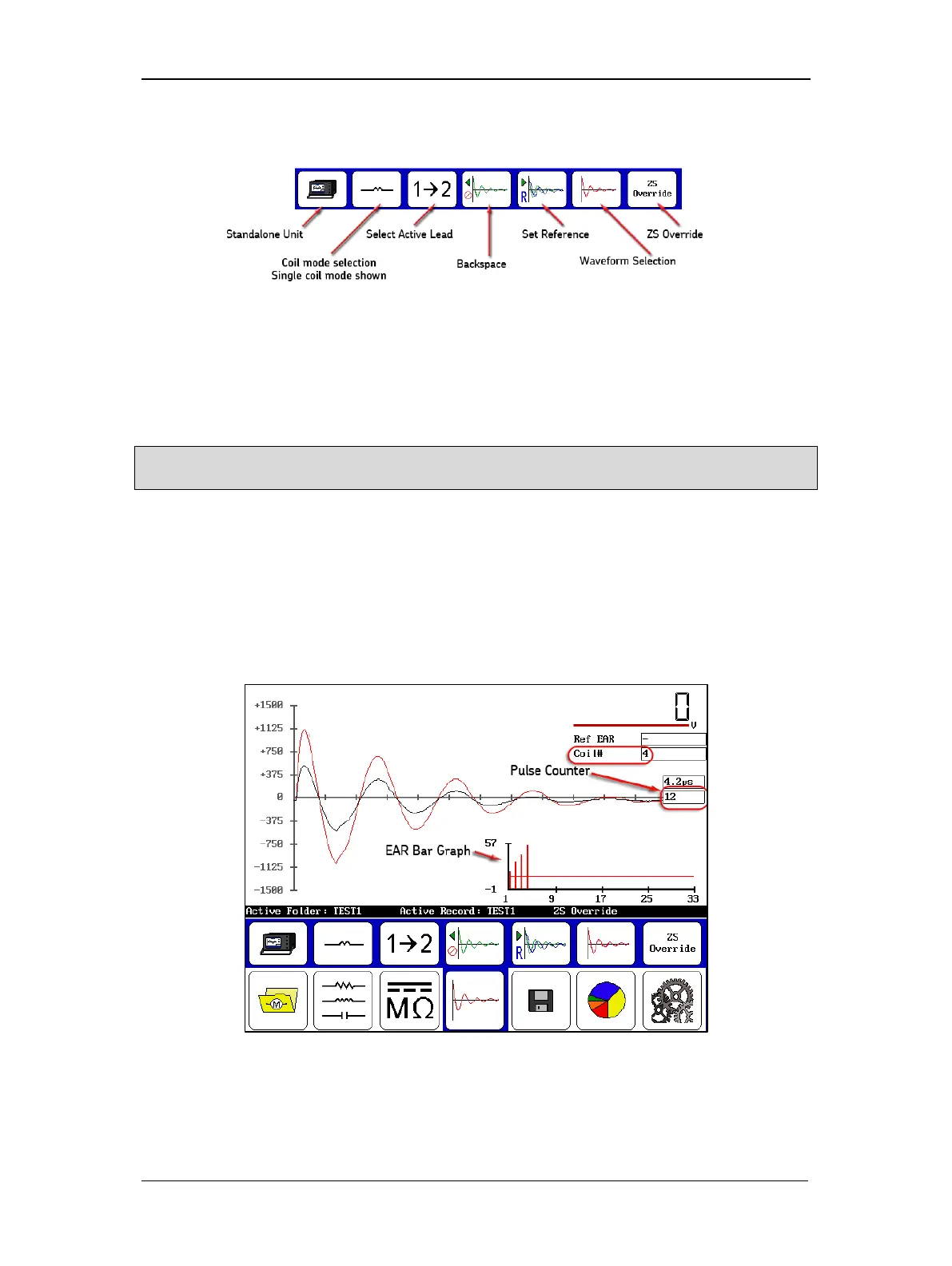
The single-coil testing submenu is shown in the following graphic.
Figure 111. Single-coil testing submenu icons.
5. Use the reference recall or import reference features to load an existing reference
waveform; or create a new one as described earlier in this chapter.
6. After you have the reference in place and the zero-start override has been set, you are
ready to test single coils that are identical to the reference (known good) coil.
NOTE: For armature testing, keep probes on the first pair (bar-to-bar) or span to collect data for those
windings. First test was used to obtain reference only.
7. On the DX host, press and hold the Start (PTT) button (or footswitch). Use the pulse
counter to watch for approximately 10 surge pulses.
8. When you have collected a satisfactory result (passing or failing) for the coil (or armature
winding), carefully disconnect the coil under test and reconnect a new coil. (During
armature testing, move to the next set of armature bars.)
9. In the simple example below, you can see the test results collected when testing single
coils.
Figure 112. Coil test results screen; reference and last waveform displayed.
10. When you have completed testing all your coils, touch the Save icon to save the test
results in the active folder and record.



 To Next Page