Procedures for Testing with the DX Host
78 Baker DX 71-030 User Guide EN V10 www.megger.com
10. Select coil 3 and repeat testing process.
11. Save data.
Surge Testing Procedure for Three-phase Coil Mode
NOTE: Ramp rates, EAR limits, test times, and other test settings are specified in the System Settings mode.
Refer to the “Using System Settings” section in chapter 4 —for more details.
1. Ensure that high-voltage leads are connected to the motor under test.
2. Ensure that the Active Folder and Active Record indicate the location of where you
want to save Surge test data.
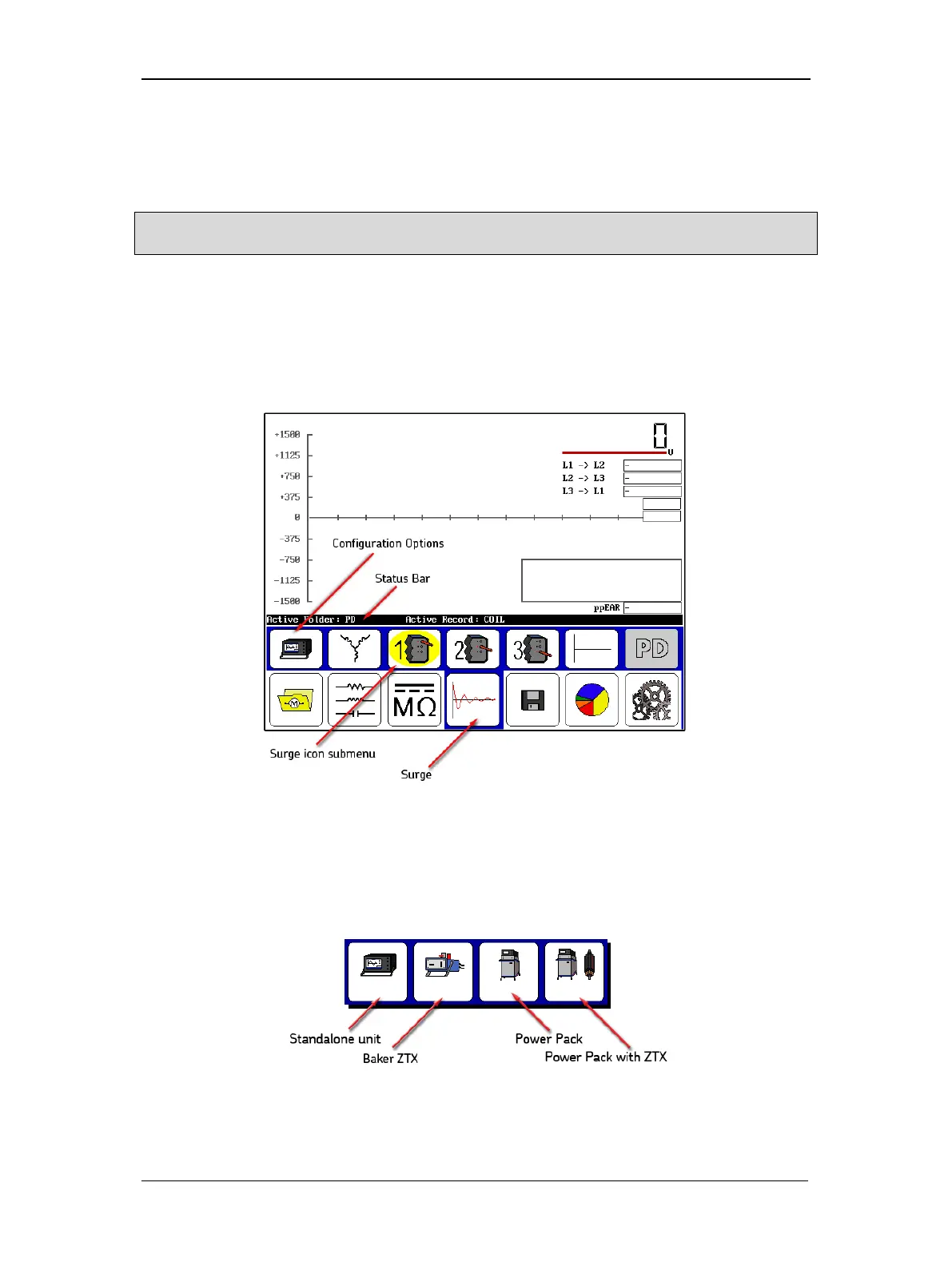
3. Touch the Surge icon to bring up the Surge Test Start screen as shown below. The first
submenu item is the Configuration Options icon.
Figure 83. Surge test start screen.
4. Touching the Configuration Options icon shows you the options that are installed
such as operation as a standalone unit, with a power pack, with a Baker ZTX, or with a
power pack containing a built-in ZTX.
Figure 84. Configuration options popup menu.



 To Next Page