XML Key
The 6940 IP phone has a feature you can enable called XML (Extensible Markup Language). XML
is a markup language much like HTML. Your System Administrator can create customized XML
menu services and load them to your IP phone. These services include things like weather and
traffic reports, contact information, company info, stock quotes, or custom call scripts.
On the 6940 IP phone, you can access the XML applications from the IP phone UI through an
XML
softkey.
Using the Mitel Web UI, you can configure a key to access XML applications. Under
Operations >
Softkeys and XML
, or
Operations > Expansion Module
, you can assign a key the type
XML
.
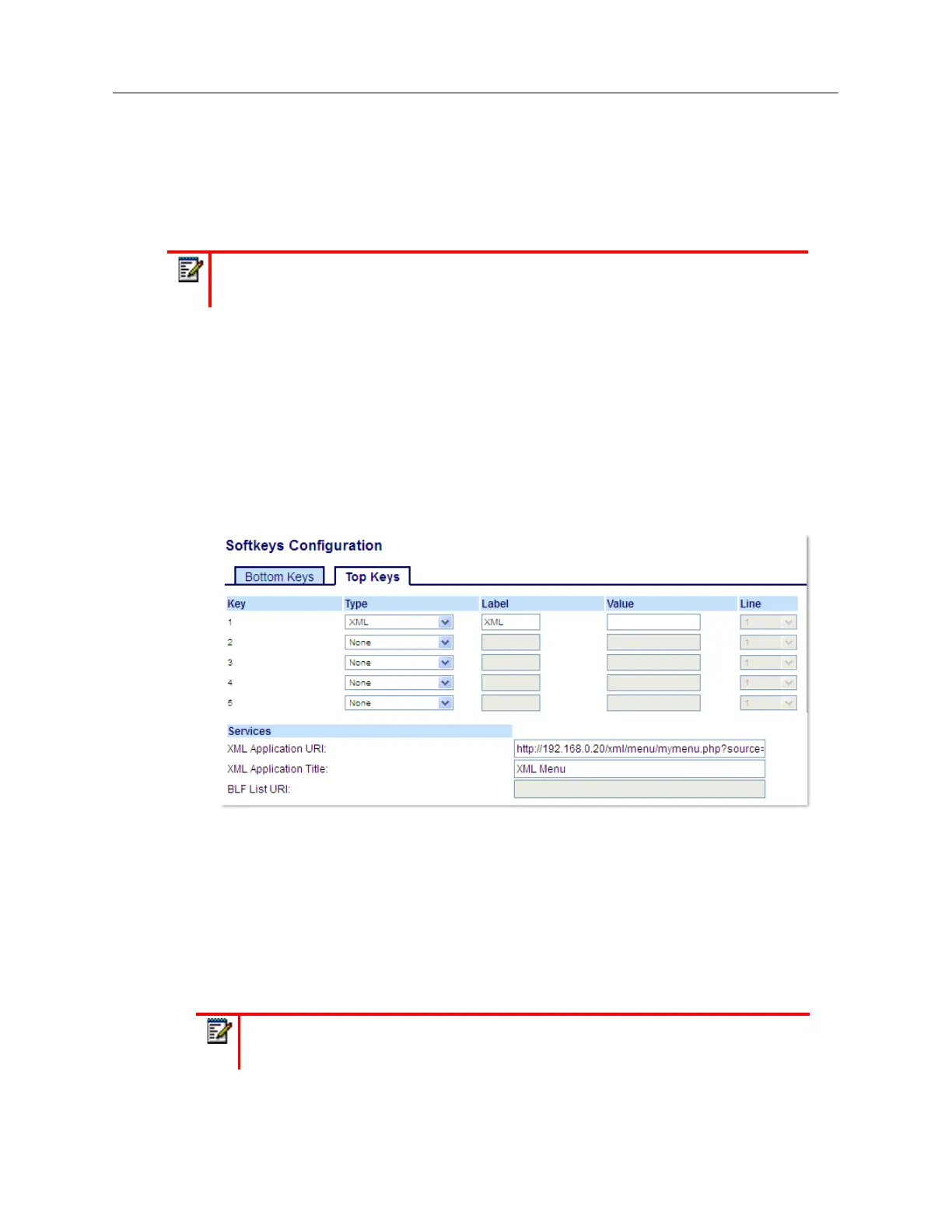
Configuring an XML Key Using the Mitel Web UI
1.
Click on
Operation > Softkeys and XML
.
or
Click on
Operation > Expansion Module <N>
.
Softkeys
2.
Select from
Key 1
through
Key 48
on the Top keys.
or
Select from
Key 1
through
Key 30
on the Bottom keys.
3.
In the
Type
field, select
XML
.
4.
In the
Label
field, enter a label to apply to this key.
5.
In the
Value
field, enter a URI(s) to apply to this key.
6.
In the state fields, check (enable) or uncheck (disable) the states you want to apply to this softkey.
Note:
The XML services must be set up by your System Administrator before you can
use the key.
Note:
Contact your System Administrator for the appropriate value(s) to enter in the
Value
field.



 To Next Page