Home
Mitel
Telephone
6940
Page 52
Mitel 6940 - Page 52
232 pages
Manual
Save Page as PDF
To Next Page
To Next Page
To Previous Page
To Previous Page
Loading...
Mitel 6940 SIP Phone Use
r Guide
lii
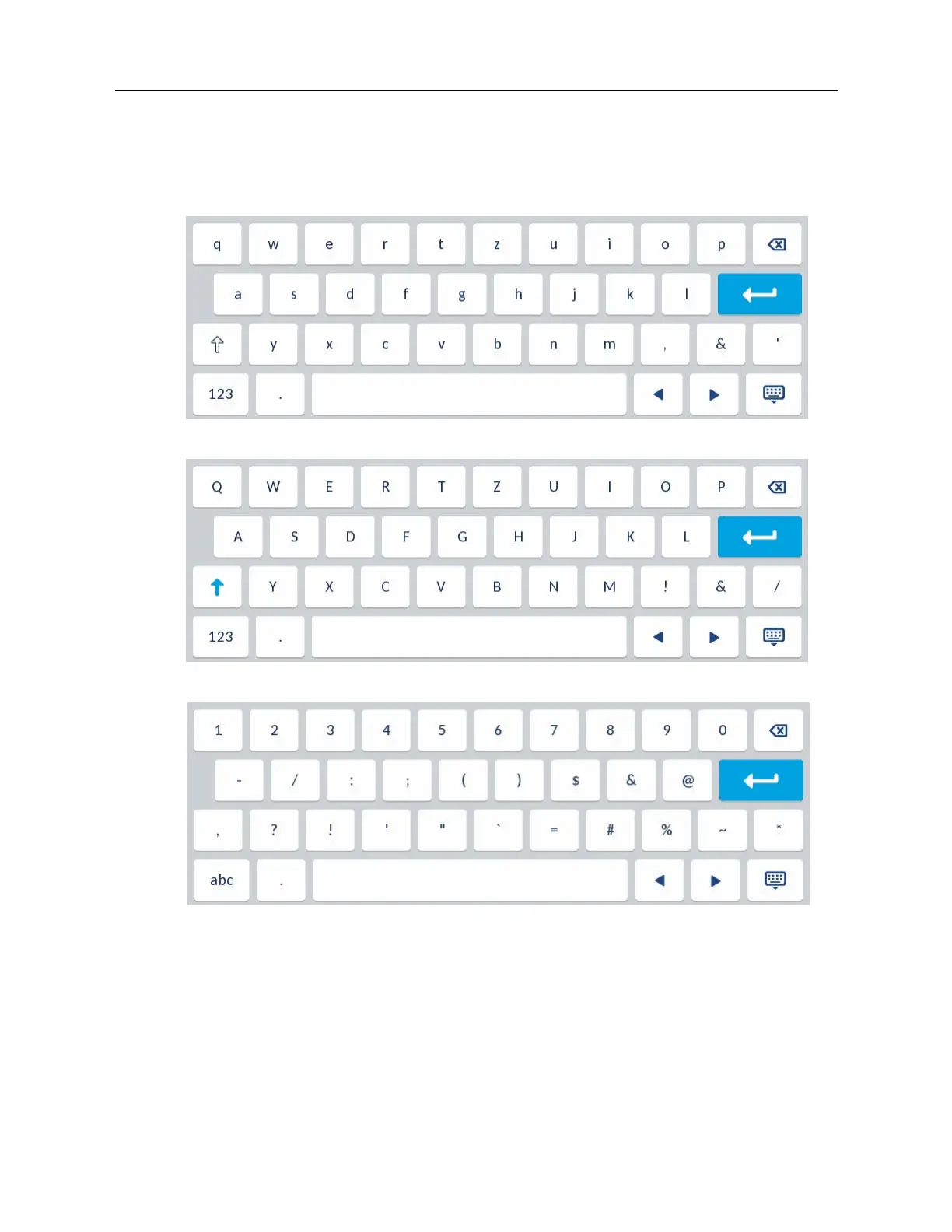
German On-Screen Keyboa
rd Layout
When the phone’
s
input language is co
nfigured as German,
the following keyb
oard layout
s are used:
German Keyboard
- Lower
Case
German Keyboard - Upper Case
German Keyboard - Numeric
51
53
Table of Contents
Main Page
Table of Contents
3
Welcome
10
About this Guide
10
Documentation
10
Supporting Documentation
11
Phone Features
11
Requirements
11
Installation and Setup
12
Cleaning the Mitel 6940 SIP IP Phone Touchscreen
12
Tips for Your Comfort and Safety
13
Don't Cradle the Handset
13
Protect Your Hearing
13
Adjust the Viewing Angle
13
IP Phone Keys
14
Key Panel
14
Key Description
15
Input Methods
15
Dialpad Keys
15
On-Screen Keyboard
17
Getting Started
20
Plugging in and Starting the Phone
20
Network Connected/Network Disconnected
22
UI Overview
23
Home Screen
23
Line Selection Screen
27
Detailed-View Call Screen
28
Multi-View Call Screen
29
Methods of Customizing Your Phone
31
Phone Options through the IP Phone UI
31
Simplified Options List
32
Using the IP Phone UI
33
Phone Options through the Mitel Web UI
34
Using the Mitel Web UI
34
Phone Status
38
Phone Status through IP Phone UI
38
To View the Status of Your Phone through IP Phone UI
38
Finding Your Phone's IP Address
40
Phone Status through the Mitel Web UI
41
SIP Account Status
42
Customizing Your Phone
43
Language
43
IP Phone UI and Web UI Language
43
Input Language
45
Specifying the Input Language Using the IP Phone UI
57
Specifying the Input Language Using the Mitel Web UI
58
Latin 2 Character Set
59
Time and Date
59
Settings
60
Time Zone
62
Set Date and Time
63
Bluetooth
65
Enabling and Disabling Bluetooth Functionality
66
Pairing a Bluetooth Device
66
Unpair/Forget a Bluetooth Device
69
Connecting to a Different Paired Bluetooth Device
70
Directory
70
Settings
70
External Sources
71
Credentials
72
Call Forward
74
Lock
74
Password
74
Phone Lock
74
Configuring Lock Settings Using the Mitel Web UI
76
Audio
78
Audio Mode
78
Headset
80
Ring Tones and Tone Sets
80
Display
86
Home Screen Settings
86
Brightness Settings
88
Dialing
88
Live Dialpad
88
Speed Dial Edit
89
Restart
89
Restarting Your Phone Using the IP Phone UI
89
Emergency Dial Plan
91
Defining an Emergency Dial Plan Using the Mitel Web UI
92
Configuring Softkeys
93
State-Based Softkeys
95
Softkey Display Behavior
96
Line Key
98
Configuring a Line Key Using the Mitel Web UI
98
Blinking Softkey Icon Support for Line Keys
98
Speed Dial Key
99
Speed Dial Prefix
99
Press-And-Hold to Create a Speed Dial
100
Creating a Speed Dial Key Using the Speed Dial Edit Option (Applicable to Softkeys, Dialpad Keys, Expansion Module Keys)
101
Creating a Speed Dial Softkey Using the Mitel Web UI
102
Creating Dialpad Speed Dial Keys Using the Mitel Web UI
103
Do Not Disturb (DND) Key
104
Configuring a DND Key Using the Mitel Web UI
104
Mobile Key
104
Configuring a Mobile Key Using the Mitel Web UI
105
Busy Lamp Field (BLF) Key
106
Blinking Softkey Icon Support for BLF Keys
106
Configuring a BLF Key Using the Mitel Web UI
107
Blf/List Key
108
Configuring a Blf/List Key Using the Mitel Web UI
109
Configuring XMPP AVATAR
110
XML Key
111
Configuring an XML Key Using the Mitel Web UI
111
Accessing the XML Service Using the IP Phone UI
112
Flash Key
112
Configuring a Flash Key Using the Mitel Web UI
112
Sprecode Key
113
Configuring a Sprecode Key Using the Mitel Web UI
113
Park/Pickup Keys
114
Configuring Park/Pickup Keys Using the Mitel Web UI
114
Utilizing the Park Call/Pickup Parked Call Feature Using the IP Phone UI
115
Call Forward Key
116
Configuring a Call Forward Key Using the Mitel Web UI
116
Blf/Xfer
117
Blf/Xfer Key Requirements and Functionality
117
Configuring a Blf/Xfer Key Using the Mitel Web UI
118
Speed Dial/Xfer
118
Speed Dial/Xfer Key Requirements and Functionality
119
Configuring a Speed Dial/Xfer Key Using the Mitel Web UI
119
Speed Dial/Conf
120
Configuring a Speed Dial/Conf Key Using the Mitel Web UI
121
Speed Dial/Mwi
122
Configuring a Speed Dial/Mwi Key Using the Mitel Web UI
122
Directory Key
123
Configuring a Directory Key Using the Mitel Web UI
124
Received Callers List Key
125
Configuring a Received Callers List Key Using the Mitel Web UI
125
Outgoing Redial Key
126
Configuring a Outgoing Redial Key Using the Mitel Web UI
127
Conference Key
127
Configuring a Conference Key Using the Mitel Web UI
128
Transfer Key
128
Configuring a Transfer Key Using the Mitel Web UI
129
Intercom Key
129
Configuring an Intercom Key Using the Mitel Web UI
130
Phone Lock Key
130
Configuring a Phone Lock Key
131
Paging Key
131
Configuring a Paging Key Using the Mitel Web UI
132
Using the Paging Key
133
Discreet Ringing Key
133
Configuring a Discreet Ringing Key
133
Call History Key
134
Configuring a Call History Key Using the Mitel Web UI
134
Empty Key
135
Configuring an Empty Key Using the Mitel Web UI
135
None Key
136
Deleting a Key's Function Using the Mitel Web UI
136
Making Calls
137
Dialing a Number
137
Pre-Dialing a Number
137
Using Handsfree Speakerphone
138
Using a Headset
138
Volume Controls for the Headset Microphone
139
Making and Receiving Calls Using a Headset
139
Using Intercom Functionality
139
Using the Icom Key
139
Outgoing Redial List
140
Accessing the Outgoing Redial List
142
Editing Entries in the Outgoing Redial List
143
Deleting All Entries in the Outgoing Redial List
143
Deleting an Entry in the Outgoing Redial List
144
Copying Entries to the Local Directory
144
Mute
145
Receiving Calls
146
Answering an Incoming Call
146
Deflecting an Incoming Call
147
Sending an Incoming Call to Voicemail
148
Handling Calls
149
Placing a Call on Hold
149
When on Hold
149
Automatic Hold
149
Retrieving a Held Call
150
Transferring Calls
150
Blind Transfer
150
Consultative Transfer
150
Direct Transfer
150
Transferring an Existing Call to Another Existing Call
152
Transferring to a Contact in the Directory
153
Indication of Transferred Calls
155
Conferencing Calls
155
Local Conferencing
155
Ending a Conference and Transferring Remaining Parties
159
Ending Calls
159
Managing Calls
160
Directory
160
General Directory Functions
161
Local Directory Features
166
Downloading the Local Directory to Your PC
173
External Directory Source Features
174
Received Callers List
175
Accessing and Using the Received Callers List
177
Editing Entries in the Received Callers List
178
Deleting Entries from the Received Callers List
178
Copying Entries to the Local Directory
179
Missed Calls Indicator
180
Downloading the Received Callers List to Your PC
181
Voicemail
182
DND and Call Forward
183
DND Configuration
184
Configuring a DND Key
185
Configuring DND Using the Mitel Web UI
185
Configuring DND Modes Using the IP Phone UI
186
Call Forward Configuration
187
Configuring a Call Forward Key
188
Using Call Forward through the IP Phone UI
191
Mobilelink
195
Pairing a Mobile Phone Using Bluetooth
196
Syncing Mobile Contacts
196
Answering an Incoming Mobile Call Using Your Mitel 6940 IP Phone
198
Mute and Hold Call
199
Goodbye Key Behavior for Mobile Line
200
Hot-Desking
200
Auto-Lock and Unlock on Mobile Proximity
200
Additional Features
203
Display DTMF Digits
203
Configuring Display of DTMF Digits
203
Play Call Waiting Tone
204
Configuring Call Waiting Tone
204
Stuttered Dial Tone
204
Configuring Stuttered Dial Tone
205
XML Beep Support
205
Configuring XML Beep Support
206
Status Scroll Delay
206
Configuring Status Scroll Delay
207
Switch UI Focus to Ringing Line
207
Configuring Switch Focus to Ringing Line
208
Call Hold Reminder During Active Calls
208
Configuring Call Hold Reminder During Active Calls
209
Call Hold Reminder (on Single Hold)
209
Configuring Call Hold Reminder
210
Call Waiting Tone Period
210
Configuring Call Waiting Tone Period
211
Preferred Line and Preferred Line Timeout
211
Configuring Preferred Line and Preferred Line Timeout
212
Goodbye Key Cancels Incoming Calls
213
Configuring Goodbye Key to Cancel Incoming Calls
213
Message Waiting Indicator
214
Configuring Message Waiting Indicator
214
Incoming Intercom Call Features
214
Auto-Answer/Play Warning Tone
215
Microphone Mute
215
Allow Barge in
215
Configuring Incoming Intercom Settings
215
Group RTP Paging
216
Configuring Group RTP Paging
216
Shared Call Appearance (SCA) Call Bridging
217
Keys States and Led/Button Behavior
218
SCA Voicemail Indicators
219
Star Codes
219
Other Features
220
Model M695 Expansion Module
221
Using the Expansion Modules
222
Press-And-Hold to Create a Speed Dial Key
222
Troubleshooting Solutions
223
Why Is My Display Blank
223
Why Is My Speakerphone Not Working
223
Why Can't I Get a Dial Tone
223
Why Doesn't My Phone Ring
223
Why Is the Light Not Coming on with a New Voicemail Message
223
Why Is My Handset Not Working
223
How Do I Find the IP Address of My Phone
223
Why Does My Phone Display the no Service Message
223
How Do I Change My User Password
224
Why Does My Phone Display Bad Encrypted Config
224
How Do I Restart the IP Phone
224
How Do I Lock My Phone
224
Appendix A - Time Zone Codes
226
Limited Warranty
231
Exclusions
231
Warranty Repair Services
231
After Warranty Service
231
Other manuals for Mitel 6940
Guide
15 pages
Quick Reference Guide
20 pages
Quick Start Guide
9 pages
Installation Guide
8 pages
Related product manuals
Mitel 6940w
292 pages
Mitel 6940 SIP
136 pages
Mitel 6905
161 pages
Mitel 6930
247 pages
Mitel 6915
207 pages
Mitel 6910
185 pages
Mitel 6930 SIP
123 pages
Mitel 6920 SIP
113 pages
Mitel 6900 Series
12 pages
Mitel SUNWIRE 6920w
12 pages
Mitel 612
30 pages
Mitel 612d
17 pages



 To Next Page