OVERVIEW
© 2014 Mold-Masters (2007) Limited. All Rights Reserved.
Revised 1 Oct, 2014
4-5
4.5 Display Page
Can be used for
• Monitor – observe zone condition.
• Control – Start/Stop & Boost/Standby immediately available. All
other (“Standby, Shutdown, Stop“) available if you choose [
Mode].
• Set – select any one or more zones to get [
Set] function to set or
alter zone set-point or run modes.
Monitoring
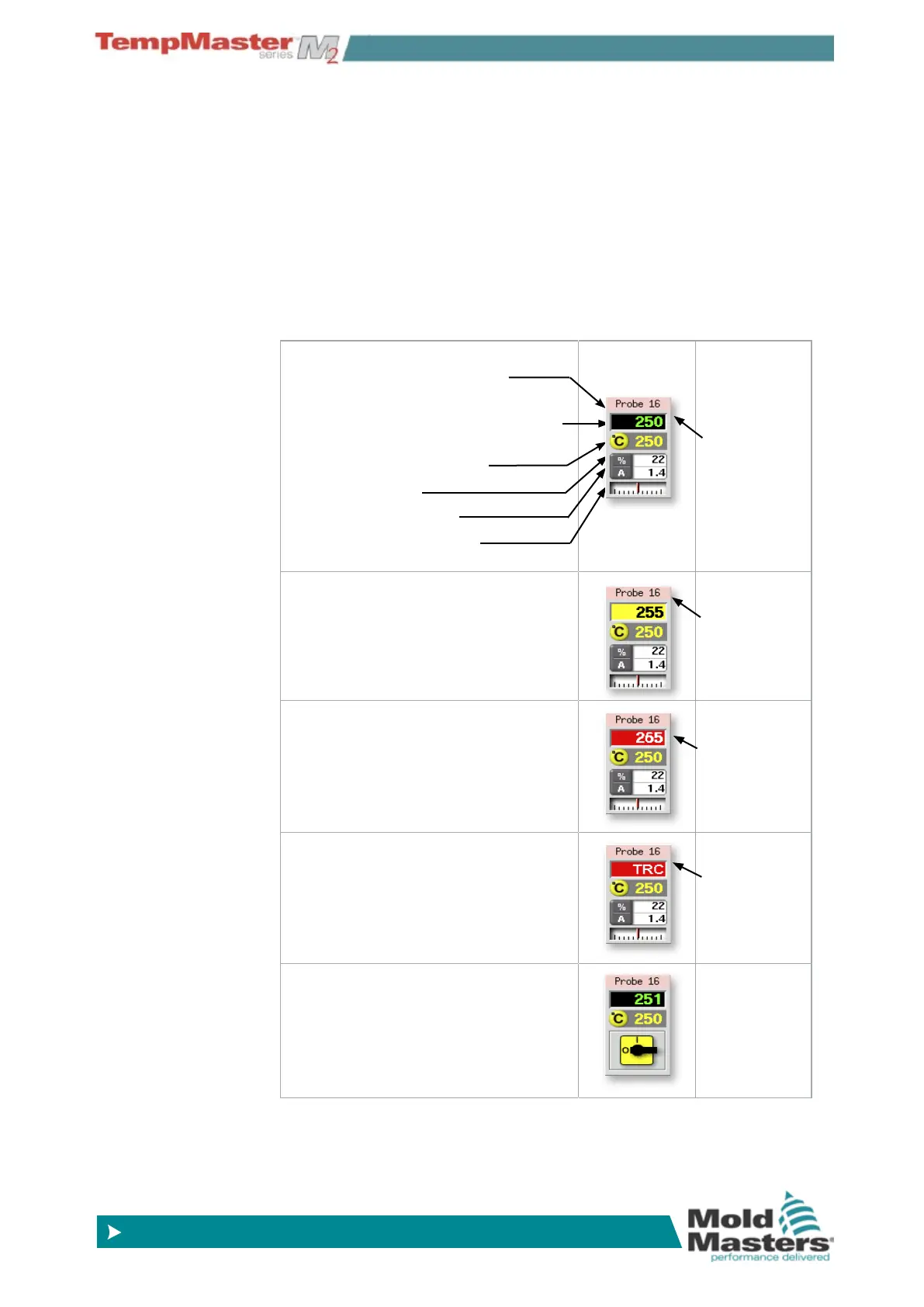
This Healthy Zone shows:
Zone Name (user congurable)
Actual Temperature (may be Coarse at
whole degree steps or Fine at tenth of a
degree steps)
Scale and Set Temperature
Applied Power (%)
Applied Current (Amps)
Deviation - between Actual
& Set Temperature
Green text
on Black
background
Warning Zone
Deviation exceeds 1st stage (Warning)
Black Text
on Yellow
Background
Alarm Zone
Deviation exceeds 2nd stage (Alarm)
White text
on Red
Background
Fatal Error
Problem detected. (See
page 6-37 for
details.)
White text
on Red
Background
Zone Off
Individual zone switched off



 To Next Page