174
Rev. 2.0
07/27/2023
MBDV Hardware Manual
The resonance suppression lter in the red area will display the resonance frequency of the current
reference line in real time. Click " Set as 1st Resonance Suppression Filter " or " Set as 2nd
Resonance Suppression Filter " to set the resonance frequency to Resonance Suppression Filter 1
Or the resonance frequency point of the resonance suppression lter 2.
Step 5
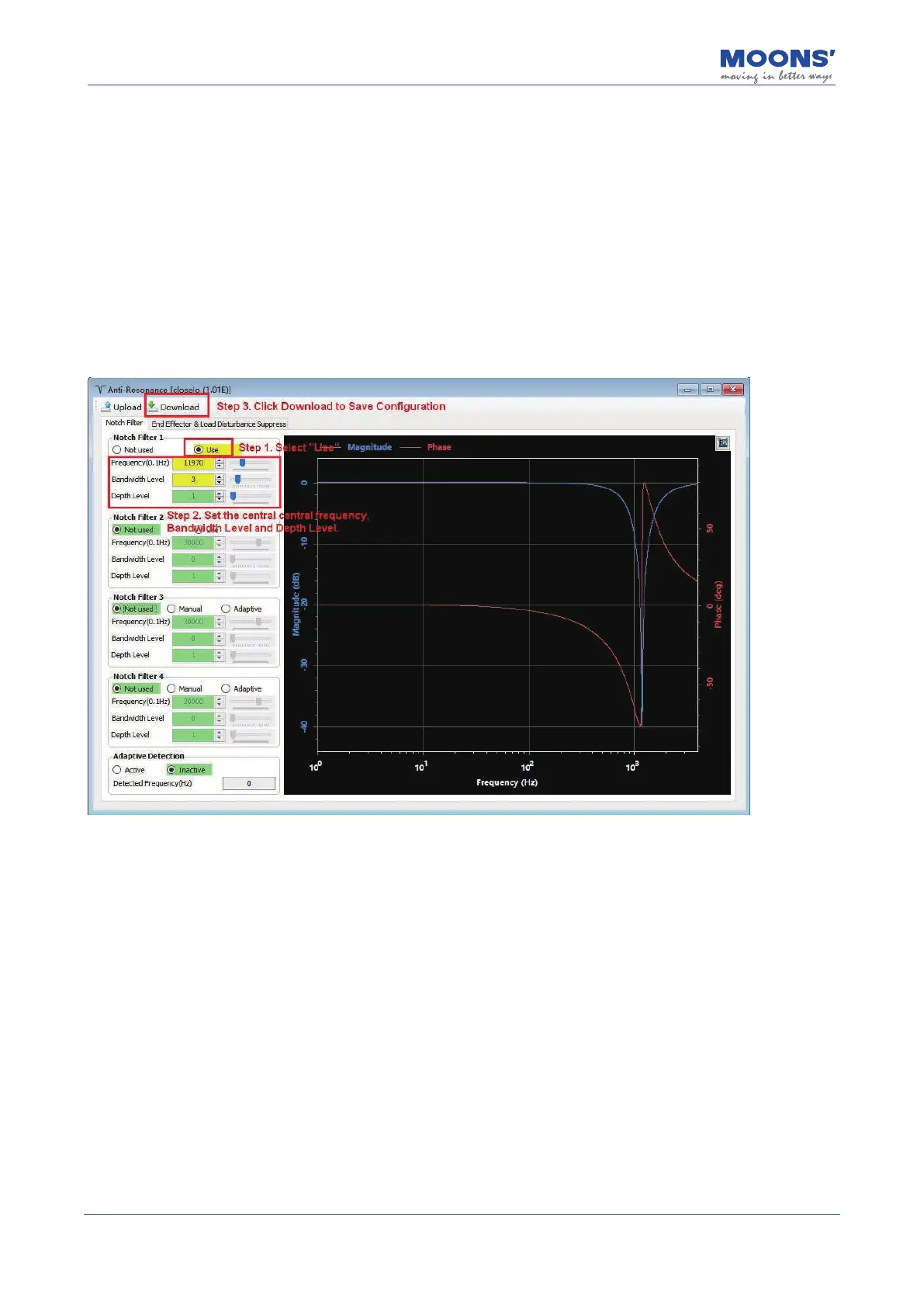
On the resonance suppression interface, select " Use " to enable the corresponding resonance
suppression lter, set the appropriate " bandwidth frequency level " and " resonance depth
level ", and click " download " to set the resonance suppression notch lter.
To set a resonance
suppression notch lter
, select the "Anti-Resonance" option in the device tree to the left of the
Luna Software. On the desired lter, select "use" to enable the lter, set the appropriate bandwidth
frequency level and resonance depth level. Then click download.
Note: Because mechanical open loop analysis does not include the closed loop of the servo
controller, any previously downloaded Notch Filters will not be active during the analysis. If users
wish to actually test the Notch Filters impact on the resonance of the system, they will need to run
the motor in the "Velocity Closed Loop" mode. Otherwise, the system will run in open loop without
the Notch Filter Equipped.













 To Next Page