Sending a File to a Shared Folder of a Computer (SMB Send) 3-13
3.2 Preparation for SMB Send
3
12 Click [OK], and close the screen.
The settings on the computer are then completed. The computer, user, and folder names you wrote
down in this procedure are required to specify a destination.
When using Mac OS X 10.7/10.6/10.5:
Carry out preparations to send original data scanned by this machine to your computer.
First, create a shared folder that is only to be used to receive scanned original data. Then, check the IP ad-
dress and user name, and start sharing.
The following shows a procedure example for Mac OS X 10.6.
0 You need to have the administrator privileges to perform this task.
1 Create a new folder in any place, and name it.
% The folder name is required to specify a destination. Write down the folder name.
2 Select [About This Mac] in the Apple menu.
The [About This Mac] screen appears.
3 Click [More Info...].
% In Mac OS X 10.7, click [More Info...] then click [System Report...].
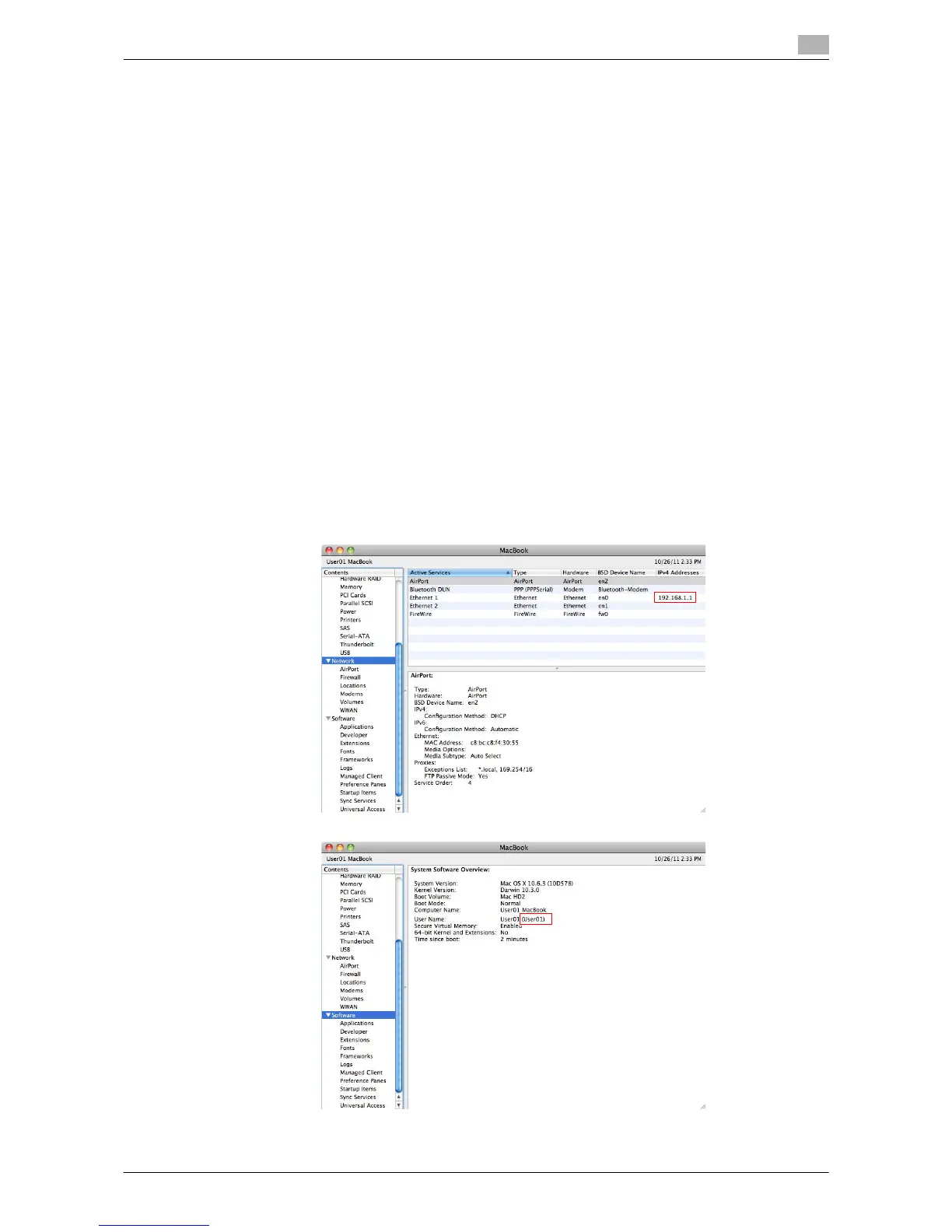
4 Check the IP address and the name of the user who logs in to the computer.
% The IP address and user name are required to configure folder sharing settings and specify desti-
nations. Write them both down.
Then, close the window.



 To Next Page
 Loading...




