User’s Guide Kona cutting plotter
Maintenance
AP-75380 - Revision 1.2 151
8
8.1.3 Cleaning the cutter blade
Use following procedure to remove small vinyl particles in the base part of the cutting blade
holder.
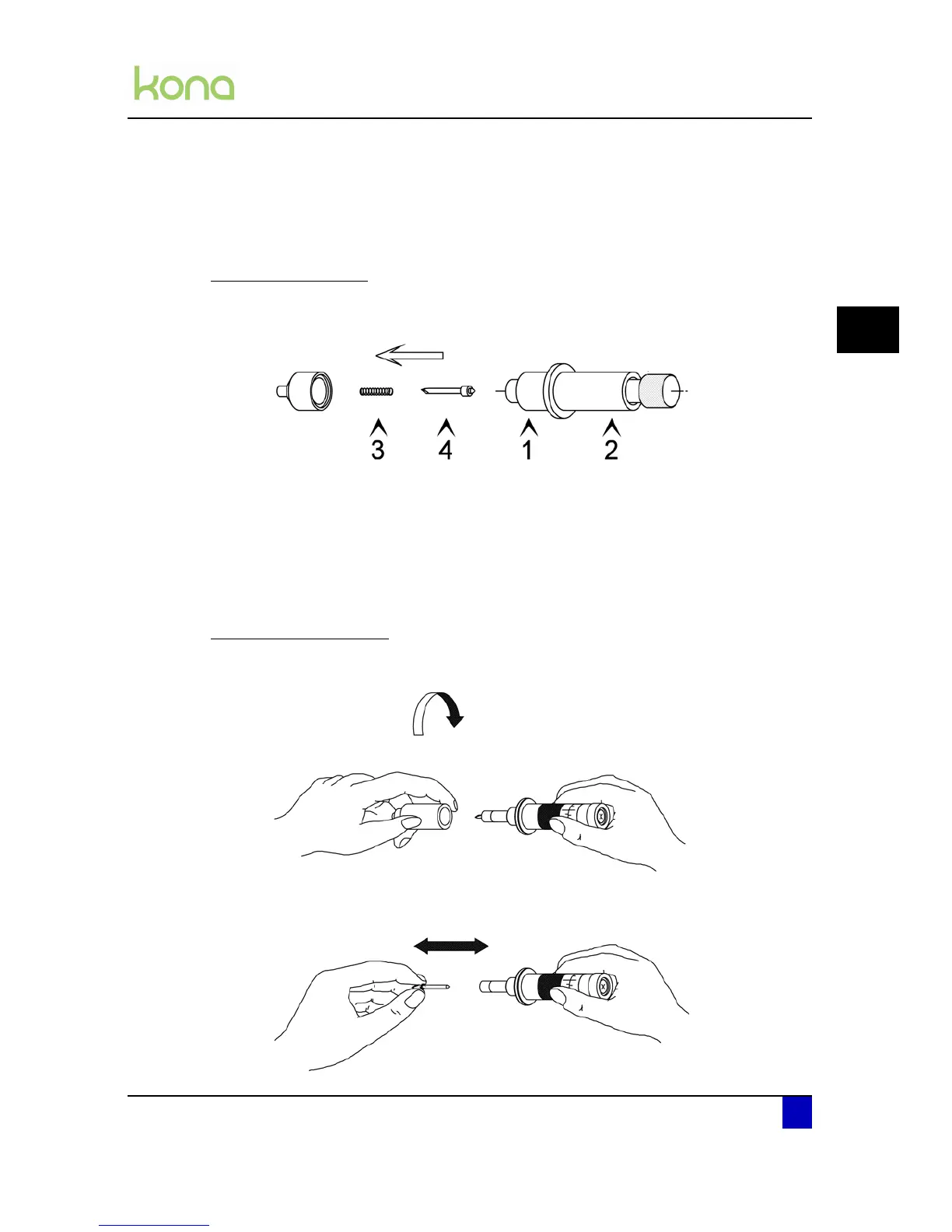
Standard knife holder
Step 1: Hold the body (2) into one hand and unscrew the base part (1)
Step 2: Remove the spring (3) and the cutting blade (4).
Step 3: Blow away vinyl particles accumulated in the top of the base part.
Step 4: Remove the spring from the cutting blade and remove any residual material from
the blade tip
Step 5: Place the spring back over the cutting blade and tightly screw the base part on the
body.
Knife holder with nonius
Step 1: Take the body into one hand and remove the base part.
Step 2: Blow away the vinyl particles accumulated in the top of the base part.
Step 3: Remove any residual material from the blade tip.












 To Next Page