Home
Nikon
Digital Camera
Z8
Page 421
Nikon Z8 - Page 421
1029 pages
Manual
Save Page as PDF
To Next Page
To Next Page
To Previous Page
To Previous Page
Loading...
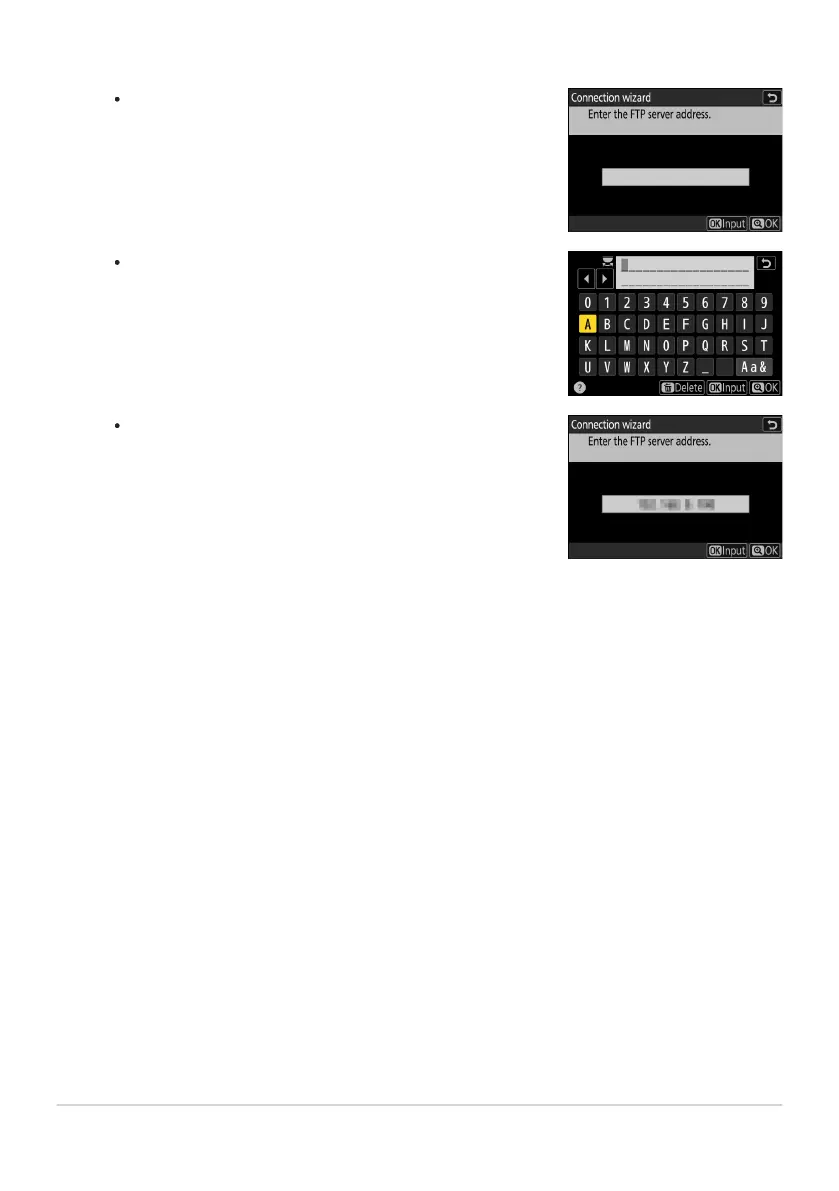
Press
J
to enter the server URL or IP address.
Press
X
when entry is complet
e.
Press
X
again to connect t
o the FTP ser
ver
. Y
ou will be
prompted to choose a login method.
Enter the ser
ver address.
347
FTP Ser
vers: Connecting via Wireless LAN
11
420
422
Table of Contents
Main Page
User’s Manual
1
Table of Contents
6
Before You Begin
2
The Z 8 User’s Manual and Reference Guide
2
Downloading Documentation and Software
3
The Nikon Download Center
3
Downloading Nikon Software
3
Package Contents
4
About This Document
5
Symbols
5
Conventions
5
Table of Contents
6
For Your Safety
8
Notices
14
Parts of the Camera
18
Camera Body
18
First Steps
23
Attaching the Strap
23
Charging the Battery
24
The Battery Charger
24
Optional Charging AC Adapters: Charging
26
Inserting the Battery
29
Removing the Battery
29
Battery Level
30
Inserting Memory Cards
31
Removing Memory Cards
33
Attaching a Lens
34
Detaching Lenses
35
Camera Setup
36
Basic Photography and Playback
39
Taking Photographs
39
Recording Videos
43
Playback
46
Troubleshooting
47
Before Contacting Customer Support
47
Technical Notes
48
Caring for the Camera
48
Long-Term Storage
48
Caring for the Camera and Battery: Cautions
49
Cautions: Using the Camera
49
Cautions: Using Batteries
54
Cautions: Using the Charger
57
Trademarks and Licenses
58
Notices
60
Bluetooth and Wi-Fi (Wireless LAN)
63
Warranty Terms - Nikon Europe Service Warranty
71
Reference Guide
75
Table of Contents
76
When Your First Photo Can’t Wait
97
Getting Ready
97
Taking and Viewing Pictures
98
Before You Begin
99
Package Contents
99
About This Document
100
Symbols
100
Conventions
100
For Your Safety
101
Notices
106
Parts of the Camera
109
Camera Body
109
The Control Panel
115
The Monitor
116
Photo Mode
116
Video Mode
119
The Viewfinder
120
Photo Mode
120
Video Mode
123
The Monitor Mode Button and the Eye Sensor
124
Touch Controls
128
Focusing and Releasing the Shutter
128
Adjusting Settings
129
Playback
130
Viewing Videos
131
The i Menu
131
Text Entry
132
Navigating the Menus
133
The Fn1 and Fn2 Buttons
135
Using the Menus
136
The MENU Button
136
Using the Menus
137
The i Button (i Menu)
142
The Still Photography i Menu
144
The Video i Menu
145
The Playback i Menu
146
Customizing the i Menu
147
First Steps
148
Attaching the Strap
148
Charging the Battery
149
The Battery Charger
149
Optional EH-7P Charging AC Adapters/EH-8P AC Adapters: Charging
151
Charging
151
Inserting the Battery
154
Removing the Battery
154
Battery Level
155
Inserting Memory Cards
156
Removing Memory Cards
158
Attaching a Lens
159
Detaching Lenses
160
Camera Setup
161
Basic Photography and Playback
163
Taking Photographs
163
Recording Videos
166
Playback
169
Viewing Videos
170
The Video Playback Display
170
Video Playback Controls
171
Deleting Unwanted Pictures
172
Shooting Settings
173
Image Recording Options (Image Area, Quality, and Size)
173
Adjusting Image Area Settings
173
Choose Image Area
174
DX Crop Alert
174
Adjusting Image Quality
175
Choosing an Image Quality Option
175
Choosing an Image Size
177
Image Size
177
Enable DX Image Sizes
178
Image Size (DX)
178
Focus
179
Focus Mode
179
Choosing a Focus Mode
179
AF-Area Mode
181
Choosing an AF-Area Mode
181
Choosing a Subject Type for Autofocus
185
Focus-Point Selection
188
The Touch Shutter
189
Focus Lock
191
Manual Focus
193
Exposure
195
Choosing a Shooting Mode
195
P (Programmed Auto)
196
S (Shutter-Priority Auto)
196
A (Aperture-Priority Auto)
196
M (Manual)
197
Long Time-Exposures (Mode M Only)
200
Autoexposure Lock
203
Exposure Compensation
205
Adjusting Exposure Compensation
205
Release Mode
207
Choosing a Release Mode
207
High-Speed Frame Capture (C30/C60/C120)
210
Using the Self-Timer
212
ISO Sensitivity
213
About ISO Sensitivity
213
Adjusting ISO Sensitivity
213
Auto ISO Sensitivity Control
215
Enabling Auto ISO Sensitivity Control
215
White Balance
217
About White Balance
217
Adjusting White Balance
217
Fine-Tuning White Balance
222
Using Buttons
222
Using the Menus
223
Choosing a Color Temperature
226
Using Buttons
226
Using the Menus
227
Preset Manual
230
Direct Measurement
230
Copying White Balance from a Photograph
234
Bracketing
236
Auto Bracketing Set
236
Exposure and Flash Bracketing
237
Cancelling Bracketing
241
White Balance Bracketing
242
Cancelling Bracketing
244
ADL Bracketing
245
Cancelling Bracketing
248
Picture Controls
249
About Picture Controls
249
Choosing a Picture Control
249
Modifying Picture Controls
251
Picture Control Settings
252
Custom Picture Controls
255
Creating Custom Picture Controls
255
Two-Button Reset
259
Photo Shooting Menu
259
Video Recording Menu
261
Custom Settings Menu
262
Other Settings
263
Video Recording
264
Video File Types
264
Tone Mode
266
Color Space
266
Video Frame Size and Rate Options
267
Frame Size and Rate Options for RAW Video
267
Frame Size and Rate Options for Other Video Formats
268
Bit Rate
270
High-Quality N-RAW 12-Bit NEV
270
Normal-Quality N-RAW 12-Bit NEV
271
H.265 10-Bit, H.265 8-Bit, and H.264 8-Bit
272
Video Image Area Options
274
Points to Note When Filming Videos
276
RAW Video
278
Recording HLG Video
279
Recording N-Log Video
281
View Assist
282
Hi-Res Zoom
283
Using Hi-Res Zoom
283
Viewing Pictures
285
Viewing Pictures
285
Full-Frame Playback
285
Thumbnail Playback
286
Photo Information
288
Basic Information
289
Exposure Data
290
Highlight Display
290
RGB Histogram
291
Shooting Data
293
Basic Shooting Data
293
Flash Data
294
Picture Control/HLG data
294
Other Shooting Data
295
Copyright Information
295
Location Data
296
IPTC Data
297
Overview
298
File Info
300
The i Button (Playback Mode)
301
Photos
301
Videos
305
Videos (Playback Paused)
306
Playback Zoom
307
Using Playback Zoom
307
Protecting Pictures from Deletion
309
Rating Pictures
311
Selecting Pictures for Upload
312
Filtered Playback
313
“Filtered Playback Criteria”
313
Viewing Slide Shows
315
During the Show
316
Deleting Pictures
317
Using the Delete Button
317
Deleting Multiple Pictures
318
Deleting Selected Pictures
319
Candidates for Deletion
320
Pictures Shot on Selected Dates
320
Deleting All Pictures
321
Retouching Photographs
322
Retouching Photographs
322
RAW Processing
325
Processing Photos Shot Using the “SDR” Tone Mode
325
Processing the Current Picture
325
Processing Multiple Pictures
327
Processing Photos Shot Using the “HLG” Tone Mode
330
Processing the Current Picture
330
Processing Multiple Pictures
332
Trim
337
Resize
338
Resizing the Current Picture
338
Resizing Multiple Pictures
339
D-Lighting
341
Straighten
342
Distortion Control
343
Perspective Control
344
Monochrome
345
Overlay (Add)
346
“Lighten” and “Darken”
348
Motion Blend
351
Editing Videos
353
Editing Videos
353
Trimming Videos
354
Saving the Current Frame as a JPEG Still
357
Creating Stills from a Selected Length of Footage
358
Voice Memos
360
Recording Voice Memos
360
Playing Voice Memos
362
Deleting Voice Memos
363
Connecting to HDMI TVs and Recorders
364
Connecting to HDMI Devices
364
TVs
365
Recorders
366
Adjusting Settings
367
“Output Resolution”
368
YCbCr and Bit Depth
371
HDMI Output and Tone Mode
372
External Recording Control
373
Connecting to Smart Devices
374
The SnapBridge App
374
What SnapBridge Can Do for You
375
Downloading Pictures from the Camera
375
Remote Photography
375
Wireless Connections
376
Connecting via Bluetooth (Pairing)
376
Pairing
376
Connecting to a Previously-Paired Smart Device
378
Connecting via Wi-Fi (Wi-Fi Mode)
379
Connecting
379
Connecting to Computers or FTP Servers
382
Making the Connection
382
Computers: Connecting via USB
382
Computers: Connecting via Wireless LAN
382
Computers: Connecting via Ethernet
383
FTP Servers: Connecting via Wireless LAN
383
FTP Servers: Connecting via Ethernet
383
Computers: Connecting via USB
384
Installing NX Studio
384
Copying Pictures to a Computer Using NX Studio
385
Computers: Connecting via Wireless LAN
388
The Wireless Transmitter Utility
388
Connecting to Computers via Wireless LAN
389
Direct Wireless Connection (Access-Point Mode)
389
Connecting in Infrastructure Mode
394
Ending the Connection to the Computer
401
Computers: Connecting via Ethernet
402
The Wireless Transmitter Utility
402
Connecting to Computers via Ethernet
403
Ending the Connection to the Computer
408
FTP Servers: Connecting via Wireless LAN
409
Connecting to FTP Servers via Wireless LAN
410
Direct Wireless Connection (Access-Point Mode)
410
Connecting in Infrastructure Mode
415
Ending the Connection to the FTP Server
424
FTP Servers: Connecting via Ethernet
425
Connecting to FTP Servers via Ethernet
426
Ending the Connection to the FTP Server
432
What You Can Do When the Camera Is Connected to a Computer or FTP Server
433
Uploading Pictures
433
Selecting Pictures for Upload
434
Uploading Photos as They Are Taken
436
The Upload Icon
436
The “Connect to Computer”/“Connect to FTP Server” Upload Status Display
437
Camera Control
439
The “Connect to Computer” Camera Control Display
440
Troubleshooting Wireless LAN and Ethernet Connections
441
Problems and Solutions
441
Error Codes
442
Connecting to Other Cameras
444
What Inter-camera Connections Can Do for You
444
Camera-Based Remote Photography (Synchronized Release)
444
Clock Synchronization (Synchronize Date and Time)
444
Synchronized Release
445
Configuring and Using Synchronized Release
445
Wireless LAN
445
Ethernet
453
Synchronizing Camera Clocks
460
Flash Photography
461
“On-Camera” Versus “Remote”
461
Camera-Mounted Flash Units
461
Remote Flash Photography
461
Using an On-Camera Flash
462
Flash Control Mode
465
Flash Modes
467
Flash Compensation
469
Adjusting Flash Compensation
469
FV Lock
470
Remote Flash Photography
472
What Is Remote Flash Photography?
472
Using Remote Flash Units
472
Radio AWL
473
Establishing a Wireless Connection
473
Remote Flash Photography
477
Group Flash
477
Quick Wireless Control
479
Remote Repeating
481
Adding a Shoe-Mounted Flash Unit
483
Optical AWL
484
Using Optical AWL with the SB-5000 or SB-500
485
Group Flash
485
Quick Wireless Control (SB-5000 Only)
487
Remote Repeating (SB-5000 Only)
489
The Photo Shooting Menu
492
Menu Items and Defaults
492
Shooting Menu Bank
495
Renaming Shooting Menu Banks
496
Copying Shooting Menu Banks
496
Restoring Default Settings
496
Extended Menu Banks
497
Storage Folder
498
Renaming Folders
498
Select Folder by Number
499
Select Folder from List
500
File Naming
501
Primary Slot Selection
502
Secondary Slot Function
503
Deleting Copies
505
Image Area
506
Tone Mode
507
Image Quality
509
Image Size Settings
510
RAW Recording
511
ISO Sensitivity Settings
512
White Balance
513
Set Picture Control
514
Manage Picture Control
515
Set Picture Control (HLG)
516
Modifying HLG Picture Controls
516
HLG Picture Control Settings
518
Color Space
520
Active D-Lighting
521
Long Exposure NR
523
High ISO NR
524
Vignette Control
525
Diffraction Compensation
526
Auto Distortion Control
527
Skin Softening
528
Portrait Impression Balance
529
Creating Portrait Impression Balance Modes
529
Applying Saved Modes
530
Photo Flicker Reduction
531
High-Frequency Flicker Reduction
533
Metering
535
Flash Control
536
Flash Control Mode
536
Wireless Flash Options
537
Remote Flash Control
538
Radio Remote Flash Info
538
Flash Mode
539
Flash Compensation
540
Focus Mode
541
AF-Area Mode
542
AF Subject Detection Options
543
Vibration Reduction
544
Auto Bracketing
545
Multiple Exposure
546
Creating a Multiple Exposure
547
The i Menu
550
Ending Multiple Exposures
552
HDR Overlay
553
Taking HDR Photographs
554
Interval Timer Shooting
557
Interval-Timer Photography
559
Pausing Interval-Timer Photography
563
Resuming Interval-Timer Photography
563
Ending Interval-Timer Photography
564
Time-Lapse Video
567
Recording Time-Lapse Videos
569
Ending Shooting
574
Focus Shift Shooting
576
Focus Shift Photography
577
Ending Focus Shift Photography
581
The Video Recording Menu
583
Menu Items and Defaults
583
Shooting Menu Bank
585
Extended Menu Banks
586
Storage Folder
587
File Naming
588
Destination
589
Video File Type
590
Frame Size/Frame Rate
591
Video Quality (N-RAW)
592
Image Area
593
Extended Oversampling
594
ISO Sensitivity Settings
595
White Balance
596
Set Picture Control
597
Manage Picture Control
598
HLG Quality
599
Active D-Lighting
600
High ISO NR
601
Vignette Control
602
Diffraction Compensation
603
Auto Distortion Control
604
Skin Softening
605
Portrait Impression Balance
606
Video Flicker Reduction
607
High-Frequency Flicker Reduction
608
Metering
609
Focus Mode
610
AF-Area Mode
611
AF Subject Detection Options
612
Subject Detection
612
AF When Subject Not Detected
612
Vibration Reduction
613
Electronic VR
614
Microphone Sensitivity
615
Attenuator
616
Frequency Response
617
Wind Noise Reduction
618
Mic Jack Plug-in Power
619
Headphone Volume
620
Timecode
621
“Reset Using Remote”
622
External Rec. Cntrl (HDMI)
623
Hi-Res Zoom
624
The Custom Settings Menu
625
Menu Items and Defaults
625
Custom Settings Bank
632
Renaming Custom Settings Banks
632
Copying Custom Settings Banks
632
Restoring Default Settings
632
a1: AF-C Priority Selection
633
a2: AF-S Priority Selection
634
a3: Focus Tracking with Lock-On
635
Blocked Shot AF Response
635
Subject Motion
635
a4: Focus Points Used
636
a5: Store Points by Orientation
637
a6: AF Activation
639
a7: Focus Point Persistence
640
a8: Limit AF-Area Mode Selection
641
a9: Focus Mode Restrictions
642
a10: Focus Point Wrap-Around
643
a11: Focus Point Display
644
Manual Focus Mode
644
Dynamic-Area AF Assist
644
AF-C In-Focus Display
645
3D-Tracking Focus Point Color
645
a12: Built-in AF-Assist Illuminator
646
a13: Focus Peaking
647
Focus Peaking Display
647
Focus Peaking Sensitivity
647
Focus Peaking Highlight Color
647
a14: Focus Point Selection Speed
648
a15: Manual Focus Ring in AF Mode
649
b1: ISO Sensitivity Step Value
650
b2: EV Steps for Exposure Cntrl
651
b3: Easy Exposure Compensation
652
b4: Matrix Metering Face Detection
653
b5: Center-Weighted Area
654
b6: Fine-Tune Optimal Exposure
655
b7: Keep Exp. When f/ Changes
656
c1: Shutter-Release Button AE-L
657
c2: Self-Timer
658
c3: Power Off Delay
659
d1: Continuous Shooting Speed
660
d2: Maximum Shots per Burst
661
d3: Pre-Release Capture Options
662
d4: Sync. Release Mode Options
664
d5: Extended Shutter Speeds (M)
665
d6: Limit Selectable Image Area
666
d7: File Number Sequence
667
d8: View Mode (Photo Lv)
669
d9: Starlight View (Photo Lv)
671
d10: Warm Display Colors
672
d11: LCD Illumination
673
d12: View All in Continuous Mode
674
d13: Release Timing Indicator
675
d14: Image Frame
676
d15: Grid Type
677
d16: Virtual Horizon Type
678
Roll
679
Pitch
680
d17: Custom Monitor Shooting Display
681
d18: Custom Viewfinder Shooting Display
683
d19: High FPS Viewfinder Display
684
e1: Flash Sync Speed
685
e2: Flash Shutter Speed
687
e3: Exposure Comp. for Flash
688
e4: Auto Flash ISO Sensitivity Control
689
e5: Modeling Flash
690
e6: Auto Bracketing (Mode M)
691
e7: Bracketing Order
692
e8: Flash Burst Priority
693
f1: Customize i Menu
694
View Memory Card Info
696
Split-Screen Display Zoom
697
MB-N12 Info
697
f2: Custom Controls (Shooting)
698
Command Dials
709
Saving and Recalling Focus Positions
710
“Save to All”
711
“Save Individually”
713
f3: Custom Controls (Playback)
715
Command Dials
718
Frame Advance
718
Video Playback
719
f4: Control Lock
720
f5: Reverse Dial Rotation
721
f6: Release Button to Use Dial
722
f7: Reverse Indicators
723
f8: Reverse Ring for Focus
724
f9: Focus Ring Rotation Range
725
f10: Control Ring Response
726
f11: Switch Focus/Control Ring Roles
727
f12: Full-Frame Playback Flicks
728
Flick Up/Flick Down
728
Flick Advance Direction
729
f13: Prefer Sub-selector Center
730
g1: Customize i Menu
731
Multi-Selector Power Aperture
733
Multi Selector Exposure Comp.
733
View Video Info
733
g2: Custom Controls
734
Command Dials
743
g3: Control Lock
744
g4: Limit AF-Area Mode Selection
745
g5: Focus Mode Restrictions
746
g6: AF Speed
747
g7: AF Tracking Sensitivity
748
g8: Hi-Res Zoom Speed
749
g9: Fine ISO Control (Mode M)
750
g10: Extended Shutter Speeds (Mode M)
751
g11: View Assist
752
g12: Zebra Pattern
753
Pattern Tone Range
753
Pattern
753
Highlight Threshold
753
Mid-tone Range
754
g13: Limit Zebra Pattern Tone Range
755
g14: Grid Type
756
g15: Brightness Information Display
757
g16: Custom Monitor Shooting Display
758
g17: Custom Viewfinder Shooting Display
760
g18: Red REC Frame Indicator
761
The Playback Menu
762
Menu Items and Defaults
762
Delete
764
Playback Folder
765
Playback Display Options
766
Delete Pictures from Both Slots
768
Dual-Format Recording PB Slot
769
Filtered Playback Criteria
770
Series Playback
771
Sub-selector Displays First Shot
771
Auto Series Playback
771
List Series as Single Thumbnails
771
Picture Review
772
After Delete
773
After Burst, Show
774
Auto-Rotate Pictures
775
Copy Image(s)
776
Copying Pictures
776
The Setup Menu
781
Menu Items and Defaults
781
Format Memory Card
784
“Yes (Full Format)”
785
Language
786
Time Zone and Date
787
Monitor Brightness
788
Monitor Color Balance
789
Viewfinder Brightness
790
Viewfinder Color Balance
791
Finder Display Size (Photo Lv)
792
Limit Monitor Mode Selection
793
Auto Rotate Info Display
794
AF Fine-Tuning Options
795
Creating and Saving Fine-Tuning Values
797
Choosing a Default Fine-Tuning Value
798
Non-CPU Lens Data
799
Save Focus Position
800
Auto Temperature Cutout
801
Sensor Shield Behavior at Power Off
802
Clean Image Sensor
803
Image Dust Off Ref Photo
804
Acquiring Image Dust Off Reference Data
804
Pixel Mapping
806
Image Comment
807
Input Comment
807
Attach Comment
807
Copyright Information
808
Artist/Copyright
808
Attach Copyright Information
808
IPTC
809
Creating, Renaming, Editing, and Copying Presets
809
Deleting Presets
809
Embedding Presets
810
Copying Presets to a Memory Card
810
Copying Presets to the Camera
811
Voice Memo Options
814
Voice Memo Control
814
Audio Output (Playback)
815
Camera Sounds
816
Shutter Sound
816
Beep On/Off
816
Volume
817
Pitch
817
Silent Mode
818
Touch Controls
819
Enable/Disable Touch Controls
819
Glove Mode
819
HDMI
820
USB Connection Priority
821
Location Data
822
Wireless Remote (WR) Options
823
LED Lamp
823
Link Mode
824
Assign Remote (WR) Fn Button
825
Conformity Marking
826
Battery Info
827
USB Power Delivery
828
Energy Saving (Photo Mode)
830
Slot Empty Release Lock
831
Save/Load Menu Settings
832
Settings That Can Be Saved and Loaded
832
Save Menu Settings
835
Load Menu Settings
835
Reset All Settings
836
Firmware Version
837
The Network Menu
838
Menu Items and Defaults
838
Airplane Mode
840
Connect to Smart Device
841
Pairing (Bluetooth)
841
Select Pictures for Upload
841
Wi-Fi Connection
842
Establish Wi-Fi Connection
842
Wi-Fi Connection Settings
842
Upload While Off
843
Location Data (Smart Device)
843
Connect to Computer
844
Network Settings
844
Create Profile
844
Copy to/from Card
846
End Current Connection
846
Connection Type
846
Options
847
Auto Upload
847
Delete After Upload
847
Upload RAW + JPEG As
847
Upload RAW + HEIF As
848
JPEG + JPEG Slot Selection
848
HEIF + HEIF Slot Selection
848
Upload RAW Video As
848
Upload Folder
848
Deselect All?
848
Connect to FTP Server
849
Network Settings
849
Create Profile
849
Copy to/from Card
851
End Current Connection
851
Options
852
Auto Upload
852
Delete After Upload
852
Upload RAW + JPEG As
852
Upload RAW + HEIF As
852
JPEG + JPEG Slot Selection
853
HEIF + HEIF Slot Selection
853
Upload RAW Video As
853
Overwrite If Same Name
853
Protect If Marked for Upload
853
Upload Marking
853
Upload Folder
853
Deselect All?
854
Manage Root Certificate
854
Connect to Other Cameras
855
Synchronized Release
855
Network Settings
855
Create Profile
855
Copy to/from Card
856
End Current Connection
856
Group Name
857
Master/Remote
857
Remote Camera List
857
Synchronize Date and Time
857
ATOMOS AirGlu BT Options
858
USB Data Connection
860
Router Frequency Band
861
MAC Address
862
My Menu/Recent Settings
863
Menu Items and Defaults
863
My Menu: Creating a Custom Menu
864
Adding Items to My Menu
864
Removing Items from My Menu
866
Reordering Items in My Menu
867
Displaying “RECENT SETTINGS”
868
Recent Settings: Accessing Recently-Used Settings
869
How Items Are Added to “RECENT SETTINGS”
869
Troubleshooting
870
Before Contacting Customer Support
870
Problems and Solutions
872
Battery/Display
872
Shooting
874
Playback
879
Bluetooth and Wi-Fi (Wireless Networks)
882
Miscellaneous
883
Alerts and Error Messages
884
Alerts
884
Error Messages
887
Technical Notes
890
Compatible Lenses and Accessories
890
Camera Displays
891
The Monitor
891
Photo Mode
891
Video Mode
897
The Viewfinder
898
Photo Mode
898
Video Mode
900
The Control Panel
901
Photo Mode
901
Video Mode
903
Compatible Flash Units
904
The Nikon Creative Lighting System (CLS)
904
Features Available with CLS-Compatible Flash Units
904
The SB-5000
905
The SB-910, SB-900, and SB-800
908
The SB-700
911
The SB-600
914
The SB-500
917
The SB-R200
920
The SB-400
923
The SB-300
926
The SU-800 Wireless Speedlight Commander
929
Notes on Optional Flash Units
932
Other Compatible Accessories
936
Optional MB-N12 Power Battery Packs
943
Parts of the MB-N12: Names and Functions
943
Attaching the MB-N12
947
Inserting Batteries in the MB-N12
949
Charging Batteries Using an Optional EH-7P Charging AC Adapter or EH-8P AC Adapter
953
Using an Optional EH-7P Charging AC Adapter or EH-8P AC Adapter as a Power Source
956
Checking the Level of the Batteries in the MB-N12
959
Precautions for Use
960
If the Holder-Chamber Cover Detaches
961
Specifications
962
Attaching an EP-5B Power Connector and EH-5d, EH-5c, or EH-5b AC Adapter
964
Software
966
Caring for the Camera
968
Long-Term Storage
968
Cleaning
968
Camera Body
968
Lens and Viewfinder
968
The Monitor
968
Image Sensor Cleaning
969
Using the Menus
969
Cleaning the Image Sensor at Shutdown
970
Manual Cleaning
971
Caring for the Camera and Battery: Cautions
973
Cautions: Using the Camera
973
Cautions: Using Batteries
977
Cautions: Using the Charger
979
Specifications
980
Nikon Z 8 Digital Camera
980
MH-25a Battery Charger
992
EN-EL15c Rechargeable Li-ion Battery
993
Approved Memory Cards
994
Portable Chargers (Power Banks)
995
Memory Card Capacity
996
Memory Card Capacity (Videos)
998
Battery Endurance
1000
Trademarks and Licenses
1002
Notices
1005
Bluetooth and Wi-Fi (Wireless LAN)
1008
Index
1014
Index
1014
Symbols, Numerics
1014
A
1014
B
1015
C
1015
D
1016
E
1016
F
1016
G
1017
H
1017
I
1017
J
1017
K
1017
L
1018
M
1018
N
1018
O
1018
P
1018
Q
1019
R
1019
S
1019
T
1020
U
1020
V
1020
W
1021
Z
1021
Roles Assignable to Z 8 Custom Controls (Available Roles for Custom Controls)
1023
Warranty
1027
Other manuals for Nikon Z8
Reference Guide
121 pages
Related product manuals
Nikon Z6
16 pages
Nikon Z9
74 pages
Nikon Z 5
80 pages
Nikon Z f
74 pages
Nikon Z fc
64 pages
Nikon Z 30
7 pages
Nikon Z 50
4 pages
Nikon Z 6II
943 pages
Nikon Z6 II
952 pages
Nikon Z 7II
943 pages
Nikon Z 6 II
80 pages
Nikon One Touch Zoom 90S
116 pages



 To Next Page