Docking Station Installation 1: Introduction
9
Docking Station Installation
This Installation Guide provides the information needed to successfully install the 866199 Efficia
DFM100 defibrillator/monitor Docking Station with the device on the ambulance shelf as Shelf Mount.
The docking station is designed for installing the DFM100 Defibrillator/Monitor with pouch system.
NOTE: Be sure that the proper ambulance shelf is available before installing the docking station.
To Install the Docking Station
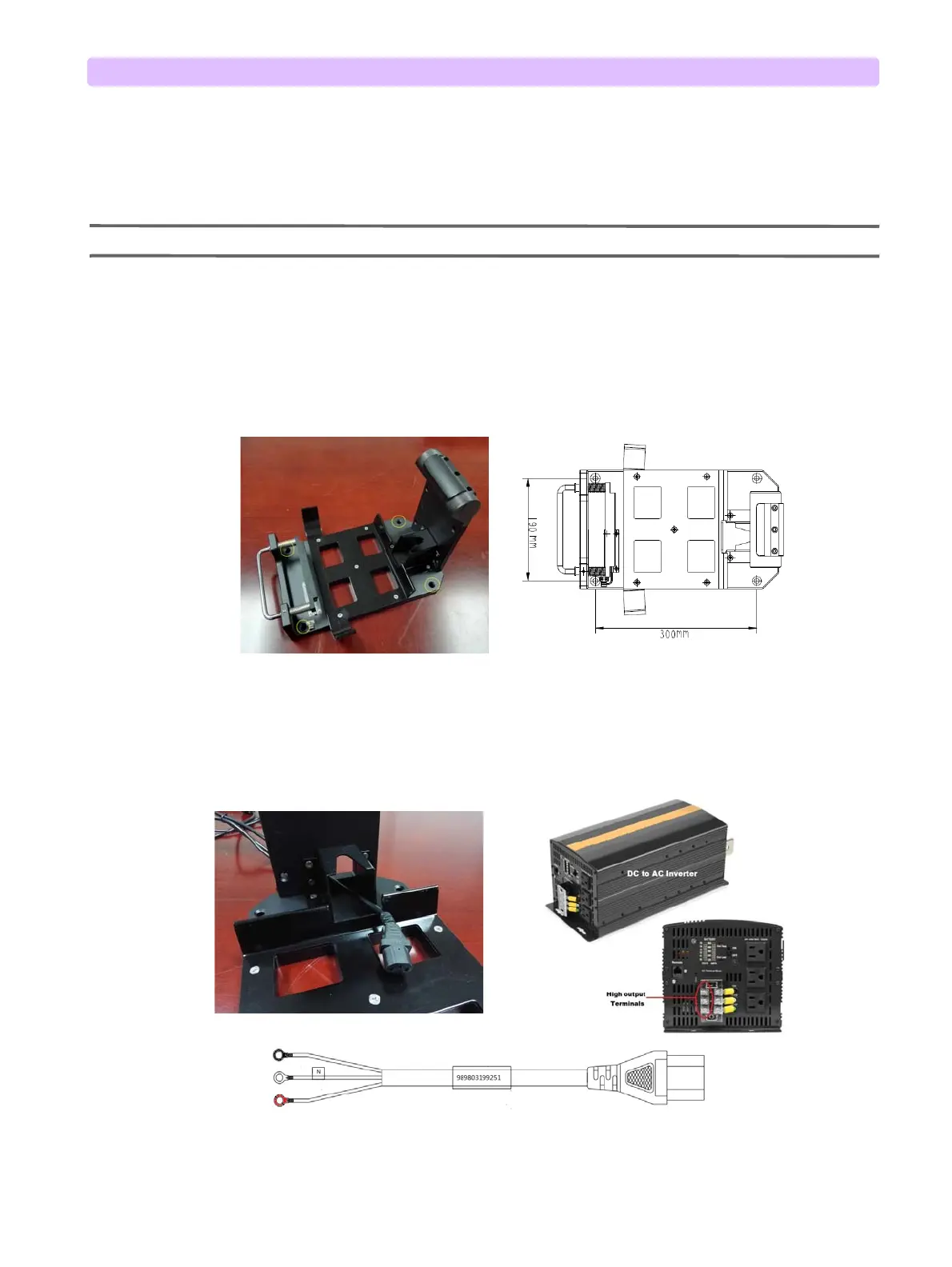
1 Place the Docking Station on the ambulance shelf, securely fix the docking station on the shelf by
installing the four M8 x30 screws into the four screw holes located on the base of the docking
station. The installation size of the four mounting holes on the bottom plate is as below picture
shows.
2 Connect the three wires end of the power cable to the high output terminals on the AC inverter
located in the ambulance.
3 Let the socket end of the power cable pass through the docking station.
Figure 10 Docking Station Installation-1
Figure 11 Docking Station Installation-2
Power Cable for Docking Station



 To Next Page