ST80i Test Screen
ST80i Stress Test System Instructions for Use 2-7
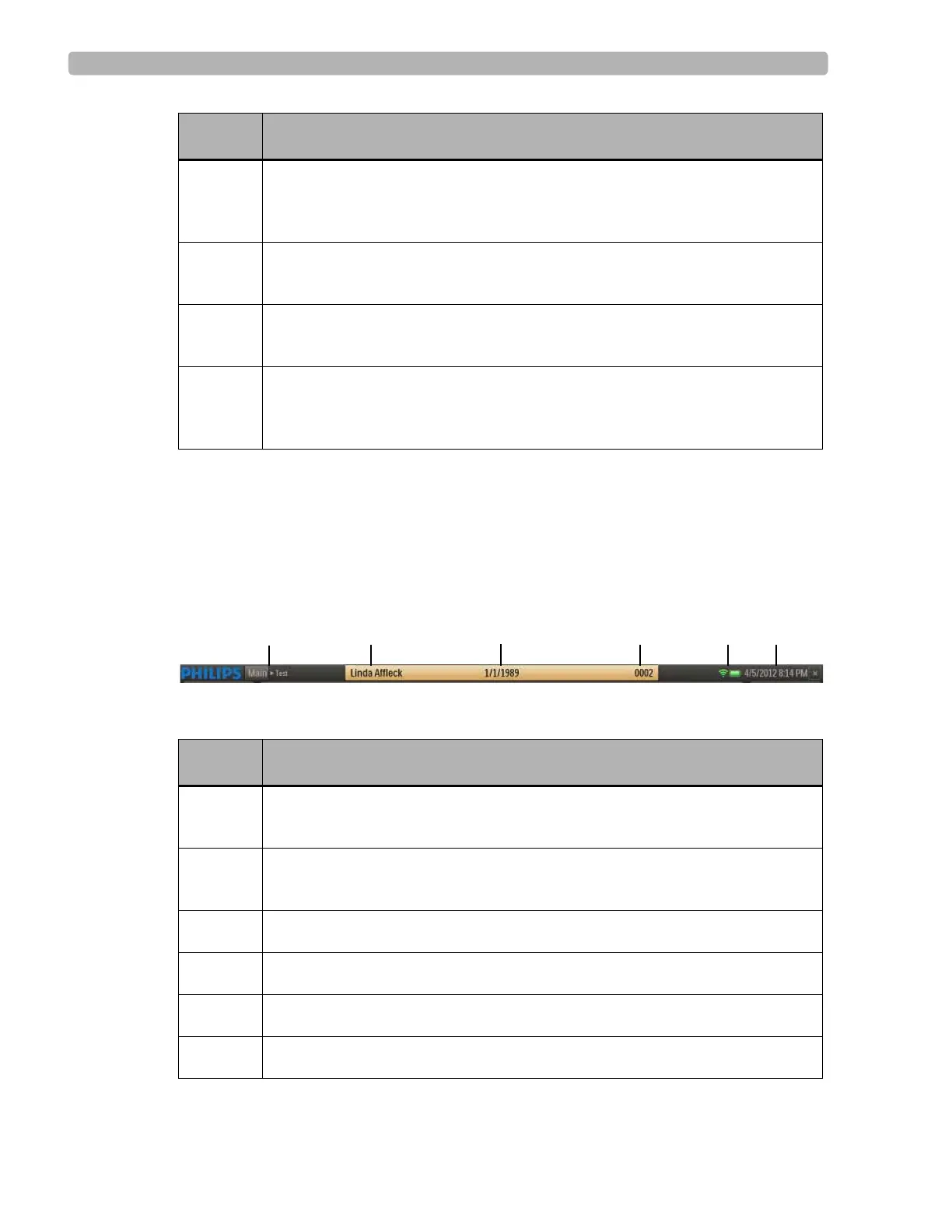
Title Bar
At any time during the Pre Exercise or Report phases of the patient session, you can use the
title bar to manually input and edit patient information with data that will be centrally stored in
the stress database. The Title Bar includes the features shown and described below.
Figure 2-3 TitleBar
Table 2-2 Title Bar Features
B
Procedure Bar - used to control the exercise stress test process; shows exercise
stage; selected patient interface device; protocol;
BP, ECG Print and Rhythm
Print
buttons; and stage time
C
Toolbar - displays the Toolbar icons that provide quick access to frequently
used commands throughout the exercise stress test
D
Waveform Screen - provides real-time ECG waveforms during the exercise
stress test
E
Side Panel - provides real-time updates during the stress test as well as target
heart rate, NIBP and SpO
2
, and exercise equipment data (speed, grade, stop &
start)
Feature Description
A
Navigation Keys [Main Test] - Click Main to leave exercise test and return to
Main screen
B
Patient Name - Click the patient name to update patient information and add
notes on the
Patient Information tab of the Patient Demographics screen
C
Patient's Date of Birth
D
Patient ID
E
LED indicators for the RF Transmitter and PIM battery status
F
Current Date and Time
Feature Description



 To Next Page