Preparing the Patient
ST80i Stress Test System Instructions for Use 3-23
Checking the Lead Map
To check the Lead Map
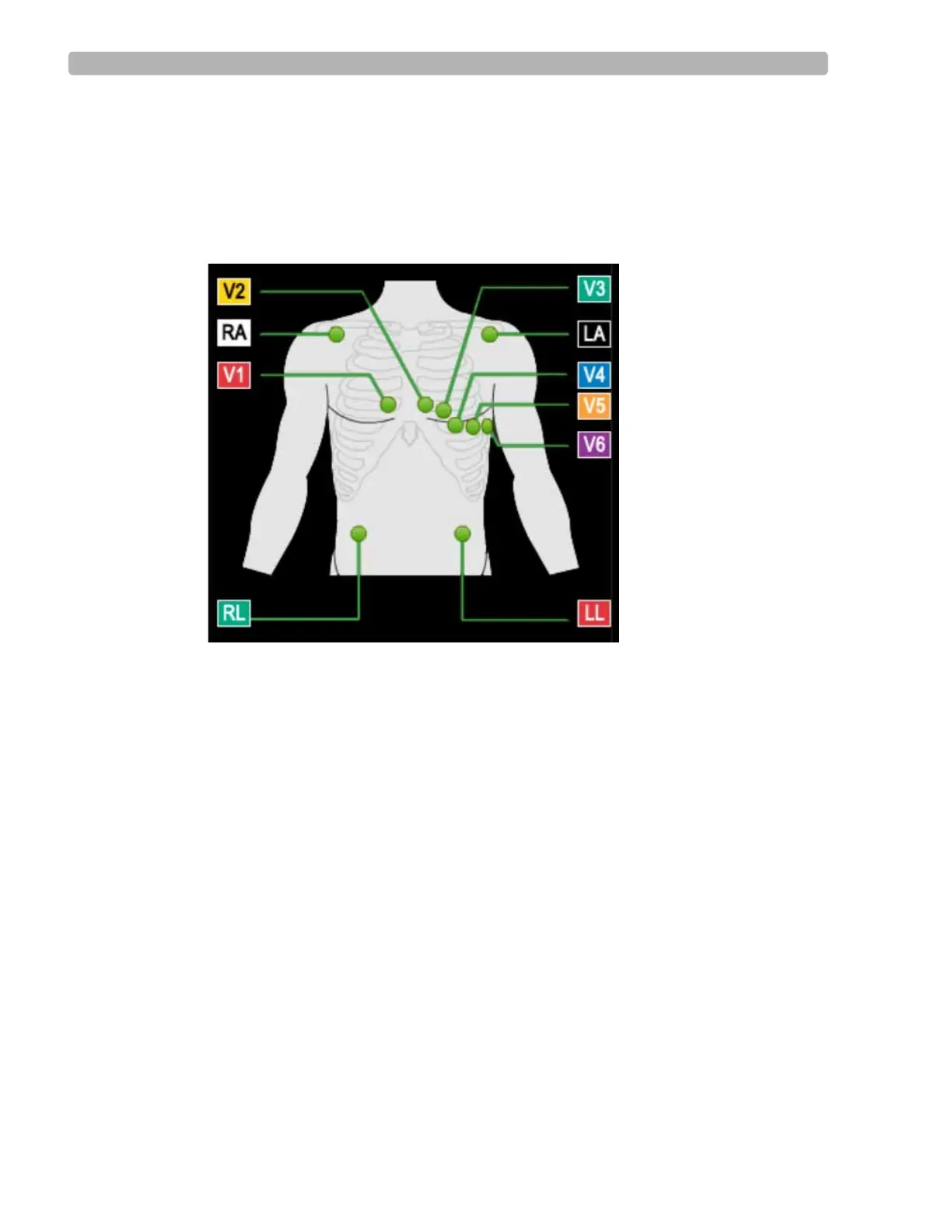
Select Show Lead Map from the Hide/Show View icon on the Pre Exercise or Exercise
screen. A color-coded anatomical diagram displays the lead connections.
Figure 3-6 Lead Connections
If a lead is off, a red “X” is displayed on the lead map and red, dashed flat line is displayed
in the real-time ECG view. On the PIM, this condition is verified by a yellow LED light.
For more details on checking the lead quality connection, see “About the Lead Map” on
page 2-19.
For more details about adjusting the filter, see “Gear (Quick Settings)” on page 2-30.
NOTE Using medical tape to fix the lead wires to the chest may help to minimize strain applied to electrode
connections, thus reducing noise and possibility of leads-off condition occurring.
Checking Signal Quality
ST80i can recognize when an electrode is not connected, and display that information on both
the wireless PIM and the Exercise screen. As you adjust the electrodes, the display is updated
to reflect changes in the connectivity of the signal. The lead-off condition will be saved with
the data and will be indicated on any printed reports which contain that data.
The waveform appears on the real-time display as green. When a lead-off condition is
detected, the corresponding lead(s) will be indicated on the real-time display as a red dashed
line; when printed, this will also appear as a dashed line.



 To Next Page