WEC8500/WEC8050 (APC) Operation Manual v10.1 243
©Samsung Electronics America
WEC8500/configure #ipv6 dhcp-relay default-dhcpv6-server primary [IPV6_ADDRESS1]
secondary [IPV6_ADDRESS2]
WEC8500/configure #ipv6 dchp-relay timeout [TIME]
Configuration using Web UI
In the menu bar of <WEC Main window>, select <Configuration> and then select the
<DHCP> <Proxy/Relay> menu in the sub-menus.
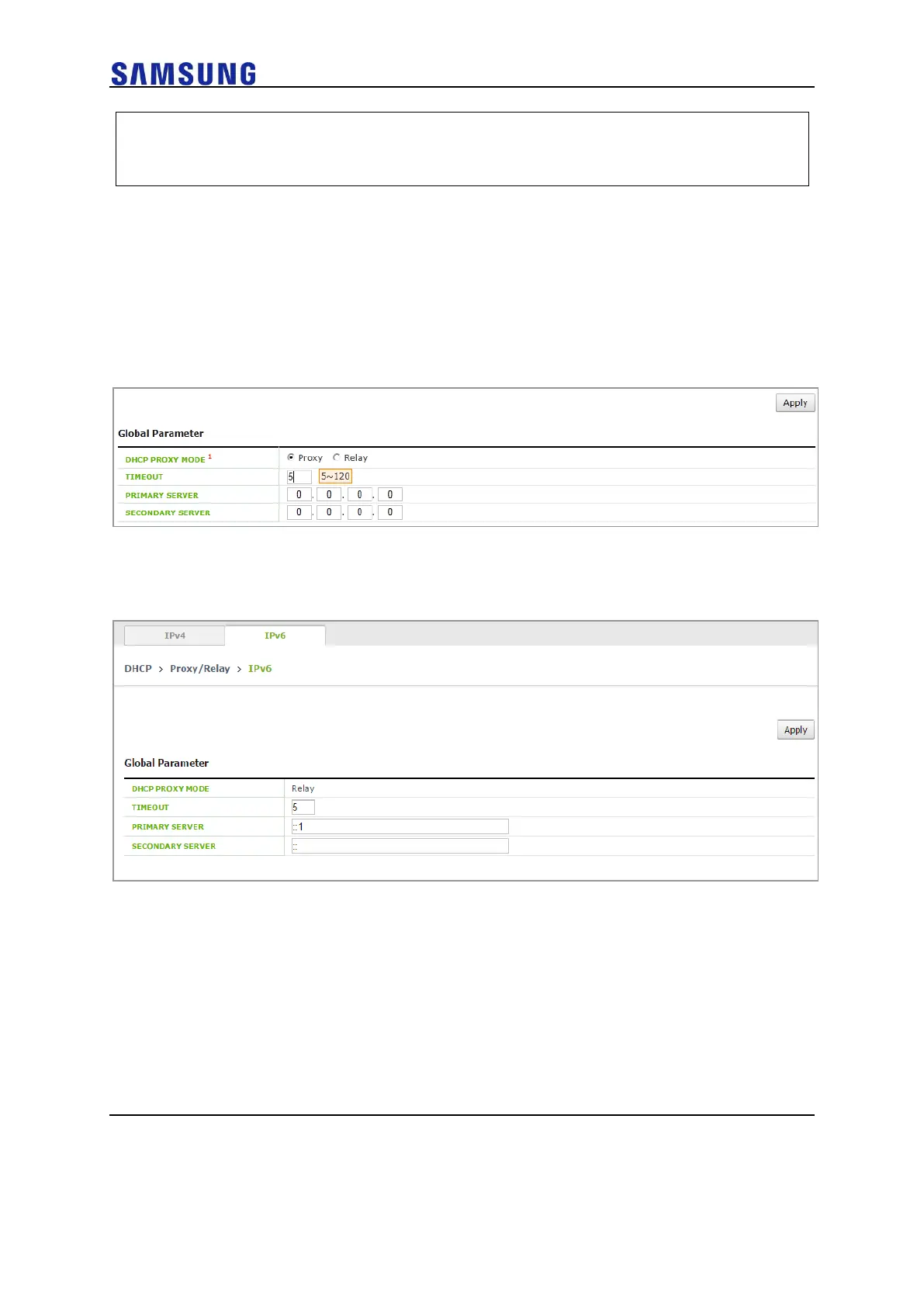
You can configure the Proxy mode of DHCP to relay/proxy. Change the radio box for
configuration in the DHCP PROXY MODE of Global Parameter item.
Figure 164. DHCP Relay
In the menu bar of <WEC Main window>, select <Configuration> and then select the
<DHCP> <Proxy/Relay> menu in the sub-menus. Select IPV6 Tab.
You can configure the timeout and Primary, Secondary Server of DHCP Relay.
DHCP Proxy
The procedure of changing to the DHCP proxy is as follows:
Configuration using CLI
The CLI configuring a DHCP proxy is located as a command under ‘ip dhcp-proxy’ in the
configure mode.
1 Go to the configure mode of the CLI.



 To Next Page