WEC8500/WEC8050 (APC) Operation Manual v10.1 261
©Samsung Electronics America
In the menu bar of <WEC Main window>, select <Configuration> and then select the
<Radio> <802.11a/n/ac> or <802.11b/g/n> <802.11h> menu in the sub-menus.
An example of selecting 802.11a/n/ac is shown below.
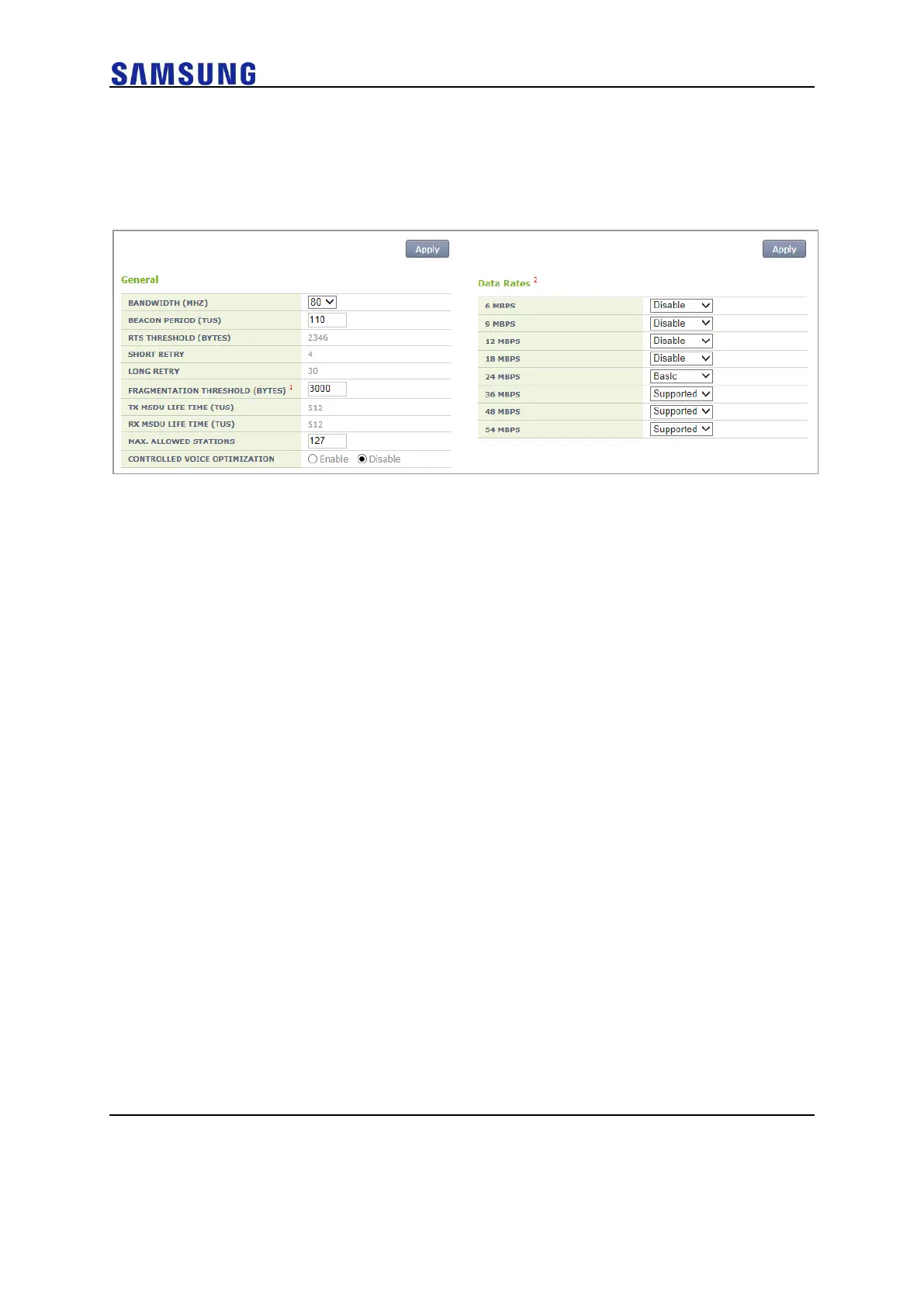
Figure 184. 802.11a/b/g/n Radio (2)
[General]
• BANDWIDTH: Configures bandwidth (range: 20, 40, 80). Available for
802.11a/n/ac only.
• BEACON PERIOD: Beacon period (range: 40-3500)
• FRAGMENTATION THRESHOLD: AP fragmentation threshold (range:
256-8000)
• MAX. CLIENT COUNTS: Limits the number of connected clients per
radio
• CONTROLLED VOICE OPTIMIZATION: Configures voice optimization.
[Data Rates]
The data rate selection options are as follows:
• Basic: Basic rate supported for a terminal to connect to an AP.
• Supported: A connected terminal that supports the supported rate can
communicate with an AP at the supported rate.
• Data Rates: data rate
o Range for 80211a: 6, 9, 12, 18, 24, 36, 48, or 54 Mbps
o Range for 80211bg: 1, 2, 5.5, 6, 9, 11, 12, 18, 24, 36, 48, or 54 Mbps
Select <Configuration> in the menu bar of <WEC Main Window> and select <WLANs>
<WLANs> <802.11a/n/ac> or <802.11b/g/n> in submenus to configure Data Rates.
Select <Configuration> in the menu bar of <WEC Main Window> and select <Radio>
<802.11a/n/ac> or <802.11b/g/n> in submenus to configure Data Rates.
An example of selecting 802.11a/n/ac is shown below.



 To Next Page