WEC8500/WEC8050 (APC) Operation Manual v10.1 366
©Samsung Electronics America
Allocates ID = 903 by checking the AP whose UIC is
invalid and that use a managed SSID.
Allocates ID=904 by checking SSID is hidden
Allocates Rogue ID = 905 for an AP whose UIC is
invalid and its channel is not in the channel validation list
among the Aps.
Allocates ID=906 for AP’s security status is open.
Allocates Rogue ID = 907 for an AP that uses a SSID
that is not in the ssid-whitelist among the APs that use a
managed MAC and its UIC is valid.
Allocates Rogue ID = 908 by checking the association
status between an unauthorized AP and a managed
client.
Allocates ID=911 for Adhoc
Allocates ID=912 by checking AP which is in the
channel validation list.
Allocates Id=913 for not assigned AP
Allocate ID=914 for error detected unmanaged
Allocates ID=915 by checking User defined managed
AP
3 To check the changed configuration, use the following command:
o show wids device ap current-config
Configuration using Web UI
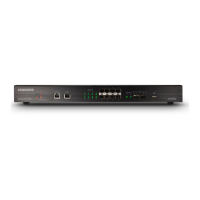
In the menu bar of <WEC Main window>, select <Configuration> and then select the
<Wireless Intrusion> <Policy> <Static Rule> menu in the sub-menus. And then,
operator can change the setting by selecting <AP> at the upper tab and clicking Apply.
In the configuration screen, operator can check Option and click Apply for configuration.
Figure 239. Configuration Window for Unauthorized AP Detection Option



 To Next Page