WEC8500/WEC8050 (APC) Operation Manual v10.1 192
©Samsung Electronics America
• show ap upgrade summary
Configuration using Web UI
In the menu bar of <WEC Main window>, select <Administrator> and then select
<Package Upgrade> <AP> menu in the sub menu.
You can perform AP upgrade in the AP Upgrade tab and configure upgrade related
environment in the Advanced tab.
[AP Upgrade tab]
AP Upgrade tab upgrades all the APs or a specific AP.
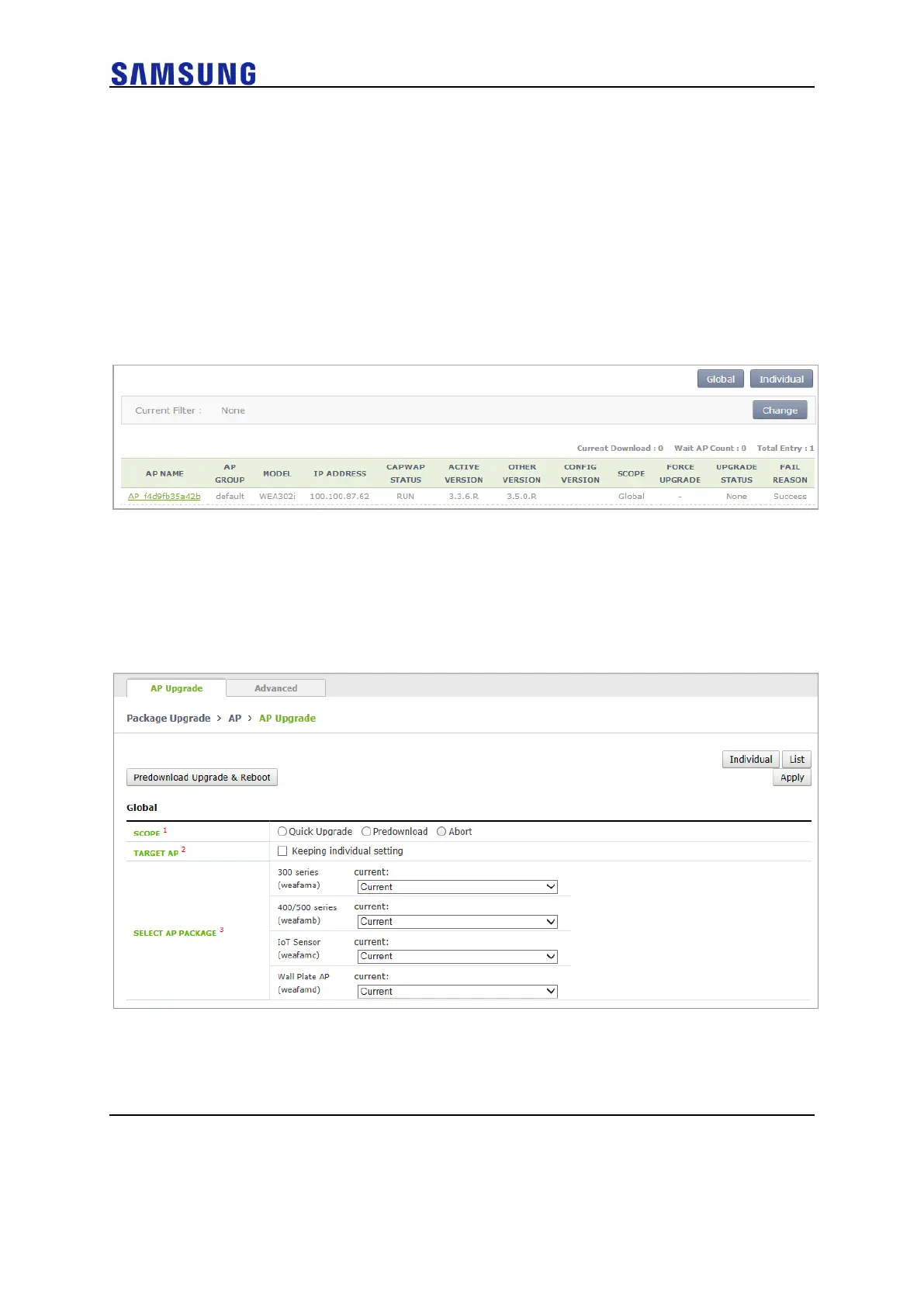
Figure 130. AP Upgrade
The procedure of entire AP upgrade is as follows:
1 In the AP Upgrade window, click the <Global> button.
2 The <Global> area is displayed on the window. After configuring each
item, click the <Apply> button.
Figure 131. AP Upgrade-Global
o SCOPE: Selects upgrade method. To make the AP working as the
package immediately after upgrade, select Quick Upgrade. To
download the package to the AP, select the Predownload menu.
o TARGE AP: Select an AP target to upgrade. If you select <Keeping



 To Next Page