WEC8500/WEC8050 (APC) Operation Manual v10.1 245
©Samsung Electronics America
WEC8500/configure# interface vlan10
WEC8500/configure/interface vlan10#
Configuration using CLI
[Configuring Option 82]
This command enables or disables the Option 82 function. It can be configured for each
interface.
• dhcp option-82 [MODE]
Configures whether to use the Option 82 function
(enable/disable).
[Configuring Remote ID]
The command is shown below:
• dhcp option-82 remote-id [MODE]
Specifies one out of the following three data to the Option 82
remote-id:
• ap-mac: MAC address of an AP
• ap-mac-ssid: MAC address and SSID of an AP
• ap-ethermac: Ethernet MAC address of an AP
Configuration using Web UI
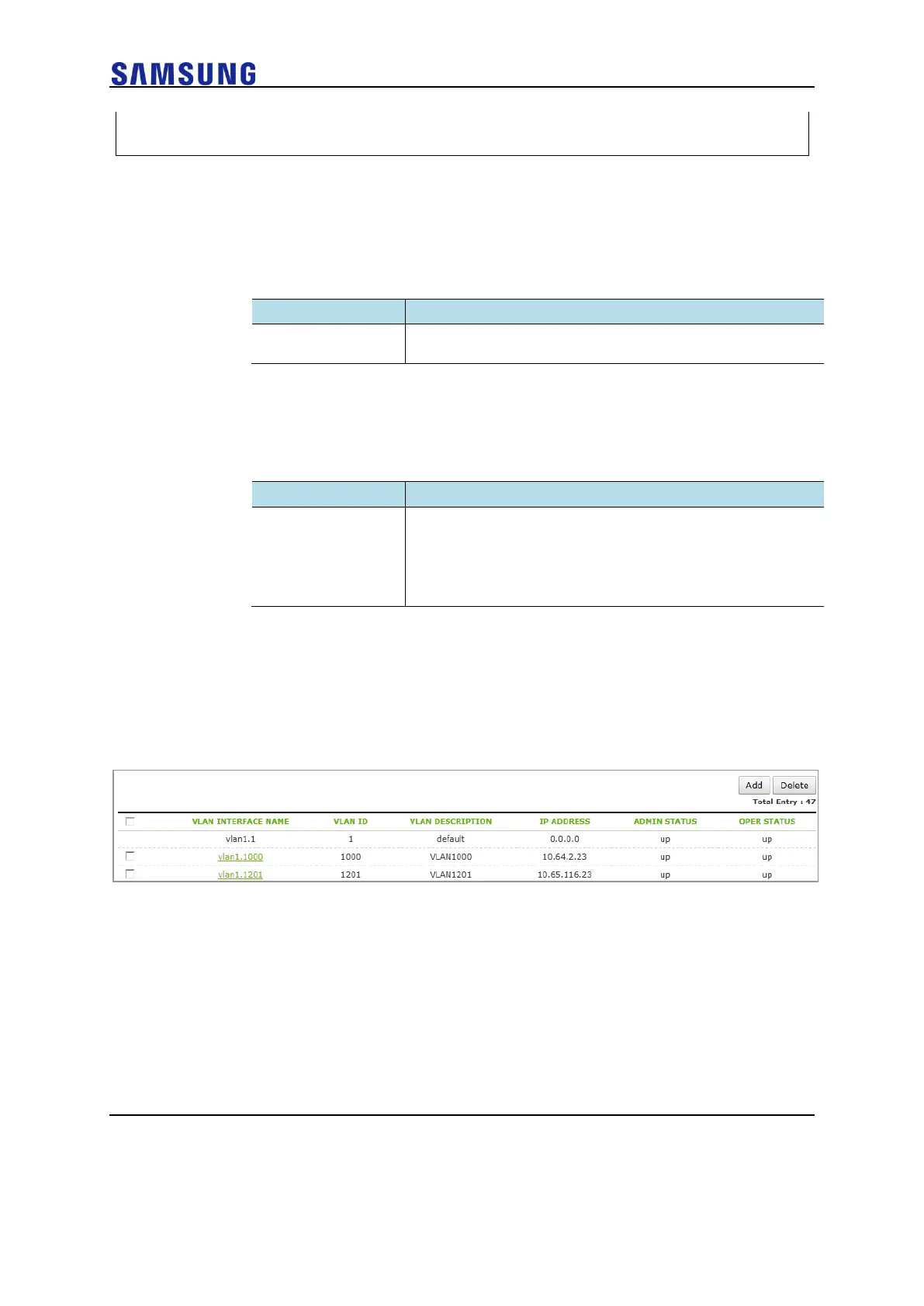
In the menu bar of <WEC Main window>, select <Configuration> and then select the
<Controller> <Interfaces> menu in the sub-menus. In the interface, you can see the
page where you can change the Option 82.
Figure 166. Option 82 Configuration (1)
Select an item in the list and perform a detailed configuration.



 To Next Page