A2537-002/01 February 2020 2-7 SEMCO Proprietary Information
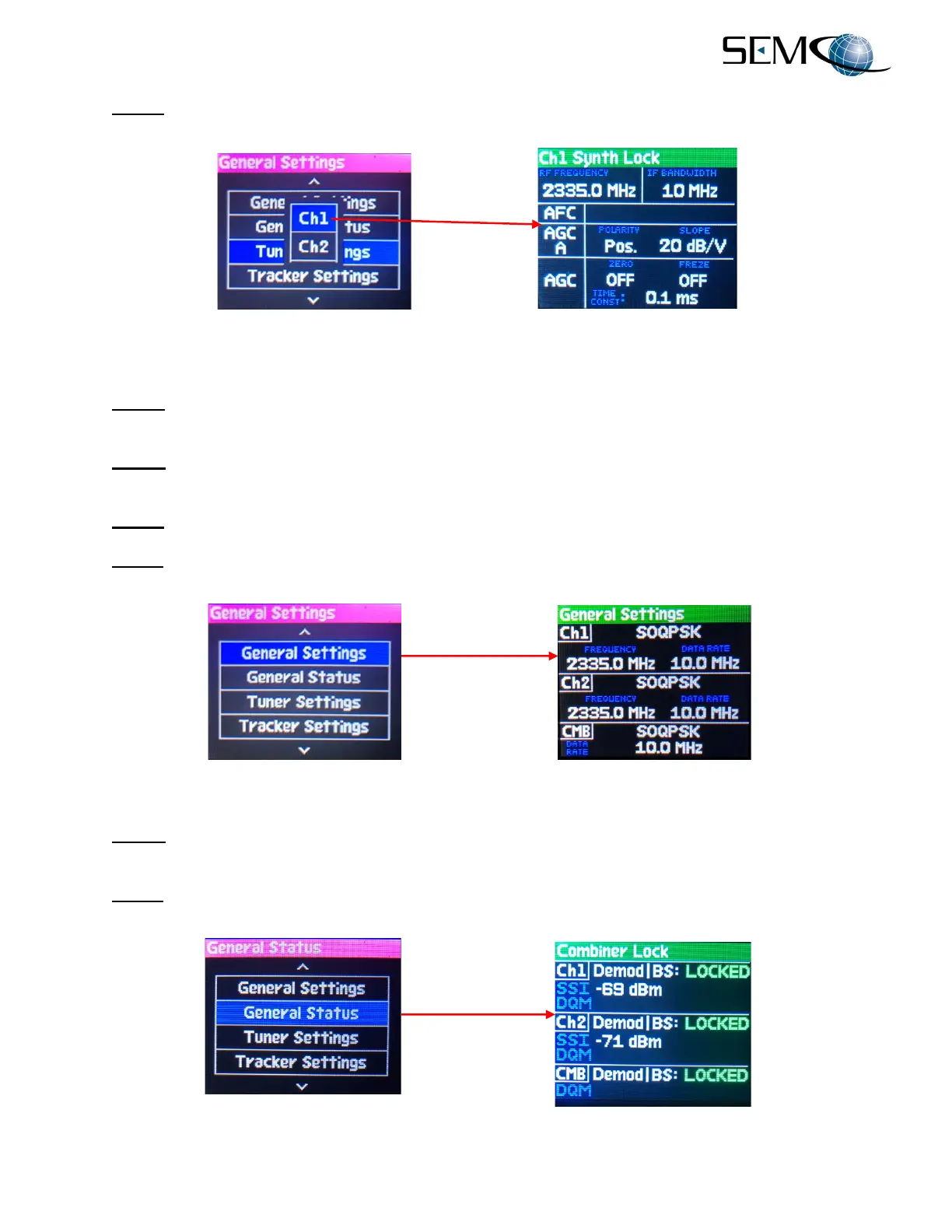
C. Step 3 - Using the LEFT (4) arrow, move the bright magenta top title bar to the far-left display and
press ENTER. The display will show a green Ch1 Synth Lock and display as depicted in Figure 2-7.
Figure 2-7
CH1 RF Tuner Settings
D. Step 4 - Repeat Steps 2 and 3 for a green Ch2 RF Synth Lock display in the second-from-the-left
display.
E. Step 5 - Select DISPLAY on the keypad and verify the far-right display is as previously shown in
Figure 2-6.
F. Step 6 - Using the DOWN (8) arrow, scroll to General Settings and press ENTER.
G. Step 7 - Using the LEFT (4) arrow, move the bright magenta top title bar to the third-from-left display
and press ENTER to enable a green General Settings display as depicted in Figure 2-8.
Figure 2-8
General Settings Display
H. Step 8 - Select DISPLAY on the keypad and verify the far-right display is as previously shown in
Figure 2-6.
I. Step 9 - Using the DOWN (8) arrow, scroll to General Status and press ENTER. The far-right display
will now show the general status of the Combiner, CH1 and CH2 as shown in Figure 2-9.
Figure 2-9
General Status Display



 To Next Page