A2537-002/01 February 2020 5-7 SEMCO Proprietary Information
5.1.8 AGC Output Impedance Selection
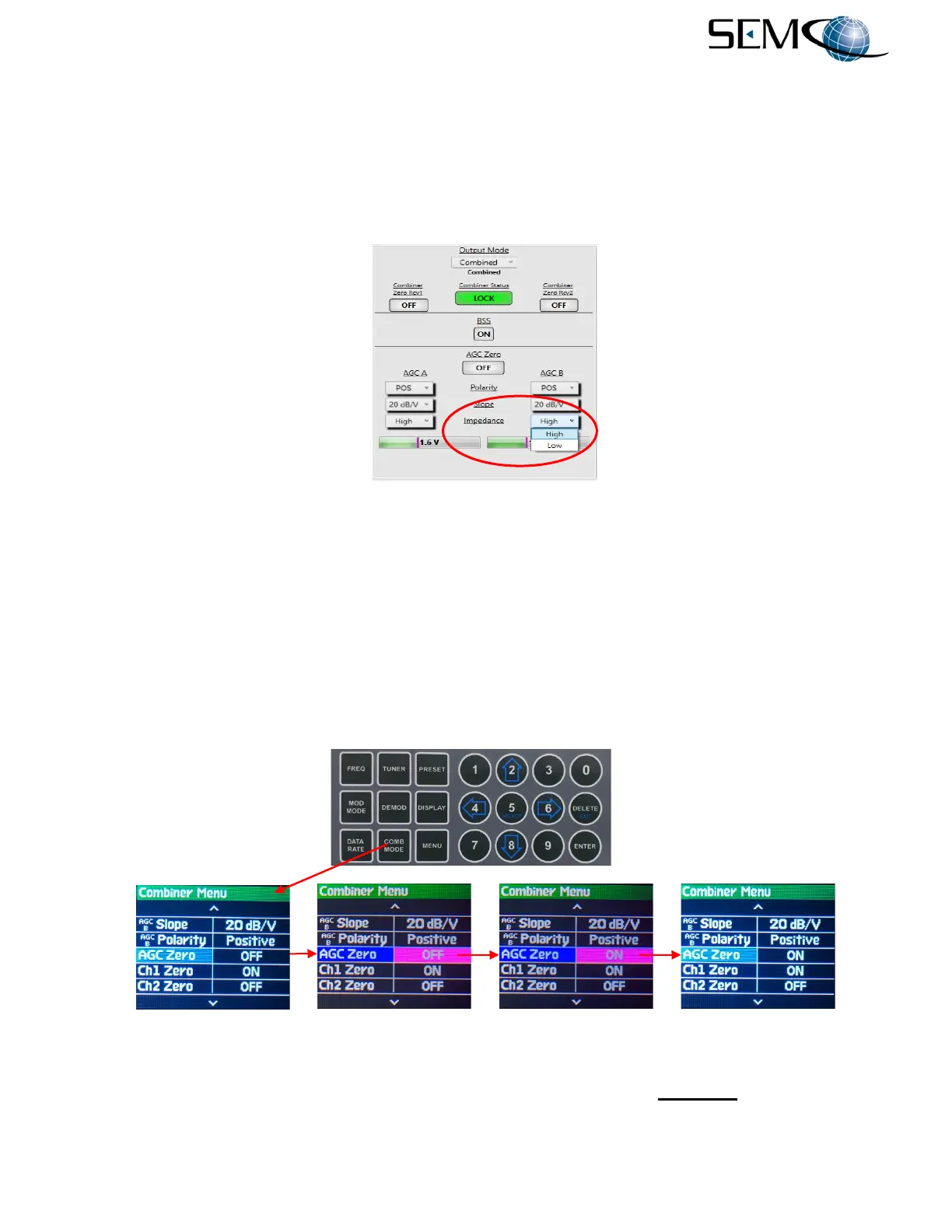
AGC output impedance is selected to drive external devices that are <5K Ohms (Low) or >5K Ohms
(High).
Combiner AGC output impedance selection is provided on the remote GUI, and selected as shown in
Figure 5-11. Combiner AGC Output Impedance selection is not available via the Front Panel.
Figure 5-11
Combiner AGC Output Impedance Selection on Remote GUI
5.1.9 AGC Zero
Combiner AGC Zero zeroes the AGC voltage level at any signal level (typically the noise floor).
Figure 5-12 illustrates the steps for enabling the Combiner AGC Zero feature using the front panel displays
and keyboard. The operator pushes the COMB MODE button to access the Combiner Menu, uses the
UP (2) and DOWN (8) arrows to scroll to AGC Zero in blue, and then pushes ENTER or SELECT (5) to
highlight the AGC Zero selection window in bright magenta. Using the UP (2) and DOWN (8) arrows, the
operator selects ON and then pushes ENTER or SELECT (5).
Figure 5-12
Front Panel Combiner AGC Zero Selection
Figure 5-13 shows Combiner AGC Zero on the remote GUI. Clicking on the AGC Zero window turns this
feature ON.



 To Next Page