A2537-002/01 February 2020 2-15 SEMCO Proprietary Information
2.6.1.3 Windows
Windows settings include System Card Set, AGC Data Logger, Combiner Zero, TM over IP, Receiver
Map, and Bit Sync and Spectral Sweep.
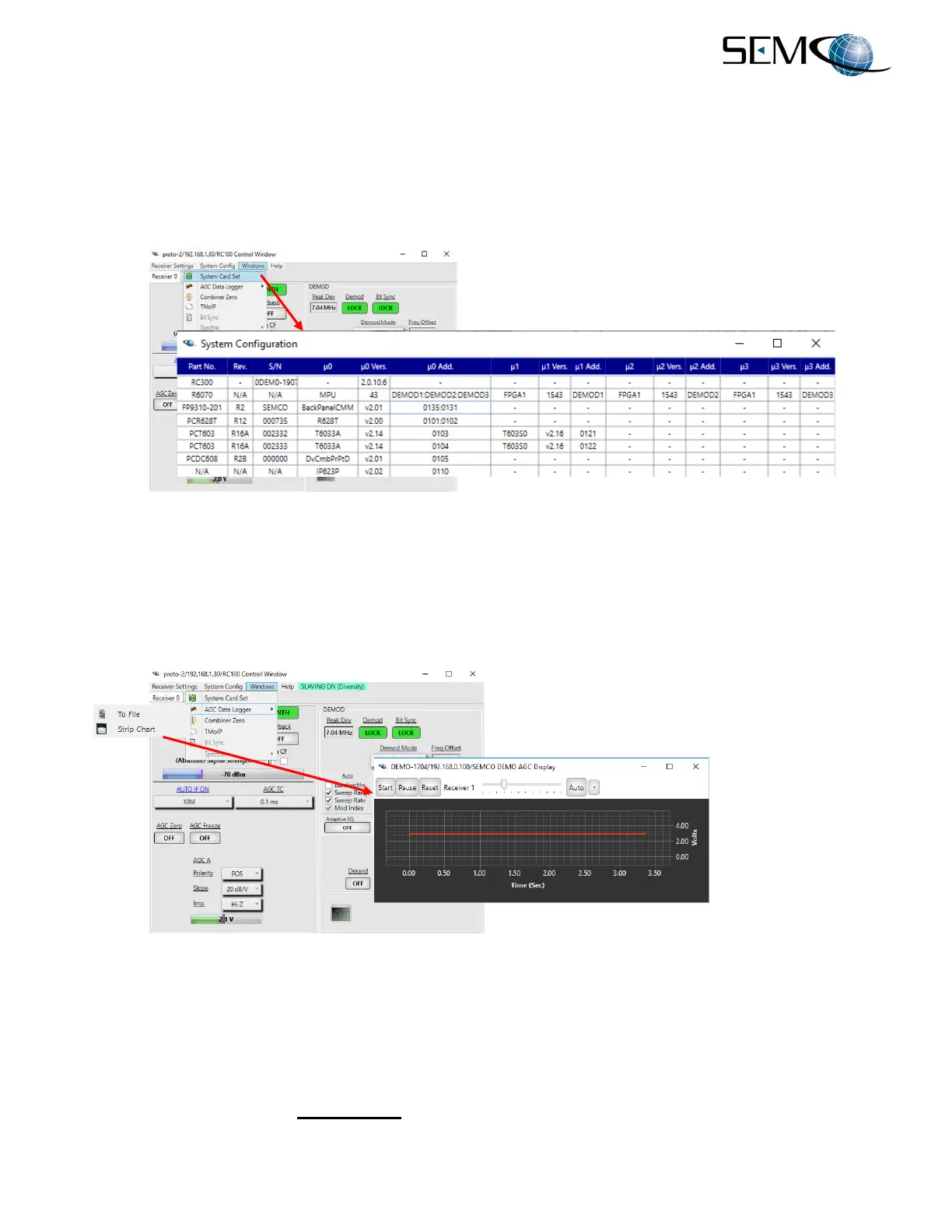
Figure 2-22 depicts the System Card Set selection, which is a listing of the configuration (HW and SW) of
all installed cards and modules.
Figure 2-22
System Card Set Selection on Remote GUI
Figure 2-23 shows the real-time AGC monitoring in Strip Chart format. This feature provides a running
visual display during a mission. The user clicks on AGC Data Logger and Strip Chart to enable this
feature. Controls on the Strip Chart Display include Start, Pause, Reset and Auto. All 3 channels are
displayed. One channel is illustrated here.
Figure 2-23
AGC Strip Chart Display
Figure 2-24 shows the AGC Data Logger and System Parameters Logger, which provides the ability to
time stamp and log both AGC output voltages and all receiver set-up parameters during a mission.
The user clicks on AGC Data Logger and To File, which opens up the AGC Data Logger window. The
user then clicks on Select File, chooses the file name and destination and clicks on Save. The file then
populates the window under Selected File as shown.



 To Next Page