A2537-002/01 February 2020 4-5 SEMCO Proprietary Information
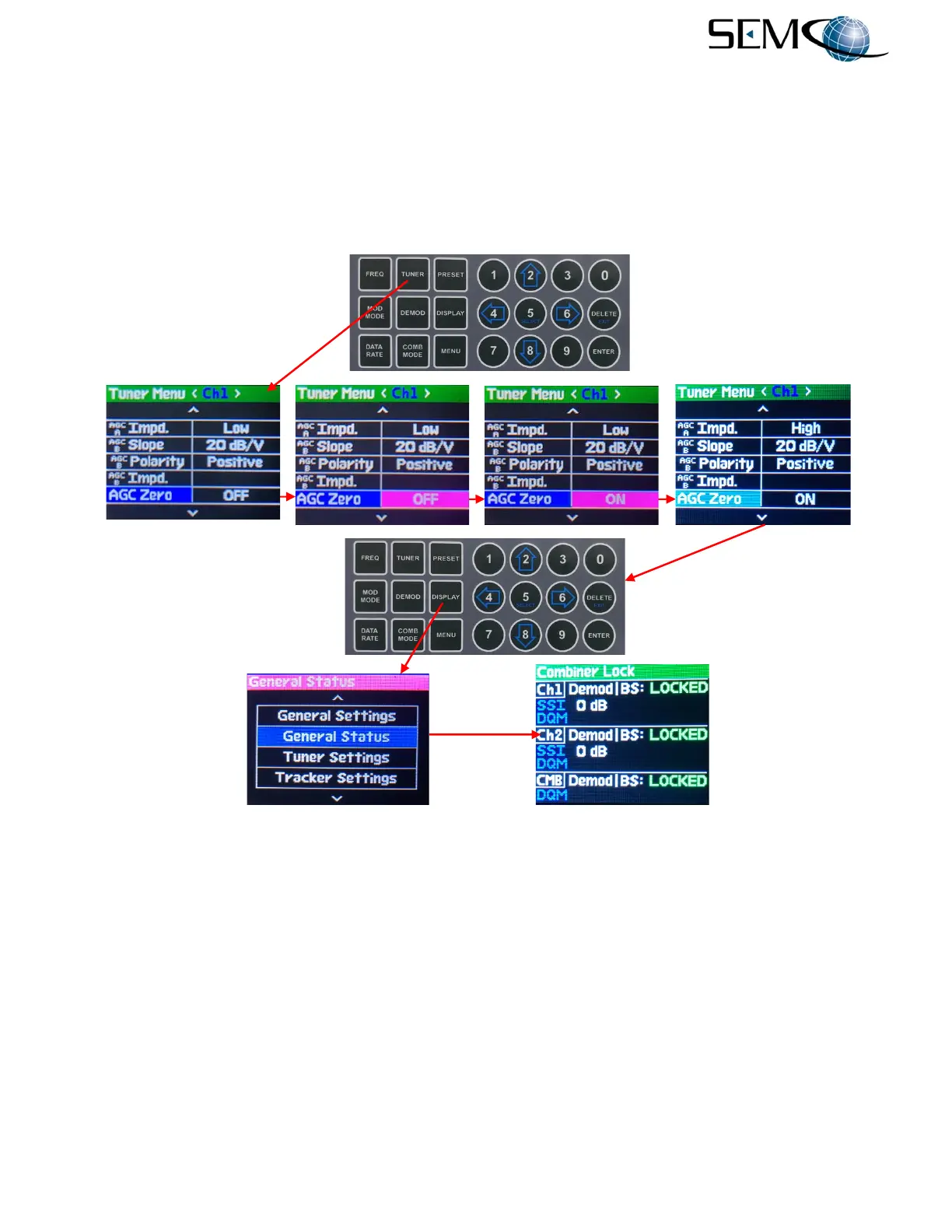
The operator then uses the either the horizontal LEFT (4) or RIGHT (6) arrows to change the Tuner Menu
to <Ch2>, pushes ENTER or SELECT (5) to highlight the AGC Zero OFF/ON value in bright magenta,
pushes either the UP (2) or DOWN (8) buttons to select ON, and then pushes ENTER or SELECT (5) to
turn <Ch2> AGC Zero ON.
Once AGC Zero is enabled in CH1 and CH2, the operator then presses DISPLAY, scrolls to GENERAL
STATUS, presses ENTER and observes a 0 dBm Relative RSSI indication (SSI 0 dB) with AGC Zero
enabled as shown.
Figure 4-9
AGC Zero and Relative RSSI Status Settings
4.2.3 Front Panel Antenna Signal Strength Display
Antenna Signal Strength provides an indication of signal strength at the antenna based on a user-specified
Correction Factor (Antenna CF) that is the insertion loss/gain between the antenna and receiver.
Figure 4-10 illustrates the Antenna Signal Strength feature using the front panel displays and keyboard.
The operator pushes the TUNER button, uses the UP (2) and DOWN (8) arrows to scroll to Ant. CF En.
in blue, and then pushes ENTER or SELECT (5) to highlight the OFF/ON window in bright magenta. The
operator then uses the UP (2) or DOWN (8) arrows to select ON, and then pushes ENTER or SELECT (5)
to enable the <Ch1> Antenna Correction Factor feature.
0 dB Relative SSI
readout with AGC
Zero Enabled



 To Next Page