A2537-002/01 February 2020 6-4 SEMCO Proprietary Information
Figure 6-6
Individual Demodulator Data Rate Selection
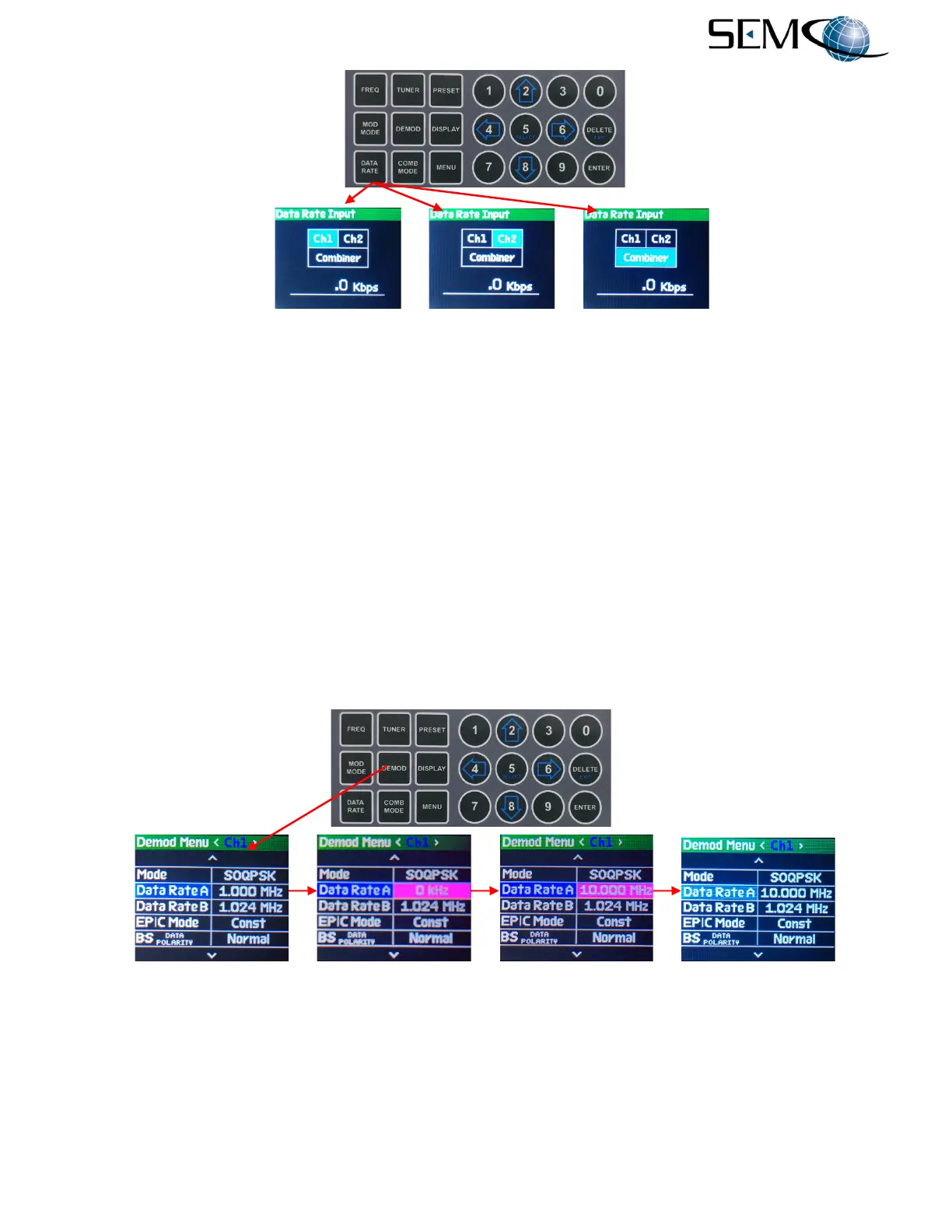
The operator can also change the data rate from the DEMOD Menu as shown in Figure 6-7.
The operator pushes the DEMOD MODE button to access the Demod Menu display, uses the UP (2) and
DOWN (8) arrows to scroll to Data Rate A in blue, and then pushes ENTER or SELECT (5) to highlight
the Data Rate selection window in bright magenta. The operator then uses the numerical keypad to enter
the desired data rate. The data rate will read in kbps and then switch to Mbps for data rate entry above
1.0 Mbps. The operator pushes ENTER or Select (5) and the data rate of the <Ch1> demodulator is set.
Using the horizontal LEFT (4) and RIGHT (6) arrows, the operator selects <Ch2> and <Comb> in the
Demod Menu header to change the Modulation Input display bar. The operator then pushes ENTER or
SELECT (5), uses the numerical keypad to enter the desired data rate and pushes ENTER or Select (5)
to set the demodulator Data Rate A in each of these channels.
As previously mentioned, the data rate only needs to be entered once for all 3 channels if Diversity Slaving
is enabled.
Figure 6-7
Demod Data Rate Selection From The Demod Menu
Figure 6-8 shows the Data Rate A and Data Rate “B” that appears on the Demod Menu when either the
AQPSK or AUQPSK demodulator format is selected. This allows the user to type in desired different
(“Asynchronous”) data rates for the I and Q data streams. The steps previously described and illustrated
in Figure 6-8 is used to enter both Data Rate A and Data Rate B values.



 To Next Page