A2537-002/01 February 2020 4-7 SEMCO Proprietary Information
4.2.4 Remote GUI RSSI Displays and Settings
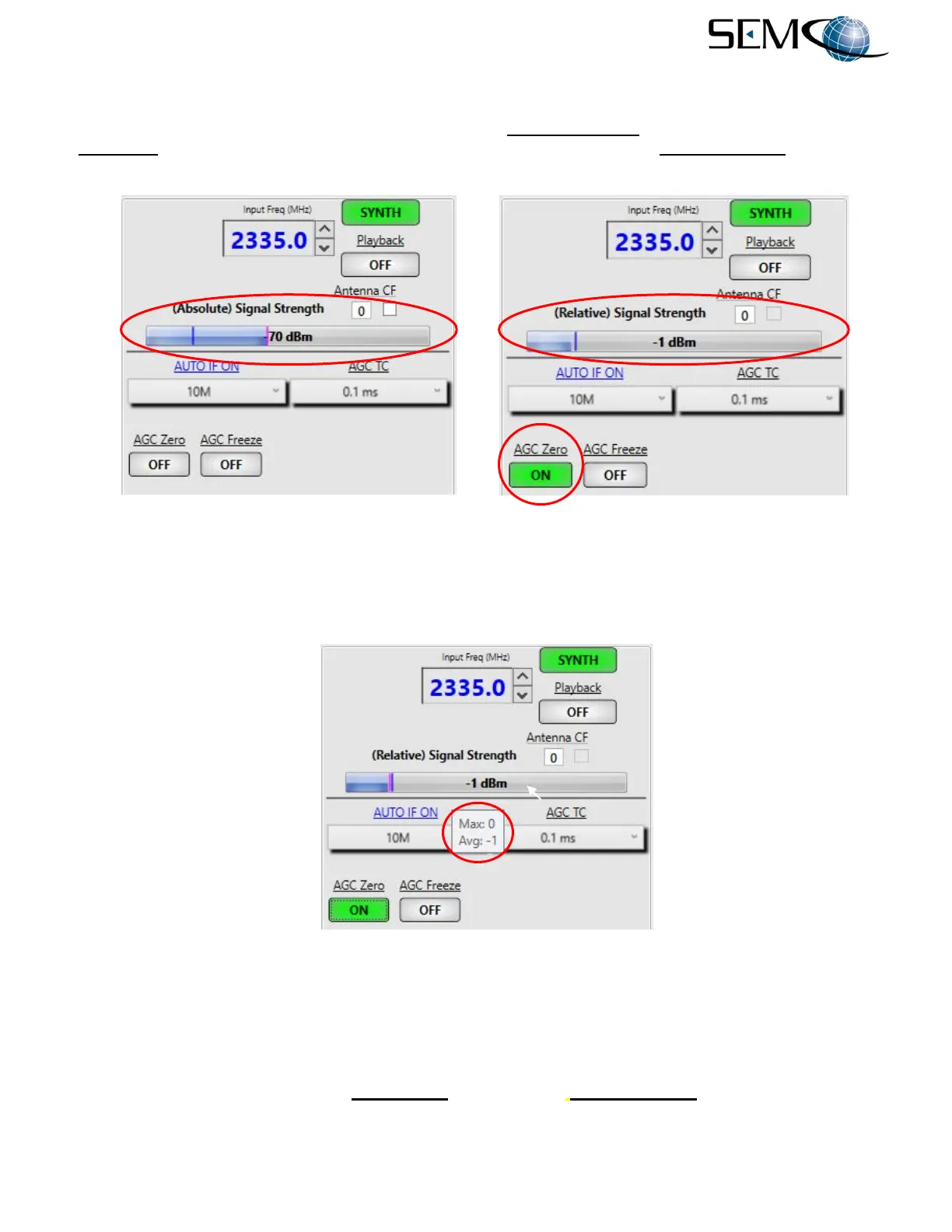
The RSSI display (Figure 4-11) provides for (Absolute) Signal Strength at the receiver RF input. When
AGC Zero is enabled (ON), the signal strength display switches to (Relative) Signal Strength, which sets
the readout at 0 dB and reading +/- dB relative to that input signal level.
Figure 4-11
Absolute and Relative Signal Strength Display on Remote GUI
Figure 4-12 depicts the RSSI Maximum (Max) and Average (Avg) Signal Level feature, which provides
the user with both maximum and average RF signal levels as they occur during a mission. The user places
the cursor over the RSSI bar as shown in order to obtain these RF signal level readouts.
Figure 4-12
Maximum/Average Signal Strength Indicator on Remote GUI
The Antenna Signal Strength feature (Figure 4-13) provides an indication of signal strength at the antenna
based on a user-specified correction factor (CF) that represents the signal loss or gain between the
antenna and the receiver.
The user clicks the small box under Antenna CF and (Antenna) Signal Strength is displayed.



 To Next Page