A2537-002/01 February 2020 6-17 SEMCO Proprietary Information
STC only applies to SOQPSK-TG modulation. The input bit stream is space-time coded, resulting in
two parallel bit streams that then have a pilot sequence added to each bit stream at fixed bit intervals
(or blocks). These encoded/pilot-added streams are then individually modulated through phase-locked
transmitters to a carrier using SOQPSK-TG modulation, power amplified and then connected to a top
and bottom antenna. The receiver performs the task of estimating frequency offset, delays, gains, and
phase shifts, and then space-time decoding the signal.
L. Viterbi and Turbo FEC Options - Viterbi Forward Error Correction (FEC) is an algorithm used by the
demodulator to recover a convolutional encoded signal, is used to compensate for noise in the
received modulated signal and provides error correction that usually results in complete recovery of
the original signal. The rate and K factor available in the receiver are Rate ½ K=7.
Turbo FEC applies to situations where data quality can be improved over bandwidth or latency-
constrained links in the presence of data-corrupting noise. Turbo codes provide very similar
performance when compared to LDPC FEC.
6.8.1 Fast Acquire
The Fast Acquire feature optimizes the demodulator acquisition of the incoming signal as fast as possible,
and is applicable to FM, Trellis FM and SOQPSK-TG.
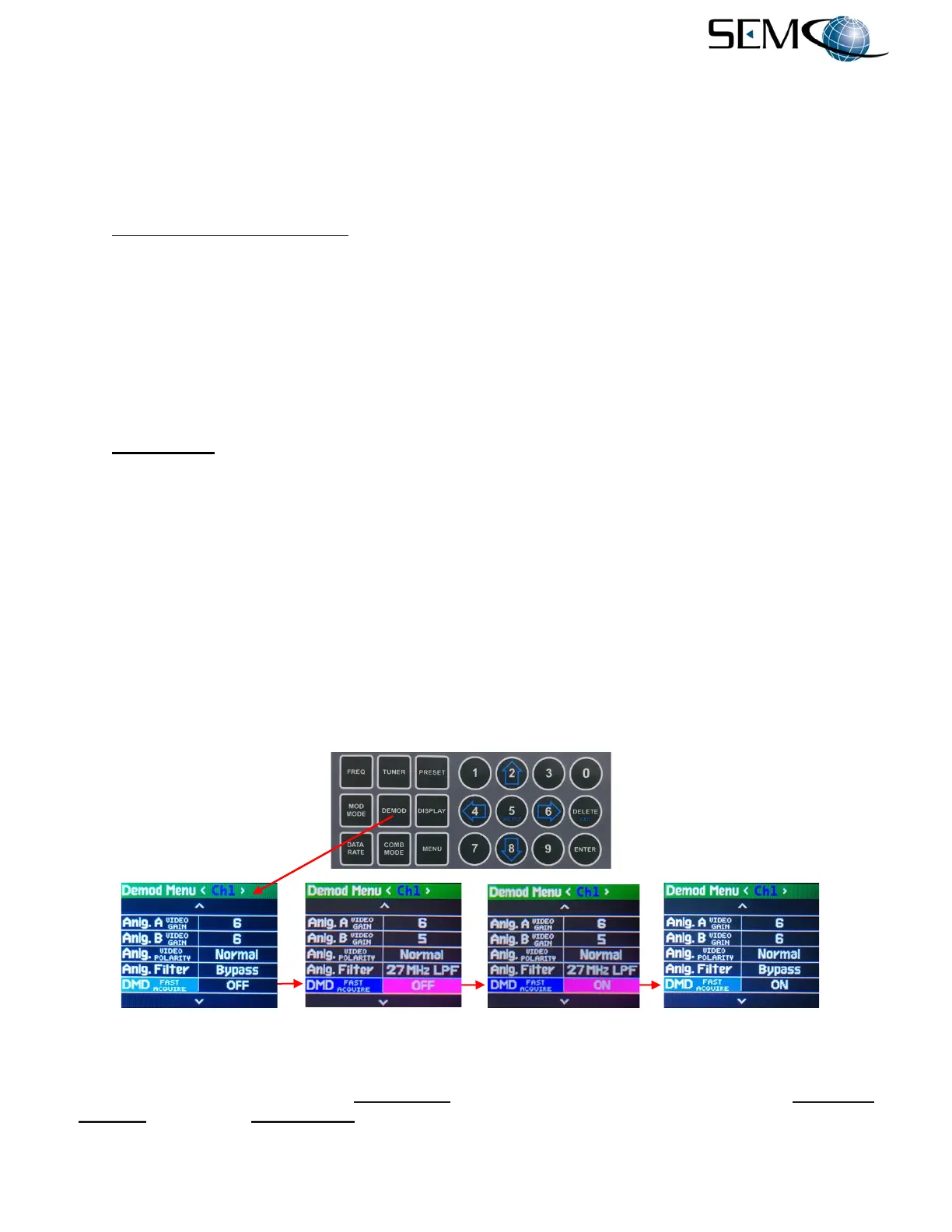
Figure 6-23 shows how to enable Fast Acquire using the Front Panel LCDs and Keypad.
The operator pushes the DEMOD button to enable the <Ch1> Demod Menu display, uses the UP (2) and
DOWN (8) arrows to scroll to DMD FAST ACQUIRE in blue, and then pushes ENTER or SELECT (5) to
highlight the ON/OFF window in bright magenta. The operator then uses the UP (2) and DOWN (8)
arrows to select ON and pushes ENTER or SELECT (5.
Using the horizontal LEFT (4) and RIGHT (6) arrows, the operator selects <Ch2> and pushes ENTER or
SELECT (5) to highlight the ON/OFF window in bright magenta. The operator then uses the UP (2) and
DOWN (8) arrows to select ON and pushes ENTER or SELECT (5). The operator repeats these steps for
<Comb>.
Figure 6-23
Front Panel Fast Acquire Feature
Figure 6-24 shows how to enable Fast Acquire on the remote GUI. The user clicks on Advanced
Settings and then the Fast Acquire window, which toggles ON/OFF as shown.



 To Next Page