A2537-002/01 February 2020 4-14 SEMCO Proprietary Information
4.5.2 Front Panel AGC Impedance and Time Constant Selection
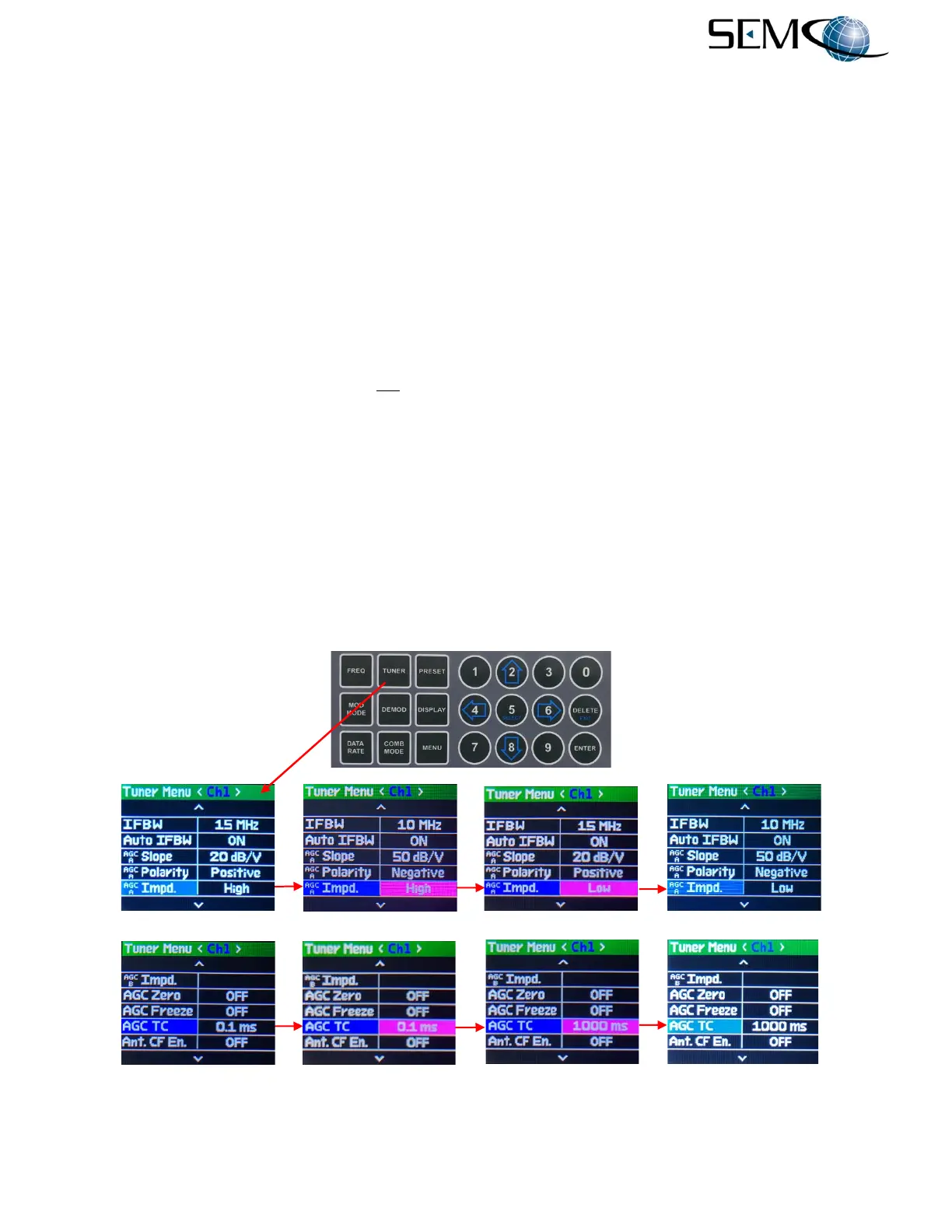
Figure 4-21 illustrates the steps for selecting AGC Impedance from the front panel. The operator pushes
the TUNER button, uses the UP (2) and DOWN (8) arrows to scroll to AGC Impd. in blue, and then pushes
ENTER or SELECT (5) to highlight the AGC Impd. window in bright magenta. The operator then uses
the UP (2) and DOWN (8) arrows to select High or Low and pushes ENTER or SELECT (5).
Using the horizontal LEFT (4) and RIGHT (6) arrows, the operator can select the other receiver channel
pushes ENTER or SELECT (5) to highlight the AGC Impd. window in bright magenta, uses the UP (2)
and DOWN (8) arrows to select the desired High or Low and pushes ENTER or SELECT (5). For the
Combiner channel, the operator pushes the COMB MODE button and repeats the process.
Figure 4-21 also illustrates the steps for selecting a desired AGC Time Constant. There are five AGC Time
Constant values available (0.1, 1.0, 10, 100 and 1000 ms). Selecting any one of these AGC time constant
values will affect the “attack” and “recovery” time of the linear 70 MHz IF output, as well as the internal 70
MHz input to the demodulator. It does not affect the “attack” and “recovery” time of the demodulated AM
output signal. The AM signal output is at a fixed 300 ms AGC time constant that provides optimum AM
response for ACU antenna tracking functions, while the ability to select faster AGC time constants
optimizes demodulator data quality and BER performance.
For AGC Time Constant selection, the operator pushes the TUNER button to access the Tuner Menu,
uses the UP (2) and DOWN (8) arrows scroll to AGC TC in blue, pushes ENTER or SELECT (5) to highlight
the AGC TC value window in bright magenta, and then uses the UP (2) and DOWN (8) arrows to select
0.1, 1, 10, 100 or 1000 ms. The operator then pushes ENTER or SELECT (5).
Using the horizontal LEFT (4) and RIGHT (6) arrows, the operator selects the other receiver channel,
pushes ENTER or SELECT (5) to highlight the AGC TC selection window in bright magenta, uses the
UP (2) and DOWN (8) arrows to select the desired TC and pushes ENTER or SELECT (5).
Figure 4-21
AGC Impedance and Time Constant Selection Using Front Panel
----------------------------------------AGC Output Impedance Selection-------------------------------------------
---------------------------------------------AGC Time Constant Selection------------------------------------------



 To Next Page