A2537-002/01 February 2020 5-4 SEMCO Proprietary Information
5.1.5 Combiner “Best Source Select” (BSS)
Th e Combiner “Best Source Select” (BSS) feature is available using either the Front Panel controls or the
remote GUI. When BSS is ON, the Combiner becomes a “Best Source Selector” that automatically
switches to the stronger of the CH1/CH2 signals during receiver operation.
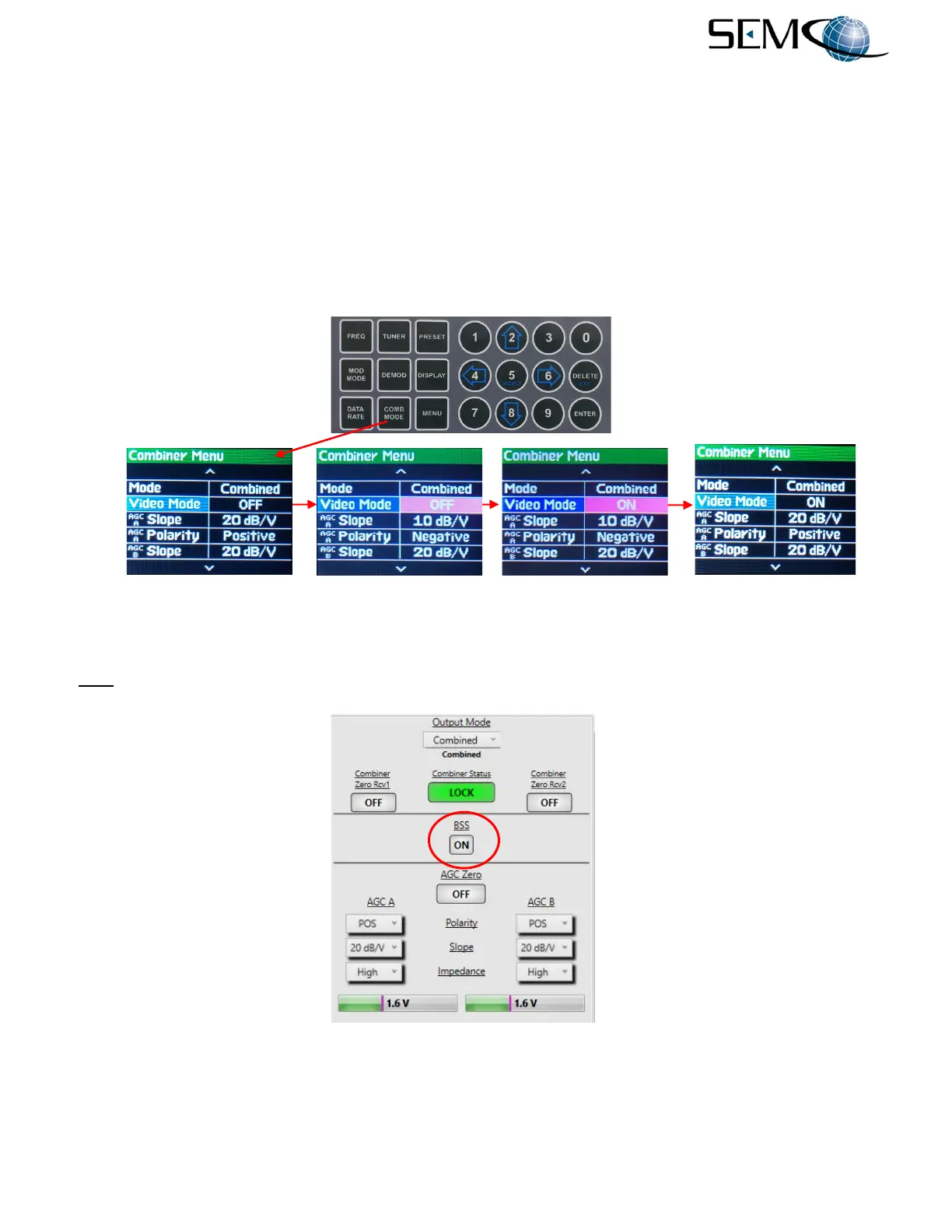
Figure 5-5 illustrates the steps to enable BSS using the front panel displays and keypad. The operator
pushes the COMB MODE button to access the Combiner Menu, uses the UP (2) and DOWN (8) arrows
to scroll to Video Mode in blue, and then pushes ENTER or SELECT (5) to highlight the Video Mode
selection window in bright magenta. Using the UP (2) and DOWN (8) arrows, the operator selects ON or
OFF and then pushes ENTER or SELECT (5).
Figure 5-5
Diversity Combiner Best Source Selection Using Front Panel
The Combiner “Best Source Select” feature using the remote GUI is shown in Figure 5-6. Clicking on the
BSS button toggles the indication OFF and ON.
Figure 5-6
Diversity Combiner Best Source Selection on Remote GUI



 To Next Page