A2537-002/01 February 2020 4-20 SEMCO Proprietary Information
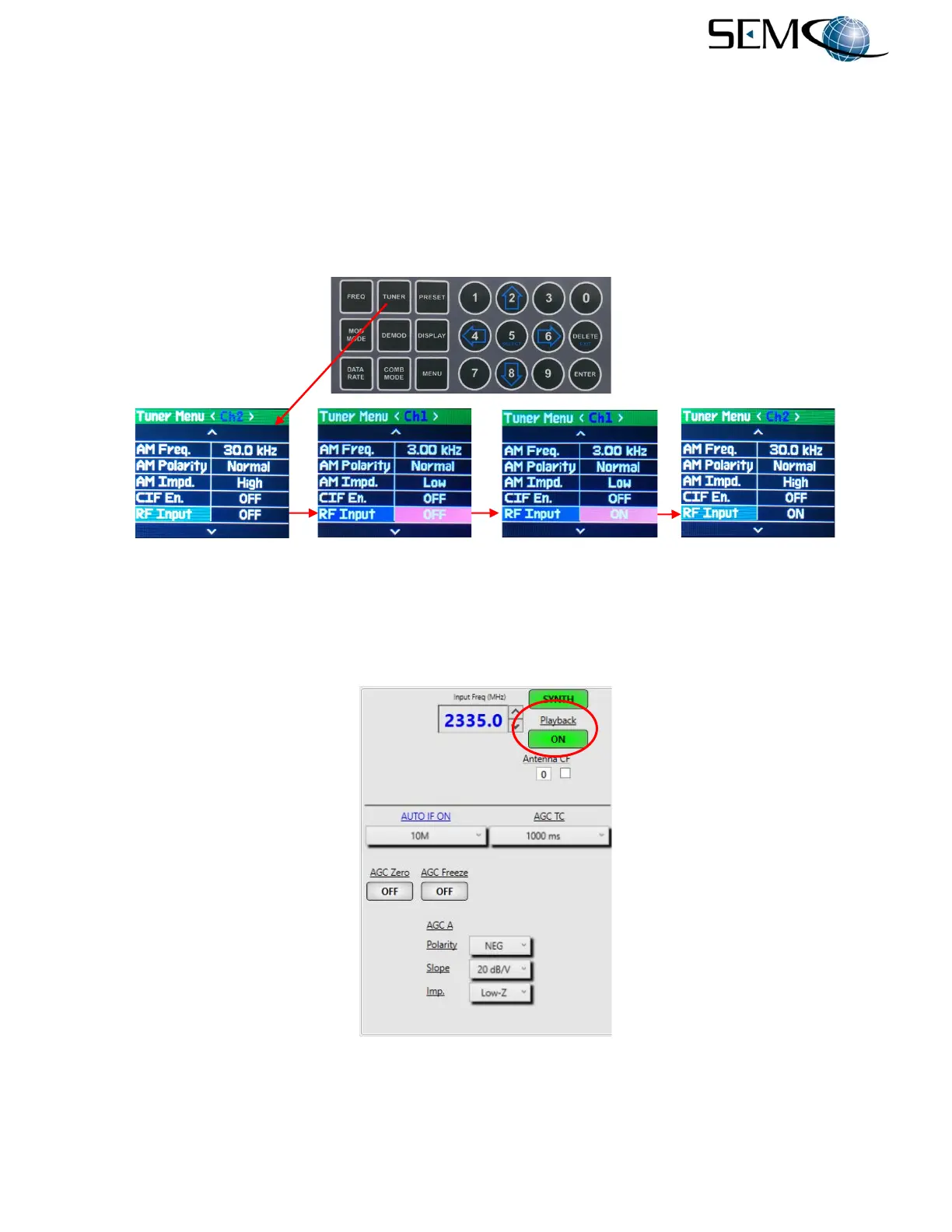
The operator pushes the TUNER button to access the Tuner Menu display, uses the UP (2) and DOWN
(8) arrows to scroll to RF Input in blue, and then pushes ENTER or SELECT (5) to highlight the RF Input
ON/OFF window in bright magenta. The operator then uses the UP (2) and DOWN (8) arrows to select
ON and pushes ENTER or Select (5) for a <Ch1> 70 MHz RF (IF) input.
Using the horizontal LEFT (4) and RIGHT (6) arrows, the operator selects <Ch2> in the Tuner Menu
header display bar and then pushes ENTER or SELECT (5) to highlight the <Ch2> RF Input ON/OFF
window in bright magenta. The operator then uses the UP (2) and DOWN (8) arrows to select ON and
pushes ENTER or Select (5) for a <Ch2> 70 MHz RF (IF) input.
Figure 4-30
70 MHz RF (IF) Pre-d and Playback Using Front Panel
Accessing the 70 MHz Pre-d Playback feature on the remote GUI is illustrated in Figure 4-31. The operator
clicks on the Playback button to enable a green ON indication as shown. The RSSI display is disabled
when the Playback feature is enabled.
Figure 4-31
70 MHz RF (IF) Pre-d and Playback on Remote GUI



 To Next Page