A2537-002/01 February 2020 6-20 SEMCO Proprietary Information
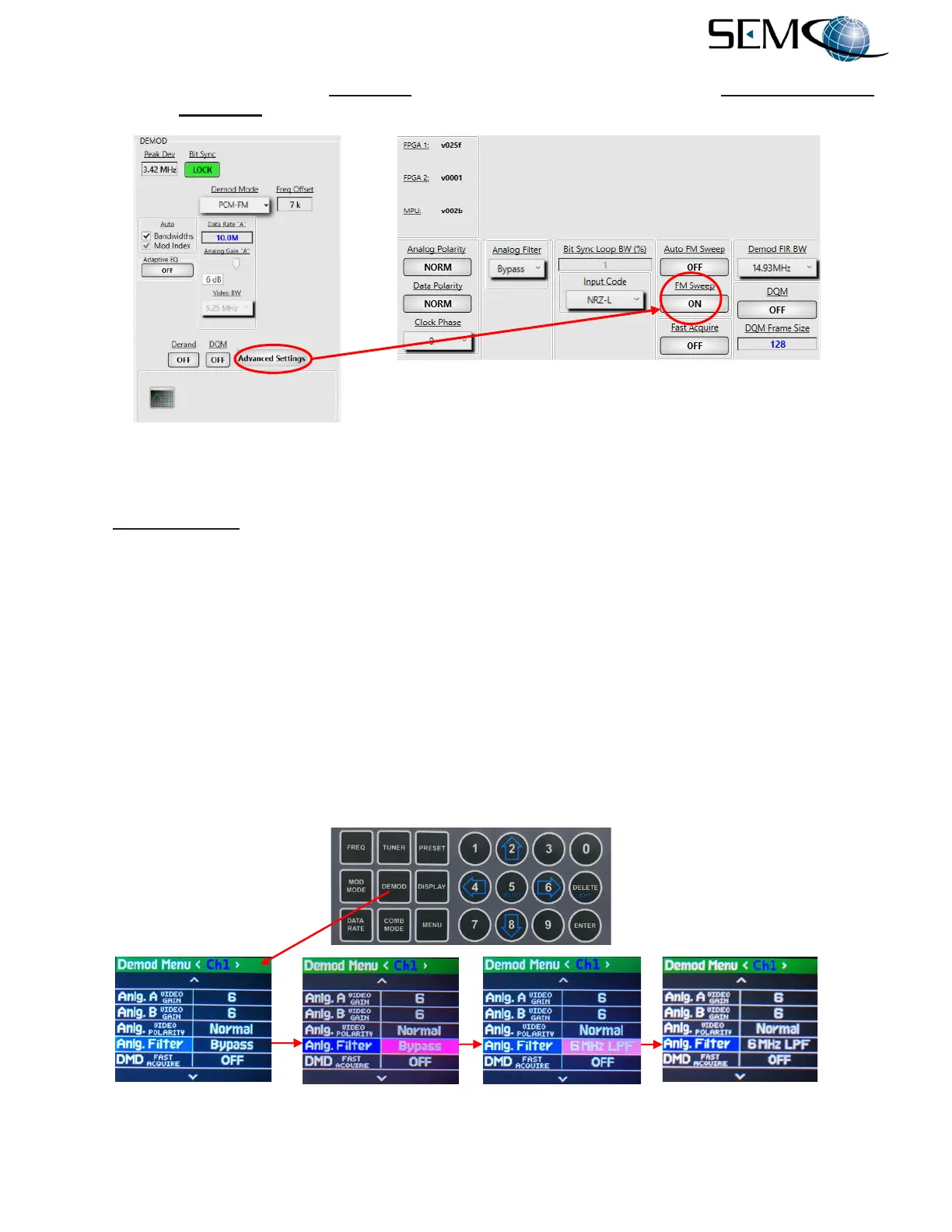
Figure 6-28 shows how to enable FM Sweep using the remote GUI. The user clicks on Advanced Settings
and then the FM Sweep window to toggle ON as shown.
Figure 6-28
FM Sweep on Remote GUI
6.8.4 De-Emphasis and Low Pass Analog Filters
The Low Pass Filter feature optimizes NTSC signal quality and should always be used for an FM NTSC
Video signal. Bypass (no filtering), De-Emph (Video De-Emphasis), 6 MHz LPF (Low Pass Filter) and 27
MHz LPF (Low Pass Filter) selections are available.
Figure 6-29 shows how to enable Low Pass Filter using the Front Panel LCDs and Keypad.
The operator pushes the DEMOD button to enable the <Ch1> Demod Menu display, uses the UP (2) and
DOWN (8) arrows to scroll to Anlg. Filter in blue, and then pushes ENTER or SELECT (5) to highlight the
selection window in bright magenta. The operator then uses the UP (2) and DOWN (8) arrows to select
Bypass, De-Emph, 6 MHz LPF or 27 MHz LPF, and pushes ENTER or SELECT (5.
Using the horizontal LEFT (4) and RIGHT (6) arrows, the operator selects <Ch2> and pushes ENTER or
SELECT (5) to highlight the selection window in bright magenta. The operator then uses the UP (2) and
DOWN (8) arrows to select Bypass, De-Emph, 6 MHz LPF or 27 MHz LPF and pushes ENTER or
SELECT (5). The operator repeats these steps for <Comb>.
Figure 6-29
Front Panel Video De-Emphasis and Low Pass Filter Setting



 To Next Page