A2537-002/01 February 2020 6-14 SEMCO Proprietary Information
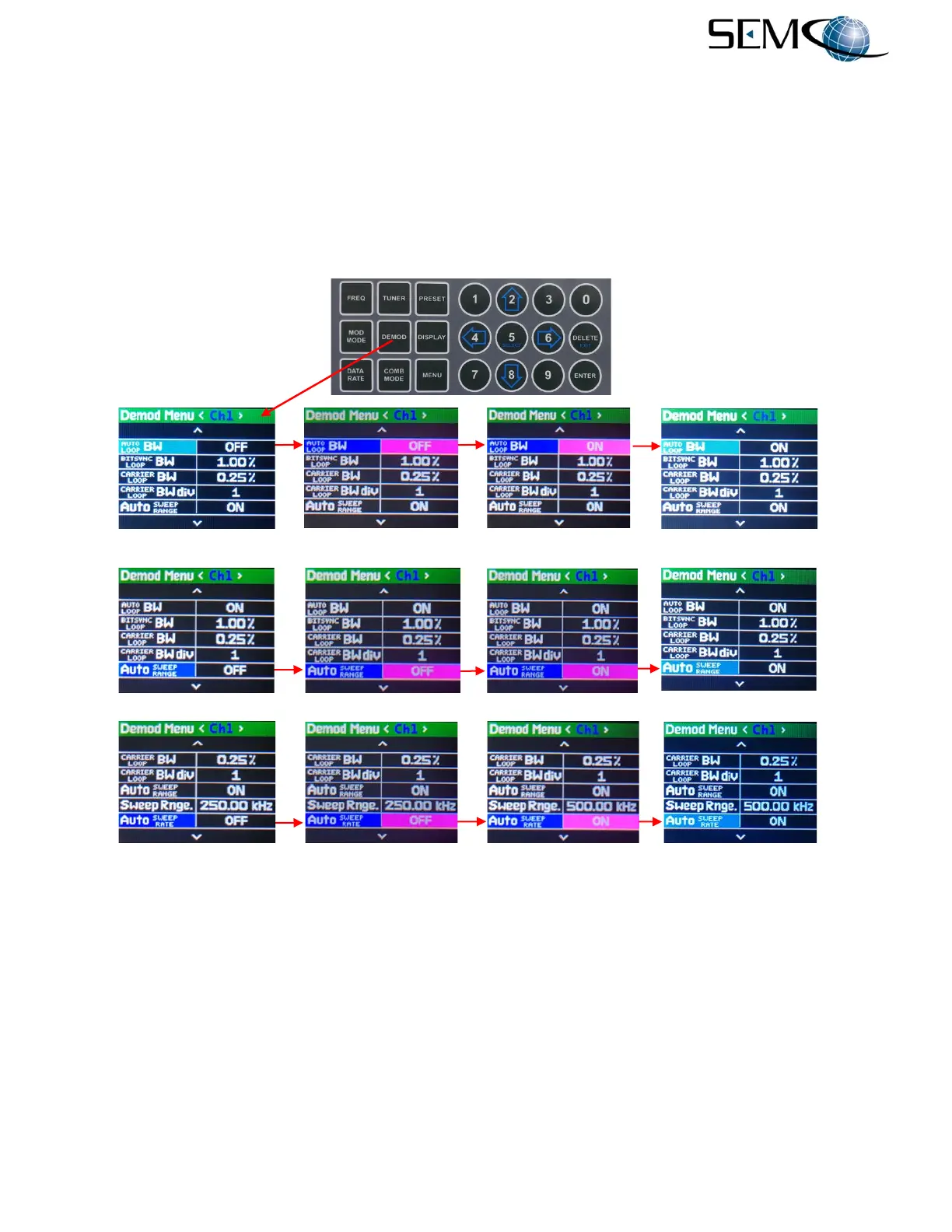
For AUTO Sweep Range, the operator pushes the DEMOD button, uses the UP (2) and DOWN (8) arrows
to scroll to AUTO SWEEP RANGE in blue, and then pushes ENTER or SELECT (5) to highlight the AUTO
SWEEP RANGE selection window in bright magenta. The operator then uses the UP (2) and DOWN (8)
arrows to select ON and pushes ENTER or SELECT (5.
Using the horizontal LEFT (4) and RIGHT (6) arrows, the operator can select <Ch2> and push ENTER or
SELECT (5) to highlight the AUTO SWEEP RANGE selection window in bright magenta. The operator
then uses the UP (2) and DOWN (8) arrows to select ON and pushes ENTER or SELECT (5). The operator
repeats these steps for <Comb>.
Figure 6-21
Front Panel AUTO Bandwidth and Sweep Settings
Referring again to Figure 6-21 and the steps for enabling AUTO Loop Bandwidths, Sweep Range and
Sweep Rate, the operator can disable the AUTO function by following the same steps outlined for enabling
AUTO, except selecting OFF rather than ON for each function.
With AUTO disabled and still in Demod Menu <Ch1>, the operator can then use the UP (2) and DOWN
(8) arrows to scroll to either BIT SYNC LOOP BW, CARRIER LOOP BW, SWEEP RANGE and/or SWEEP
RATE in blue, and push ENTER or SELECT (5) to highlight the respective selection window in bright
magenta. The operator then uses the numerical keypad to enter the desired BANDWIDTH, SWEEP
RANGE and/or SWEEP RATE value and pushes ENTER or Select (5).
---------------------------------------------AUTO BANDWIDTH Selection----------------------------------------------
---------------------------------------------AUTO SWEEP RANGE Selection----------------------------------------------
------------------------------------------AUTO SWEEP RATE Selection---------------------------------------------



 To Next Page