A2537-002/01 February 2020 2-18 SEMCO Proprietary Information
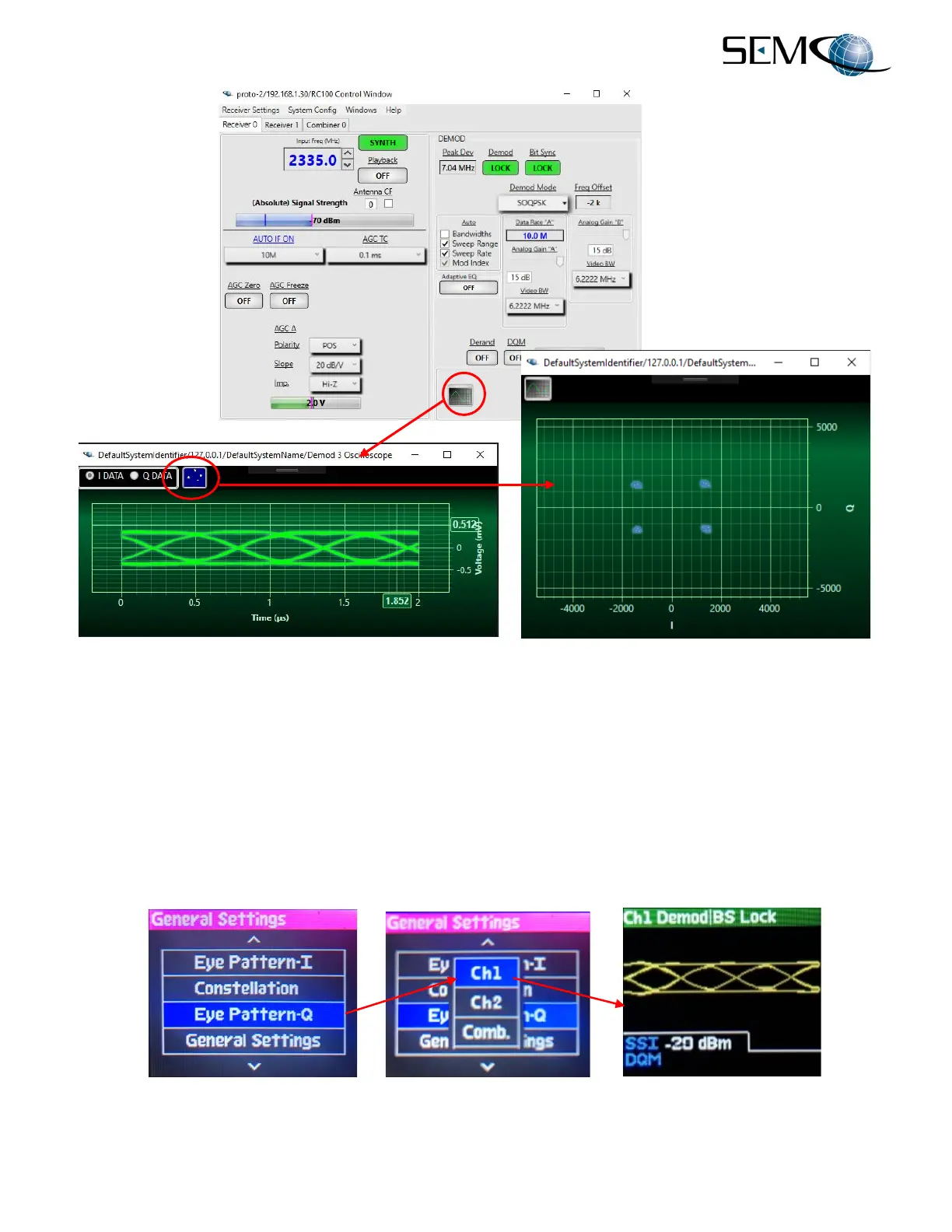
Figure 2-28
Eye Pattern and Constellation Feature
Both the Eye Pattern and Constellation displays can also be accessed using the front panel LCD displays
and keypad as shown in Figure 2-29. The user presses the DISPLAY button, uses the DOWN (8) arrow
to scroll down to Eye Pattern-I, Eye Pattern-Q or Constellation and presses ENTER. The user then
uses the DOWN (8) arrow to select Ch1, Ch2 or Comb. and presses ENTER. Once the desired selection
is made, DELETE (EXIT) is pressed to return the display to its original setting.
Eye Pattern-Q is shown in the Figure 2-29 example. The user repeats these steps for selecting either Eye
Pattern-I or Constellation displays.
Figure 2-29
Eye Pattern and Constellation Selection Using Front Panel



 To Next Page