A2537-002/01 February 2020 2-19 SEMCO Proprietary Information
2.7 Presets Feature
The Presets feature allows the user to save receiver settings and then load these settings to a receiver
simply by clicking on a particular preset (SLTS GUI) or touching a preset that has been saved on the Touch
Screen.
This preset feature can be used to facilitate mission setups, and is particularly useful when there are
several receivers on an Ethernet network.
2.7.1 Saving a Preset
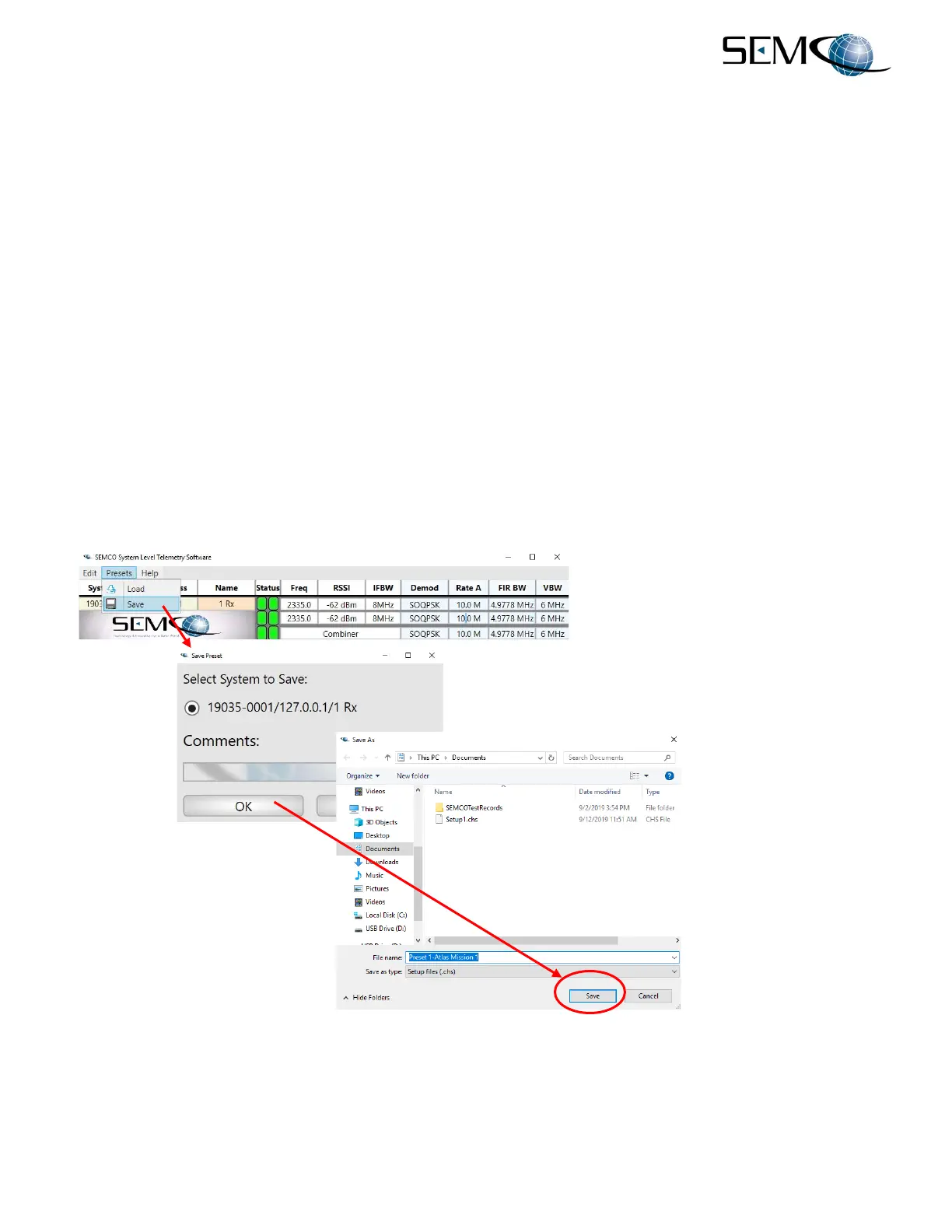
Figure 2-30 shows how to save Presets using the remote GUI. The user clicks on Presets and then Save
to access the Save Preset window as shown. In a networked system, the list of receivers in the network
is listed in this window, and the user selects which receiver settings to be saved (In the example, Receiver
19035-0001 is running in a local SLTS environment as the only connected receiver). The user then clicks
on OK to access the SEMCO Presets directory as shown.
Once in the SEMCO Presets directory, the user can now name and save the selected receiver settings
as a preset. The naming convention is Preset 1 - (Name), Preset 2 – (Name)…and so forth.
In the example, Preset1-Atlas Mission 1 is used.
Figure 2-30
Save Presets Feature



 To Next Page