A2537-002/01 February 2020 2-20 SEMCO Proprietary Information
2.7.2 Loading a Preset
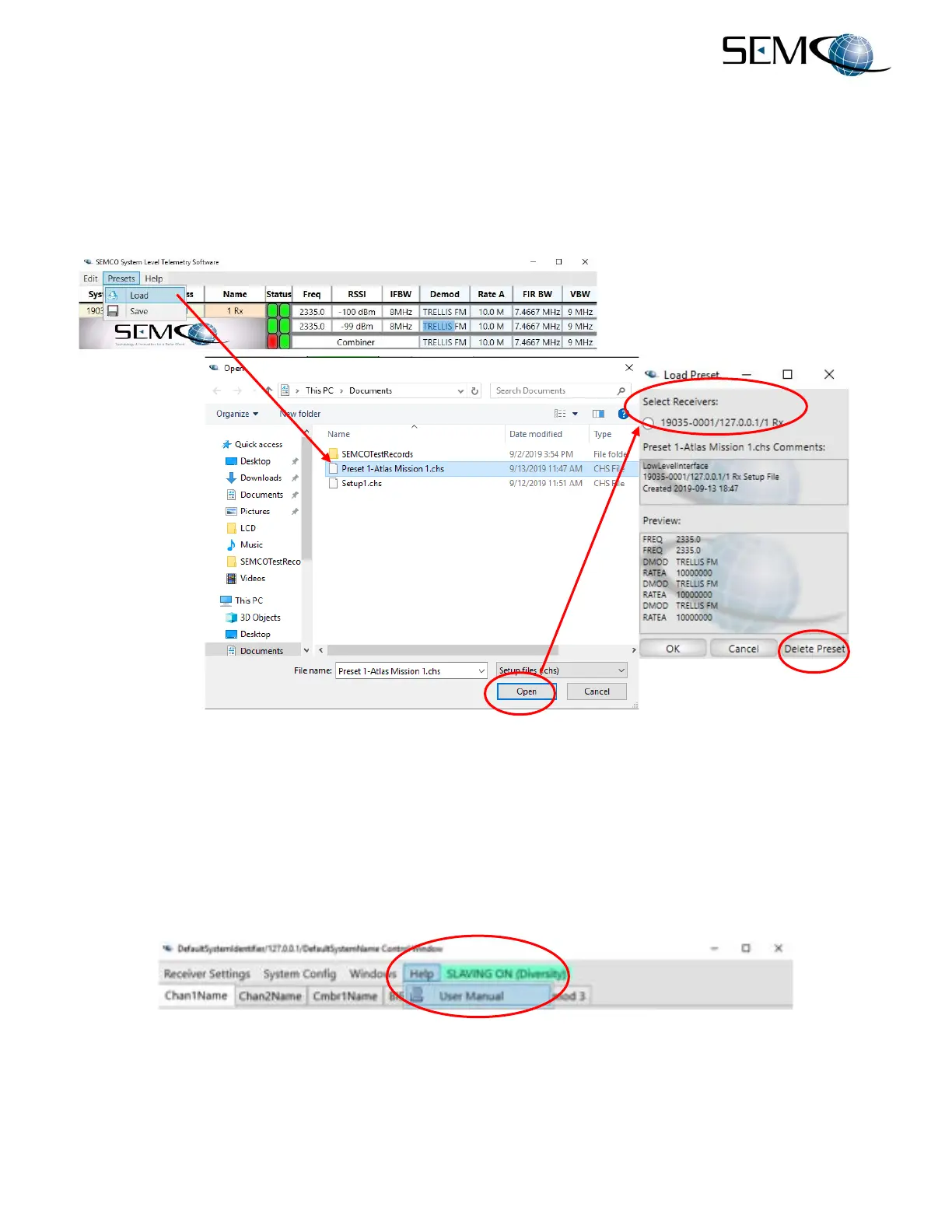
Figure 2-31 shows the Load Presets function on the remote GUI. The user clicks on Presets and then
Load to access the SEMCO Preset directory. The user then selects the desired Preset listed in the
directory and clicks on Open, which accesses the Load Preset window where the user can select the
receivers listed under Select Receivers to be loaded with the selected preset and then press OK as
shown. Major saved receiver parameters are listed under Preview as shown.
Figure 2-31
Load Presets Feature
Referring to Figure 2-31 again, the user can delete any preset by clicking on the Delete Preset button after
selecting the preset to be deleted.
2.8 Help Feature
Figure 2-32 illustrates the Help feature. Clicking on Help provides access to a .pdf of this User’s Guide.
Figure 2-32
Receiver Help Feature



 To Next Page