A2537-002/01 February 2020 4-11 SEMCO Proprietary Information
4.4 Amplitude Modulation (AM) Settings
The RC100C-2 AM signal is derived by an analog detector, thus not susceptible to signal latency and the
requirement to provide for adjustable delay that is inherent in digital AM demodulation. AM settings include
polarity (Normal and Inverted), output impedance (High or Low) and low pass filtering (LPF) between 30
Hz and 30 kHz.
4.4.1 Front Panel AM Settings
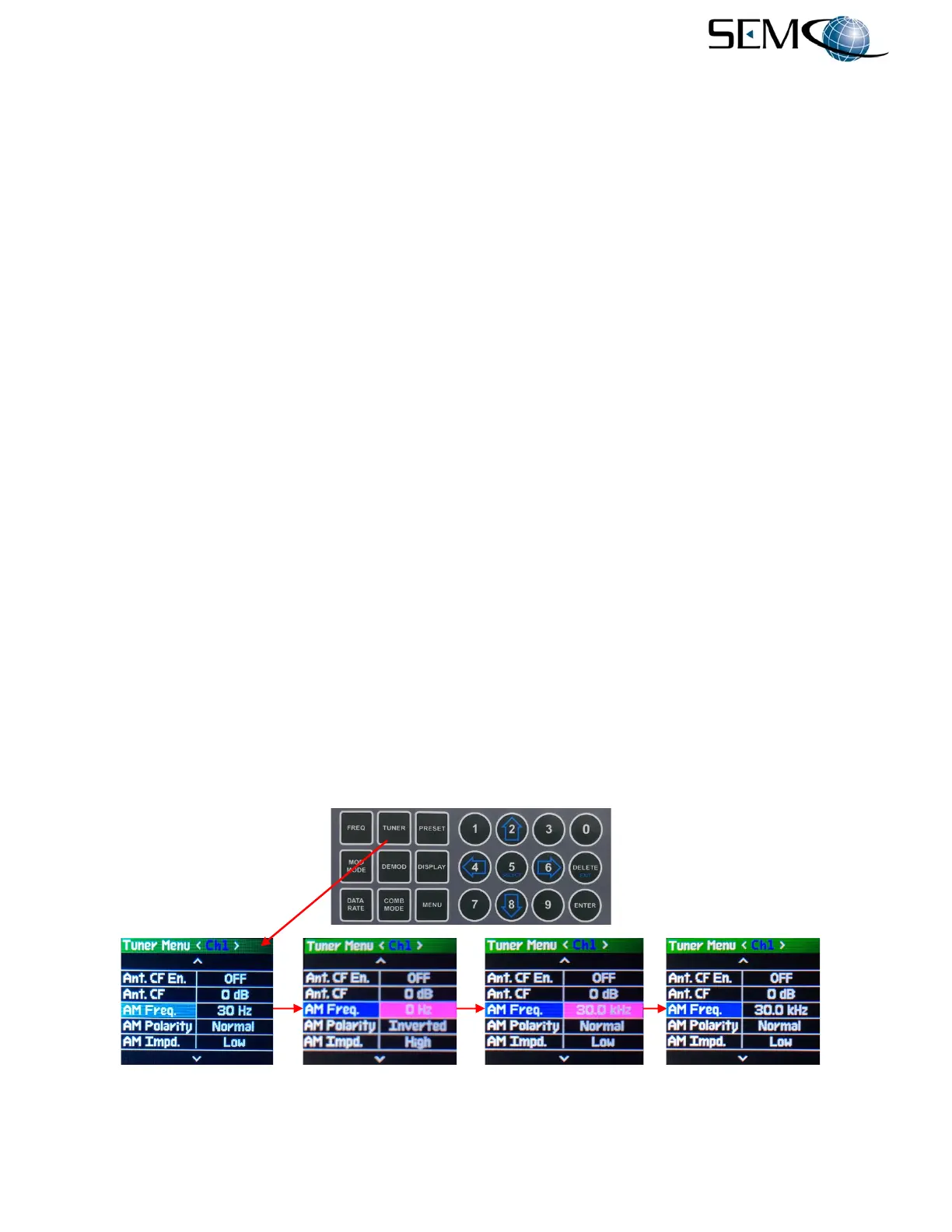
Figure 4-18 illustrates how to set-up AM LPF Frequency, Polarity and Impedance).
For AM LPF Frequency, the operator pushes the TUNER button, uses the UP (2) and DOWN (8) arrows
to scroll to AM Freq. in blue, and then pushes ENTER or SELECT (5) to highlight the AM Freq. value
window in bright magenta. The operator then enters a numerical value that represents the AM LPF value
and pushes ENTER or SELECT (5) to set the <Ch1> AM Freq. value.
Using the horizontal LEFT (4) and RIGHT (6) arrows, the operator can select <Ch2>, push ENTER or
SELECT (5) to highlight the AM Freq. value window in bright magenta. The operator then enters a
numerical AM LPF value and pushes ENTER or SELECT (5).
For AM Polarity, the operator pushes the TUNER button, uses the UP (2) and DOWN (8) arrows to scroll
to AM Polarity in blue, and then pushes ENTER or SELECT (5) to highlight the AM Polarity window in
bright magenta. The operator then uses the UP (2) and DOWN (8) arrows to select Normal or Inverted
and pushes ENTER or SELECT (5) to set the AM Polarity.
Using the horizontal LEFT (4) and RIGHT (6) arrows, the operator can select <Ch2>, push ENTER or
SELECT (5) to highlight the AM Polarity window in bright magenta. The operator then enters Normal
or Inverted and pushes ENTER or SELECT (5).
For AM Output Impedance, the operator pushes the TUNER button, uses the UP (2) and DOWN (8) arrows
to scroll to AM Impd. in blue, and then pushes ENTER or SELECT (5) to highlight the AM Impd. window
in bright magenta. The operator then uses the UP (2) and DOWN (8) arrows to select High or Low and
pushes ENTER or SELECT (5) to set the AM Impd.
Using the horizontal LEFT (4) and RIGHT (6) arrows, the operator can select <Ch2>, push ENTER or
SELECT (5) to highlight the AM Impd. window in bright magenta. The operator then enters High or Low
and pushes ENTER or SELECT (5).
Figure 4-18
AM LPF Frequency, Polarity and Impedance Selection Using Front Panel
---------------------------------------------AM LPF Frequency Selection----------------------------------------------



 To Next Page