A2537-002/01 February 2020 6-26 SEMCO Proprietary Information
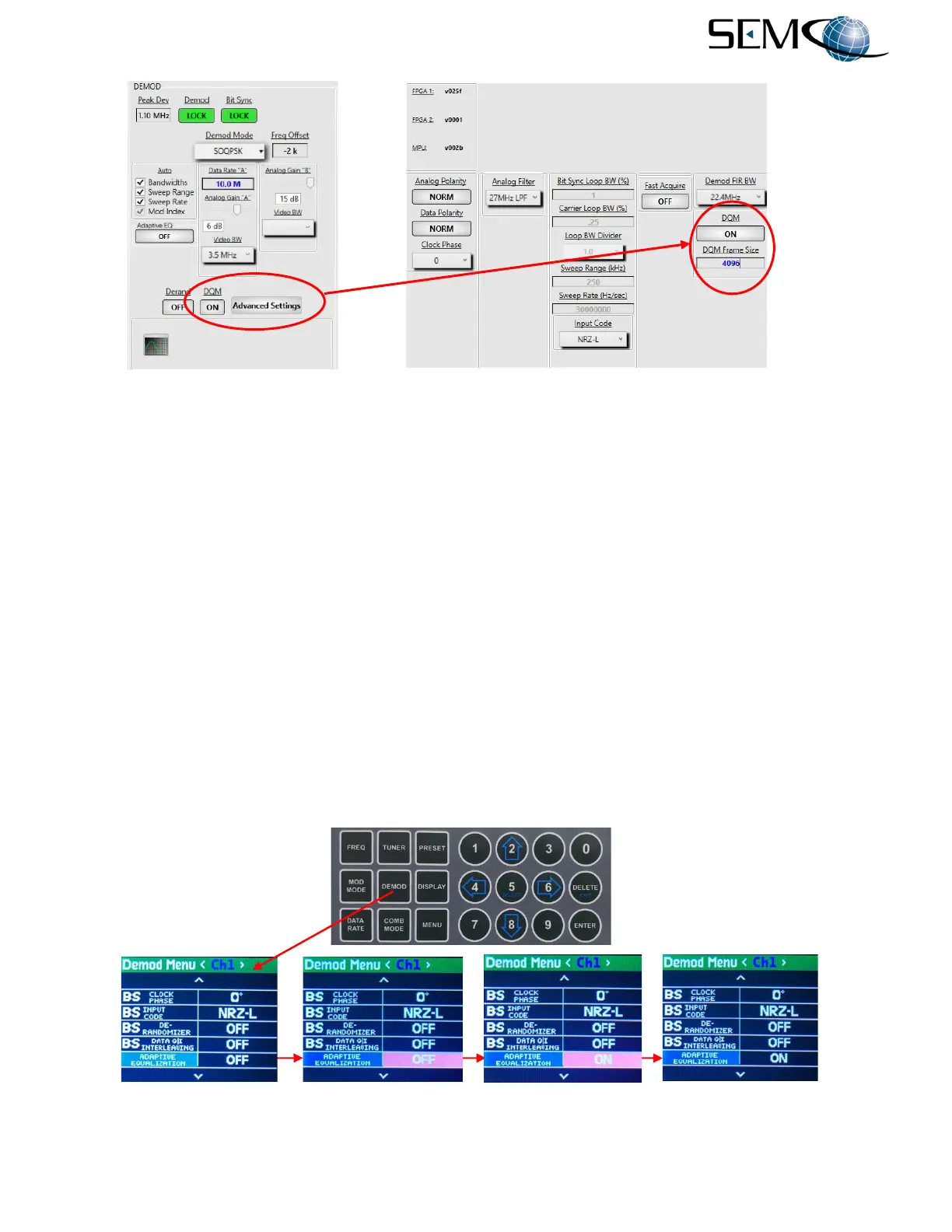
Figure 6-37
DQM Setup on Remote GUI
6.8.7 Adaptive Equalization (AE)
The AE feature mitigates RF multi-path that is present at the receiver’s input and automatically adapts to
time-varying properties of the RF signal. It can be used in FM, PSK, QPSK, AQPSK and SOQPSK-TG
demodulation modes and mitigates the effects of multipath propagation and Doppler spreading.
Figure 6-38 shows how to enable AE using the Front Panel LCDs and Keypad.
The operator pushes the DEMOD button to enable the <Ch1> Demod Menu display, uses the UP (2) and
DOWN (8) arrows to scroll to ADAPTIVE EQUALIZATION in blue, and then pushes ENTER or SELECT
(5) to highlight the ON/OFF window in bright magenta. The operator then uses the UP (2) and DOWN
(8) arrows to select ON and pushes ENTER or SELECT (5.
Using the horizontal LEFT (4) and RIGHT (6) arrows, the operator selects <Ch2> and pushes ENTER or
SELECT (5) to highlight the ON/OFF window in bright magenta. The operator then uses the UP (2) and
DOWN (8) arrows to select ON and pushes ENTER or SELECT (5). The operator repeats these steps for
<Comb>.
Figure 6-38
Front Panel AE Selection



 To Next Page