A2537-002/01 February 2020 6-2 SEMCO Proprietary Information
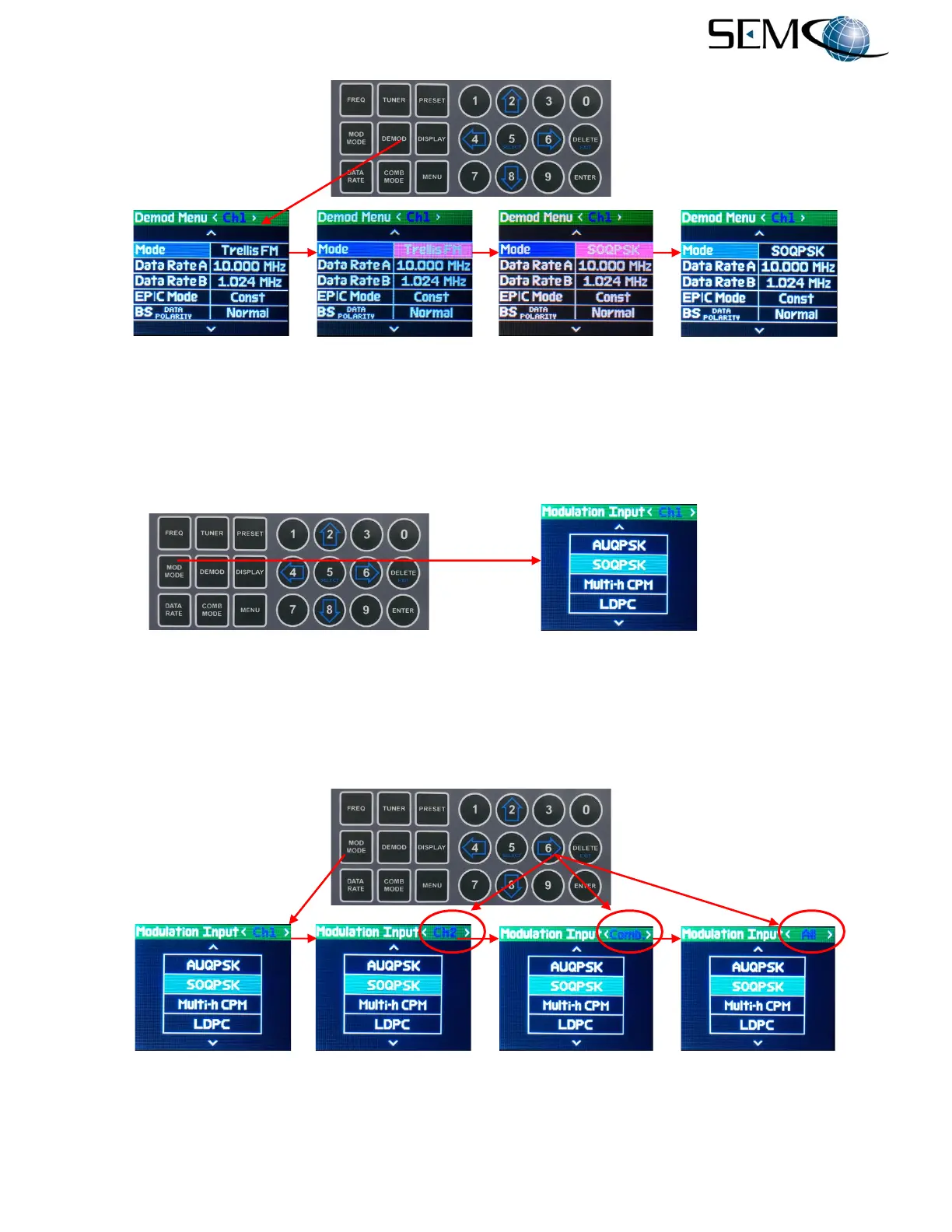
Figure 6-1
Demod Mode Selection Using Front Panel DEMOD Controls
The operator can also select the demodulation mode using the MOD MODE button as shown in Figure 6-
2. The operator pushes the MOD MODE button to access the Modulation Input display and uses the UP
(2) and DOWN (8) arrows to scroll to the desired demodulation mode in blue. The operator then pushes
ENTER or SELECT (5).
Figure 6-2
Demod Mode Selection Using Front Panel MOD MODE Controls
The operator can change the demodulation format for <Ch1>, <Ch2>, <Comb> or all 3 demodulators
<All> by using the horizontal LEFT (4) and RIGHT (6) arrows to change the Modulation Input display bar
as shown in Figure 6-3 and then push ENTER or SELECT (5).
Figure 6-3
Demod Mode Selection in Individual or Multiple Channels



 To Next Page