A2537-002/01 February 2020 4-8 SEMCO Proprietary Information
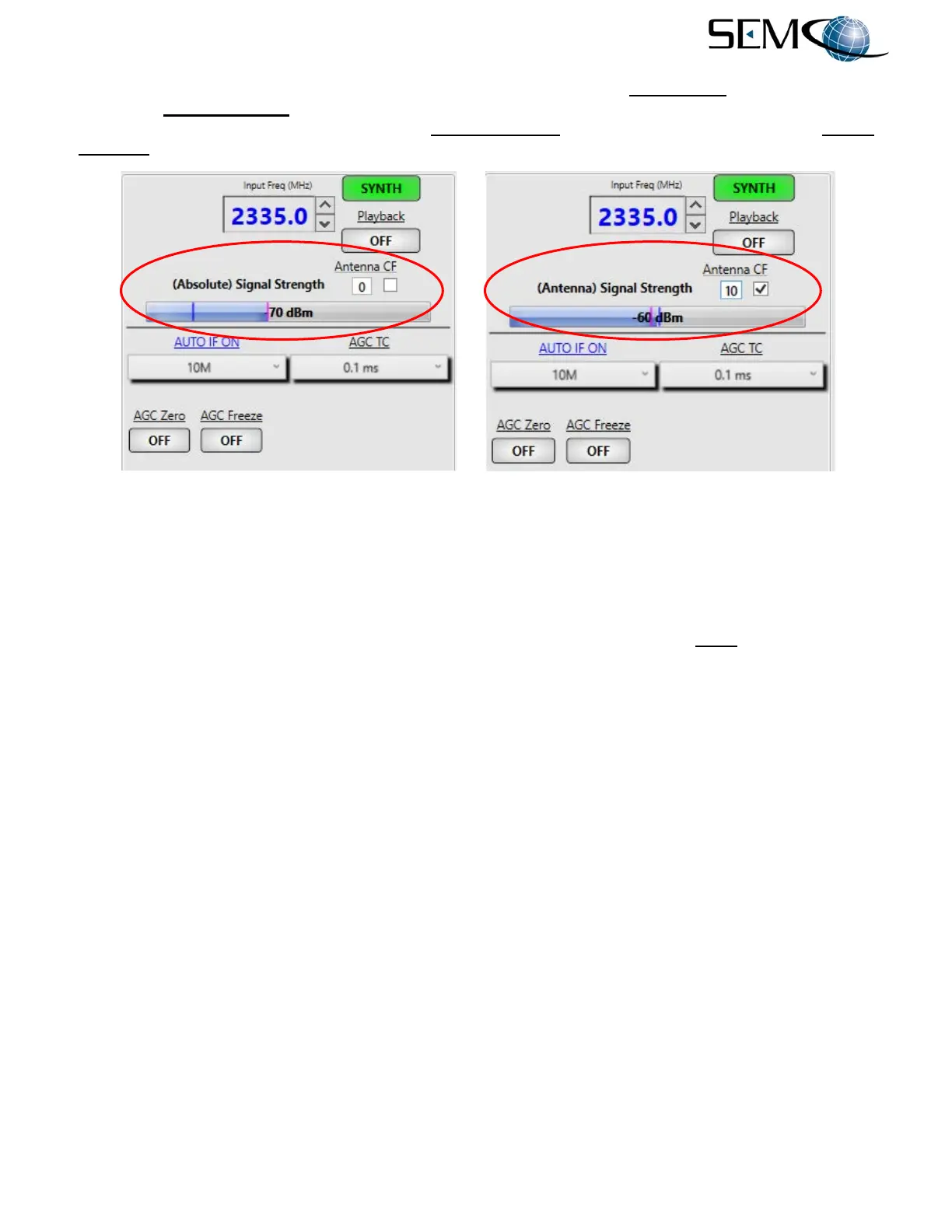
The user then enters a numerical +/- correction factor in the box under Antenna CF as shown, and the
(Antenna) Signal Strength now reads the RF signal level that represents the signal level at the antenna.
In the Figure 4-13 example, the (Absolute) Signal Strength is -61 dBm, and the (Antenna) Signal
Strength is -41 dBm, taking into account a loss of -20 dBm between the antenna and receiver.
Figure 4-13
Antenna Signal Strength Feature on Remote GUI
4.3 IF Filter Bandwidth Selection and Control
The receiver provides for 28 user-selectable IF SAW filters (14 IFBW values from 300 kHz to 40 MHz. In
addition, 15 IF FIR filters are presented to the user as a function of the data rate and demodulator format.
This means that a different set of 15 IF FIR filters are made available to the user for every data rate entered.
An AUTO Select feature is also available as described in the following paragraphs.
4.3.1 Front Panel IF SAW Filter Selection
SAW IFBW selection using the front panel displays and keypad is shown in Figure 4-14. The operator
pushes the TUNER button, uses the UP (2) and DOWN (8) arrows to scroll to IFBW in blue, and then
pushes ENTER or SELECT (5) to highlight the IFBW value window in bright magenta. The operator then
uses the UP (2) and DOWN (8) arrows to select one of 14 SAW IFBW filter values available, and pushes
ENTER or SELECT (5) to set the <Ch1> IFBW value.
For <Ch2>, the operator uses the horizontal LEFT (4) and RIGHT (6) arrows to change the Tuner Menu
to <Ch2>, and pushes ENTER or SELECT (5) to again highlight IFBW. The operator then pushes ENTER
or SELECT (5) to highlight the IFBW value window in bright magenta, and uses the UP (2) and DOWN
(8) arrows to select one of 14 SAW IFBW filter values available. The operator then pushes ENTER or
SELECT (5) to set the <Ch2> IFBW value. A 10 MHz IFBW value has been entered in the Figure 4-14
example.
To select the AUTO IFBW feature, the operator pushes the TUNER button, uses the horizontal LEFT (4)
and RIGHT (6) arrows to change the Tuner Menu to <Ch1>, uses the UP (2) and DOWN (8) arrows to
scroll to Auto IFBW in blue, and then pushes ENTER or SELECT (5) to highlight the IFBW Auto ON/OFF
window in bright magenta. The operator uses the UP (2) and DOWN (8) arrows to select ON, and then
pushes ENTER or SELECT (5) to set the <Ch1> Auto IFBW feature.
The operator repeats these steps for enabling <Ch2> Auto IFBW.



 To Next Page