A2537-002/01 February 2020 5-3 SEMCO Proprietary Information
5.1.3 Front Panel Combiner Status Indicators
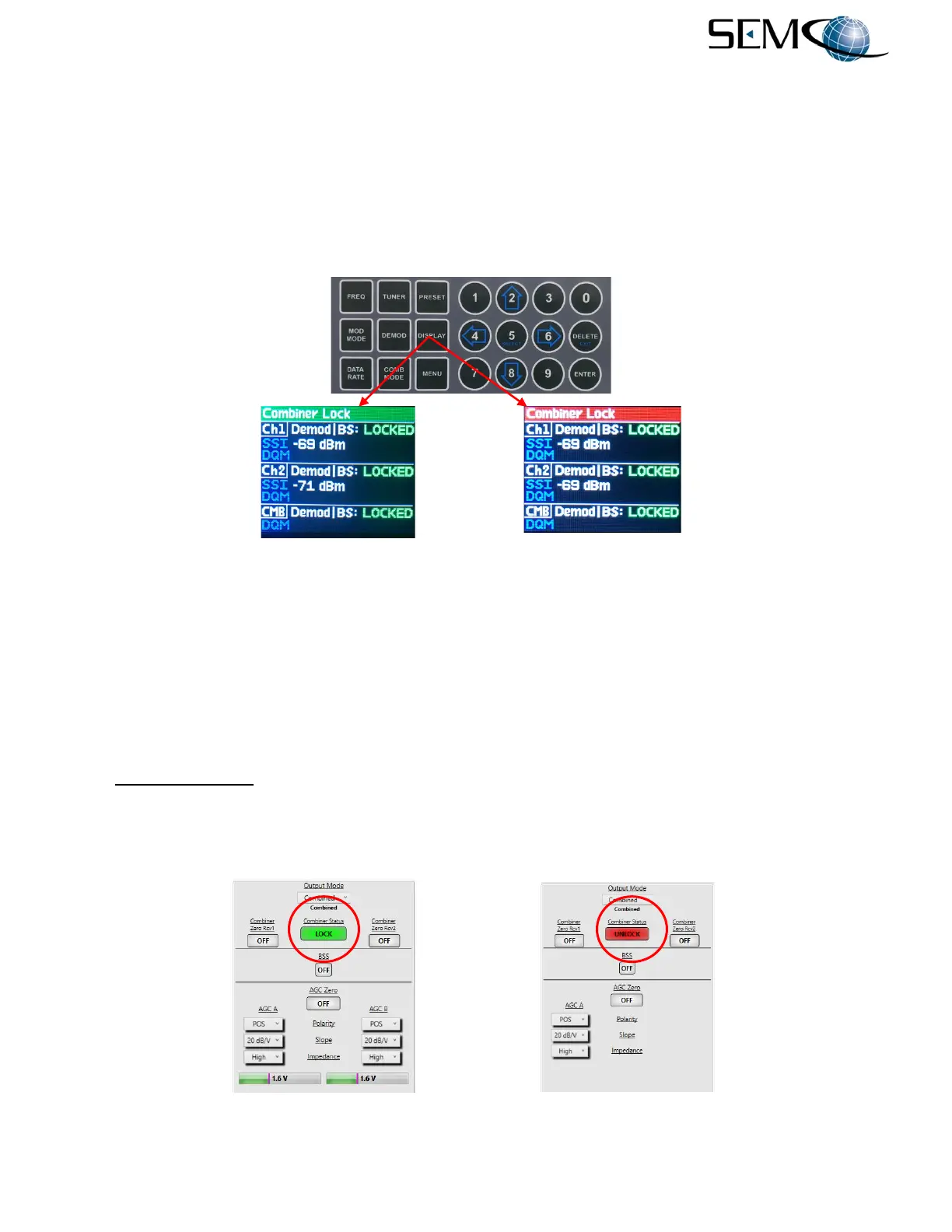
As previously mentioned in paragraph 5.1.1 above, the Combiner status is displayed on the Front Panel
General Status display header bar. This header bar is a GREEN Combiner Lock when Combined is
selected and a RED Combiner Lock when either CH1 or CH2 is selected (or any Combiner Unlock
condition exists).
Figure 5-3 illustrates these 2 conditions. The operator touches the DISPLAY button, uses the UP (2) and
DOWN (8) arrows to scroll to General Status in blue, and then pushes ENTER or SELECT (5).
Figure 5-3
Front Panel Combiner Lock/Unlock Displays
A GREEN Combiner Lock indication means that the combiner is functioning in its AM/AGC optimal ratio-
combining mode. When the combiner is Unlocked and BSS is not activated, the combiner will still output
a "combined" signal. The optimal ratio weighting circuitry will maximally bias the strongest channels in the
combiner circuit. When BSS mode (Combiner Menu Video Mode on Front Panel) is enabled and the
combiner is unlocked, it will physically switch the IF output from Combined to CH1 or 2.
5.1.4 Combiner Status Window on Remote GUI
The Combiner Status window indicates either a Combiner Lock or Unlock condition (Figure 5-4). A
Combiner Lock indication means that the combiner is functioning in its AM/AGC optimal ratio-combining
mode. A Combiner Unlock condition indicates that the Combiner is not functioning either as a Combiner
or Best Source Selector. Typically, this indicates no signal input, a signal present at only one channel, or
either Channel 1 or Channel 2 has been selected as the Combiner output mode.
Figure 5-4
Diversity Combiner Status Display on Remote GUI



 To Next Page