A2537-002/01 February 2020 8-4 SEMCO Proprietary Information
The UDP Ethernet output packets can be both segmented and non-segmented depending on the
configuration. The hardware for TM over IP provides maximum flexibility with standard configurations for
IRIG Chapter 10, Chapter 4/8 PCM data and user specified custom interfaces with factory support.
8.4 TM over IP Setting and Controls
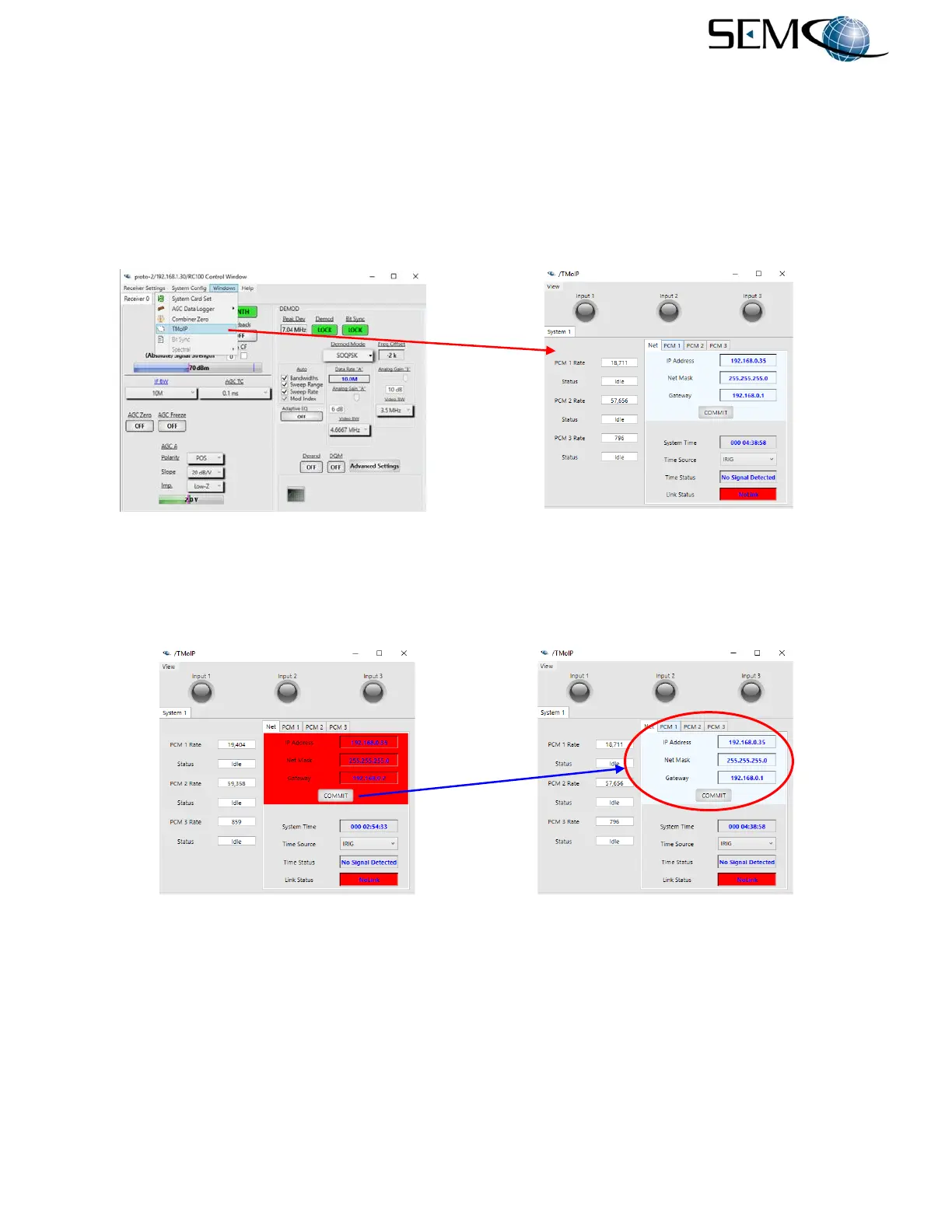
TM over IP setup using the remote GUI is depicted in Figure 8-4. The user clicks Windows on the Toolbar
and then TMoIP on the pull-down menu. This accesses the TMoIP Control Window as shown.
Figure 8-4
TM over IP Setup on Remote GUI
Figure 8-5 shows how to enter the IP Address, Net Mask and Gateway settings. The user clicks on each
box, types in the desired values and the window turns red until the user clicks on Commit.
Figure 8-5
IP Address, Netmask and Gateway Settings on Remote GUI
8.4.1 Time Source
Using the remote GUI, each of the receiver’s TM over IP Channel Settings are accessed by clicking on
PCM 1, PCM 2 or PCM 3 as shown in Figure 8-6.



 To Next Page