A2537-002/01 February 2020 4-12 SEMCO Proprietary Information
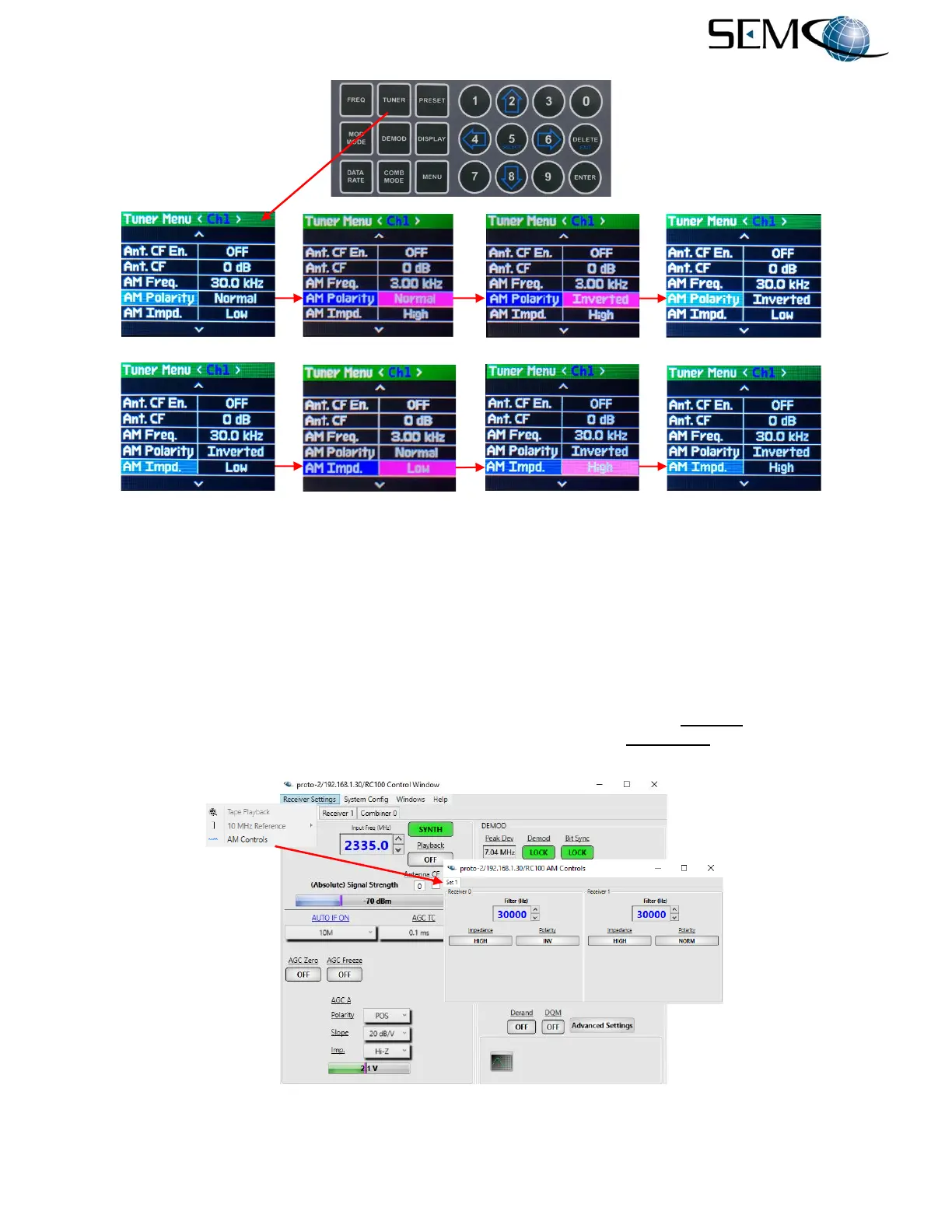
Figure 4-18 (continued)
AM LPF Frequency, Polarity and Impedance Selection Using Front Panel
4.4.2 Remote GUI AM Settings
AM settings are accessible via a pull-down menu as shown in Figure 4-19. The operator clicks on the Tool
Bar Receiver Settings tab and then AM Controls on the pull-down menu to access the AM Controls
window for receiver CH1 and CH2. AM LPF frequency is entered by clicking on the Filter (Hz) box and
typing and entering the desired frequency between 30 Hz and 30 kHz. Clicking on the Up-Down arrows to
the right of the box changes the frequency in 1 Hz increments. Clicking on the Polarity box changes the
AM polarity to either normal (NORM) or inverted (INV). Clicking on the Impedance box changes the AM
output impedance to either High or Low.
Figure 4-19
AM LPF Frequency, Polarity and Impedance Selection Using Remote GUI
---------------------------------------------AM Output Polarity Selection----------------------------------------------
------------------------------------------AM Output Impedance Selection---------------------------------------------



 To Next Page