A2537-002/01 February 2020 6-19 SEMCO Proprietary Information
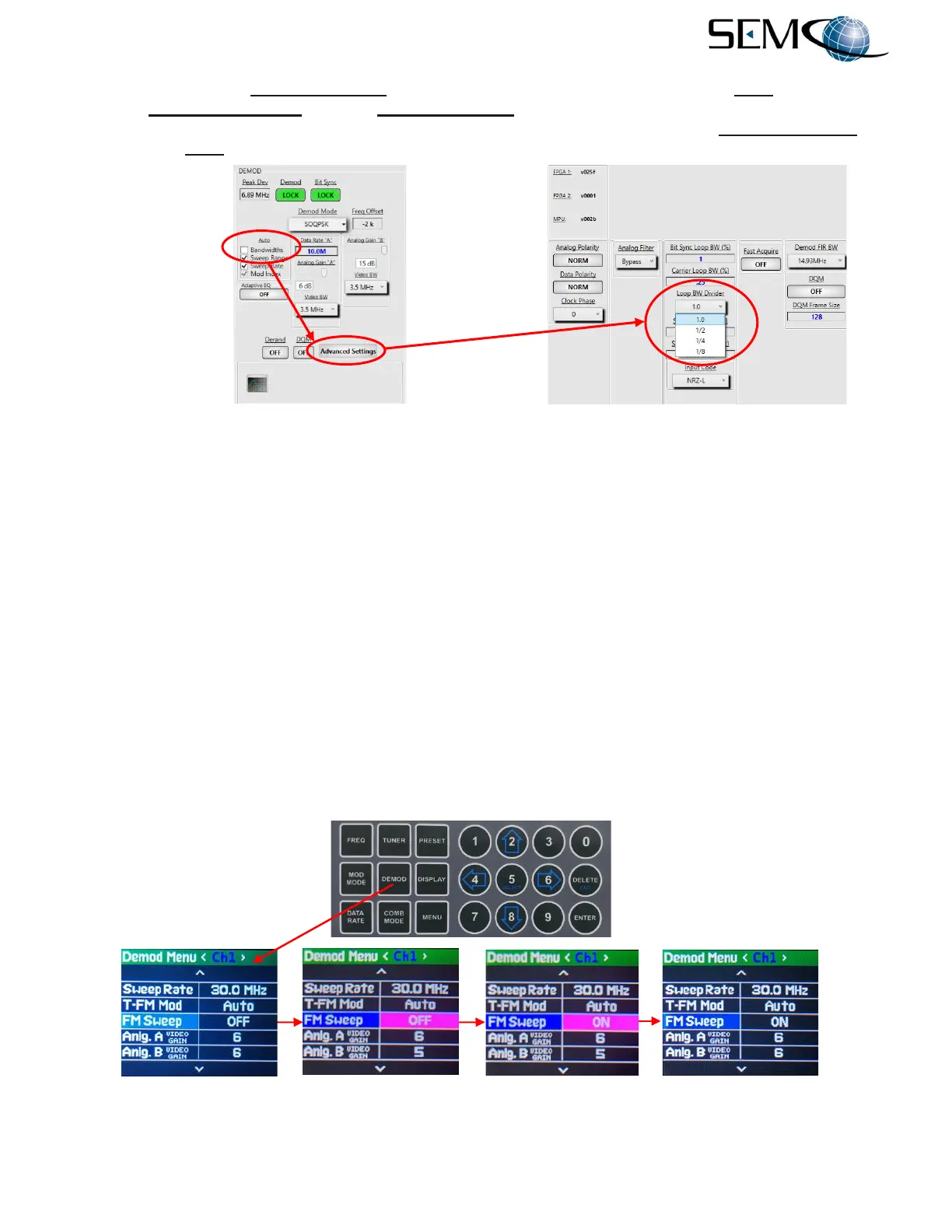
Figure 6-26 shows the Loop BW Divider feature on the remote GUI. The user disables Auto Bandwidths
clicks on Advanced Settings and then Loop BW Divider to access a pull-down menu. The desired value
for reducing Carrier Loop Bandwidth during initial signal acquisition is then selected. Loop BW Divider is
available with Auto disabled for PM, BPSK, A/U/Q/PSK and SOQPSK-TG demodulator formats as shown.
Figure 6-26
Loop BW Divider on Remote GUI
6.8.3 FM Sweep
This feature is used when acquiring FM signals below 30 Kbps. When this feature is enabled, the
demodulator’s AFC is enabled, and the demodulator’s center frequency is swept when demodulating
narrow FM signals to ensure that the desired signal is centered in the selected IF FIR Filter bandpass.
Figure 6-27 shows how to enable FM Sweep using the Front Panel LCDs and /Keypad.
The operator pushes the DEMOD button to enable the <Ch1> Demod Menu display, uses the UP (2) and
DOWN (8) arrows to scroll to FM SWEEP in blue, and then pushes ENTER or SELECT (5) to highlight the
ON/OFF window in bright magenta. The operator then uses the UP (2) and DOWN (8) arrows to select
ON and pushes ENTER or SELECT (5.
Using the horizontal LEFT (4) and RIGHT (6) arrows, the operator selects <Ch2> and pushes ENTER or
SELECT (5) to highlight the ON/OFF window in bright magenta. The operator then uses the UP (2) and
DOWN (8) arrows to select ON and pushes ENTER or SELECT (5). The operator repeats these steps for
<Comb>.
Figure 6-27
Front Panel FM Sweep Settings



 To Next Page