A2537-002/01 February 2020 6-6 SEMCO Proprietary Information
6.3.1 QPSK Data Rate Entry
It is important to note that when receiving a QPSK-modulated RF signal, the Data Rate entered on the
Front Panel and/or remote GUI is twice the data rate of the incoming signal. For example, the receiver
must be a 10 Mbps data rate when receiving and demodulating a 5.0 Mbps QPSK- modulated signal.
6.4 Demodulator Output Modes
The following four fixed baseband video outputs (rear panel 75 ohm BNC connectors) are provided:
A. Video 0 - Analog 0-4 Vp-p
B. Video 1 - Analog 0-4 Vp-p
C. Video 2 - Digital Clock (Min 3.3 V TTL/CMOS)
D. Video 3 - Digital Data (Min 3.3 V TTL/CMOS)
6.5 Analog/Digital Baseband Video FIR Filter Bandwidth and Gain Controls
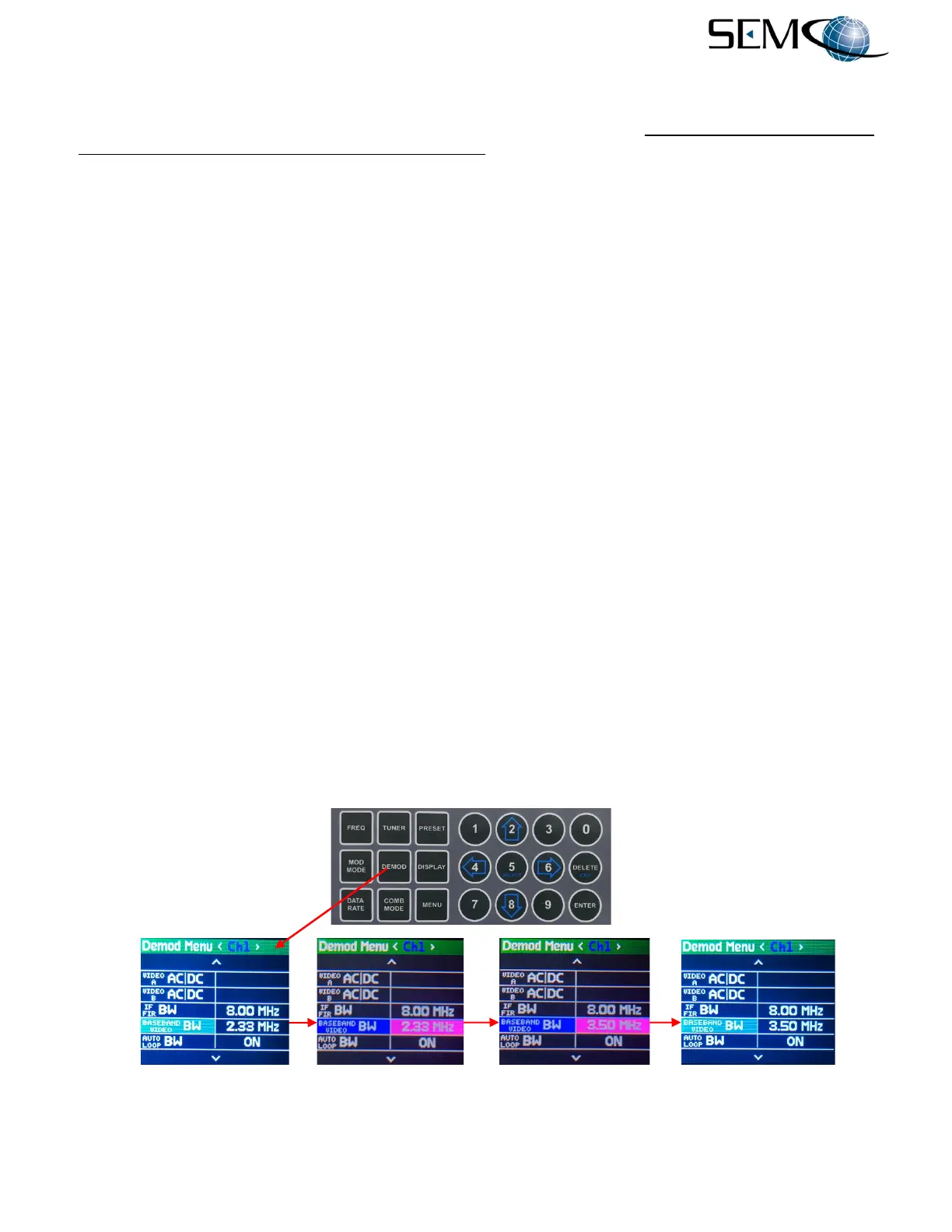
Figure 6-11 illustrates the process for selecting Video FIR Bandwidth and Gain Controls using the front
panel LCD displays and Keypad. In general terms, the optimum Video FIR BW value for all demodulation
formats with I and Q outputs is determined by 0.7 x (Data Rate/2). All other Video FIR BW values are
normally 0.7 x Data Rate. These values are not absolute, and 15 selectable Video FIR Bandwidth values
for every data rate are provided.
For Video FIR Bandwidth selection, the operator pushes the DEMOD MODE button to access the Demod
Menu display, uses the UP (2) and DOWN (8) arrows to scroll to BASEBAND VIDEO BW in blue, and
then pushes ENTER or SELECT (5) to highlight the BASEBAND VIDEO BW selection window in bright
magenta. The operator then uses the UP (2) and DOWN (8) arrows to select the desired BASEBAND
VIDEO BW value and pushes ENTER or Select (5).
Using the horizontal LEFT (4) and RIGHT (6) arrows, the operator selects <Ch2> and <Comb> in the
Demod Menu header display bar. The operator then pushes ENTER or SELECT (5) to highlight the
BASEBAND VIDEO BW selection window in bright magenta, uses the UP (2) and DOWN (8) arrows to
select the desired BASEBAND VIDEO BW value and pushes ENTER or Select (5).
As previously mentioned, the Baseband Video BW value only needs to be entered once for all 3 channels
if Diversity Slaving is enabled.
Figure 6-11
Front Panel Video FIR Filter BW Selection



 To Next Page