Cirklon Sequencer User Manual
Fixing and Labelling Rows
So far we have only added two rows to the example pattern. You could continue adding as
many more notes as you need, up to the 128 note limit imposed by MIDI, but the grid view
only has space to show eight rows.
Once more than eight rows have been added, the scroll bar on the left hand side of the grid
view comes into use. The box represents the current view position within all the rows of the
pattern, and will move up and down a thin centre line to indicate where you are within the
full range of rows.
As grid edit is aimed mainly at percussion programming, a couple of problems may become
apparent. It would be tedious to have to add the same set of note rows to the grid every time
you create a new pattern. And you may prefer to see which drum instrument is assigned to
each note, rather than the note name itself.
The further two columns in the “add/edit rows” page, “Label” and “Fixed”, address these
issues.
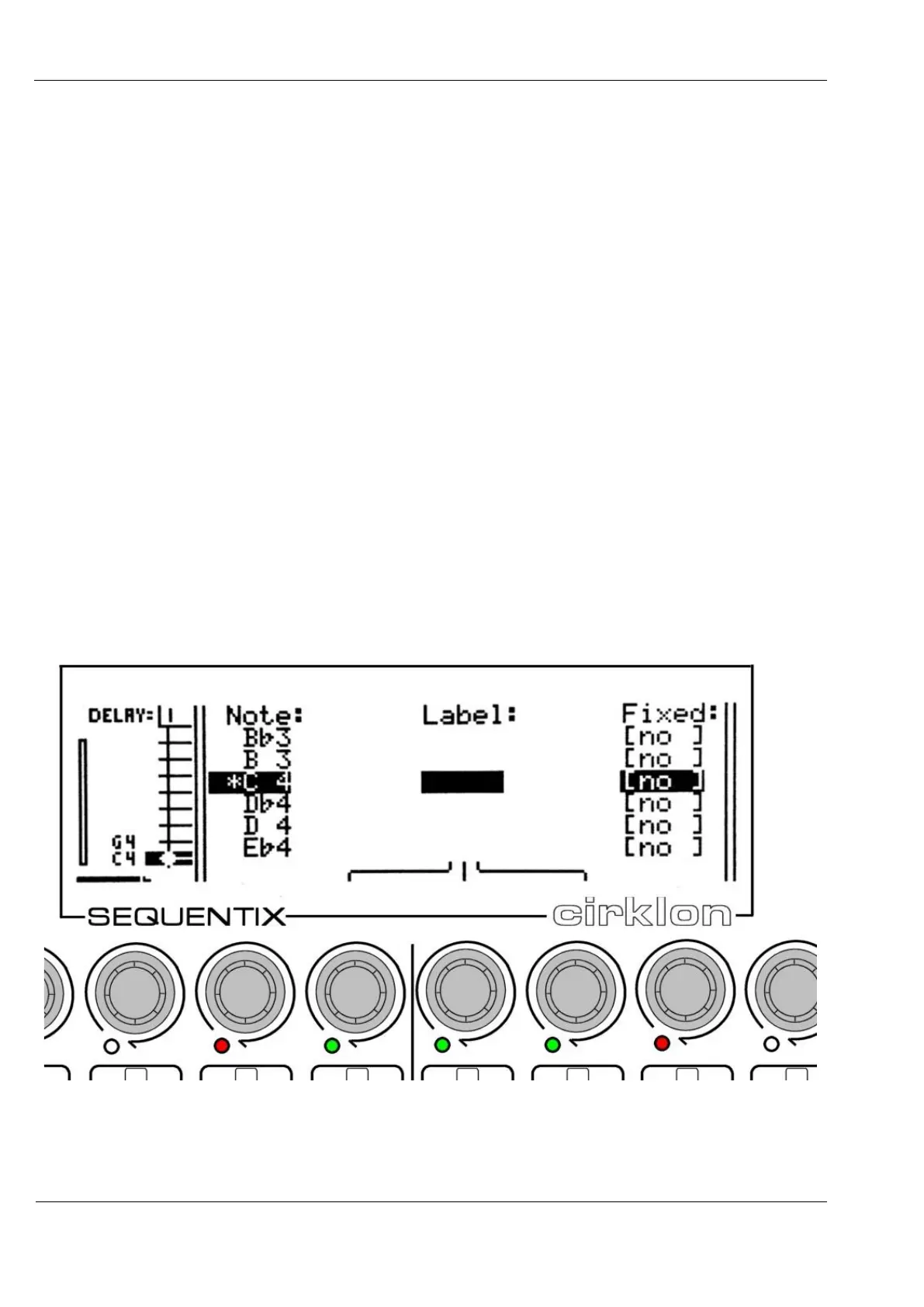
For example, let’s say the C 4 note in use in this pattern is mapped to a bass drum sound on
the instrument assigned to the track. Press MENU, then “add/edit rows”, and use the
VALUE encoder to select note C 4 in the list. The display should look like this:
Encoders 8, 9 and 10 are active here for setting a 3 character label to replace the note name.
Characters A to Z, 0 to 9, <flat>, <sharp>, backslash and dash can be used.



 To Next Page