Cirklon Sequencer User Manual
7. MIDI configuration
Port Configuration
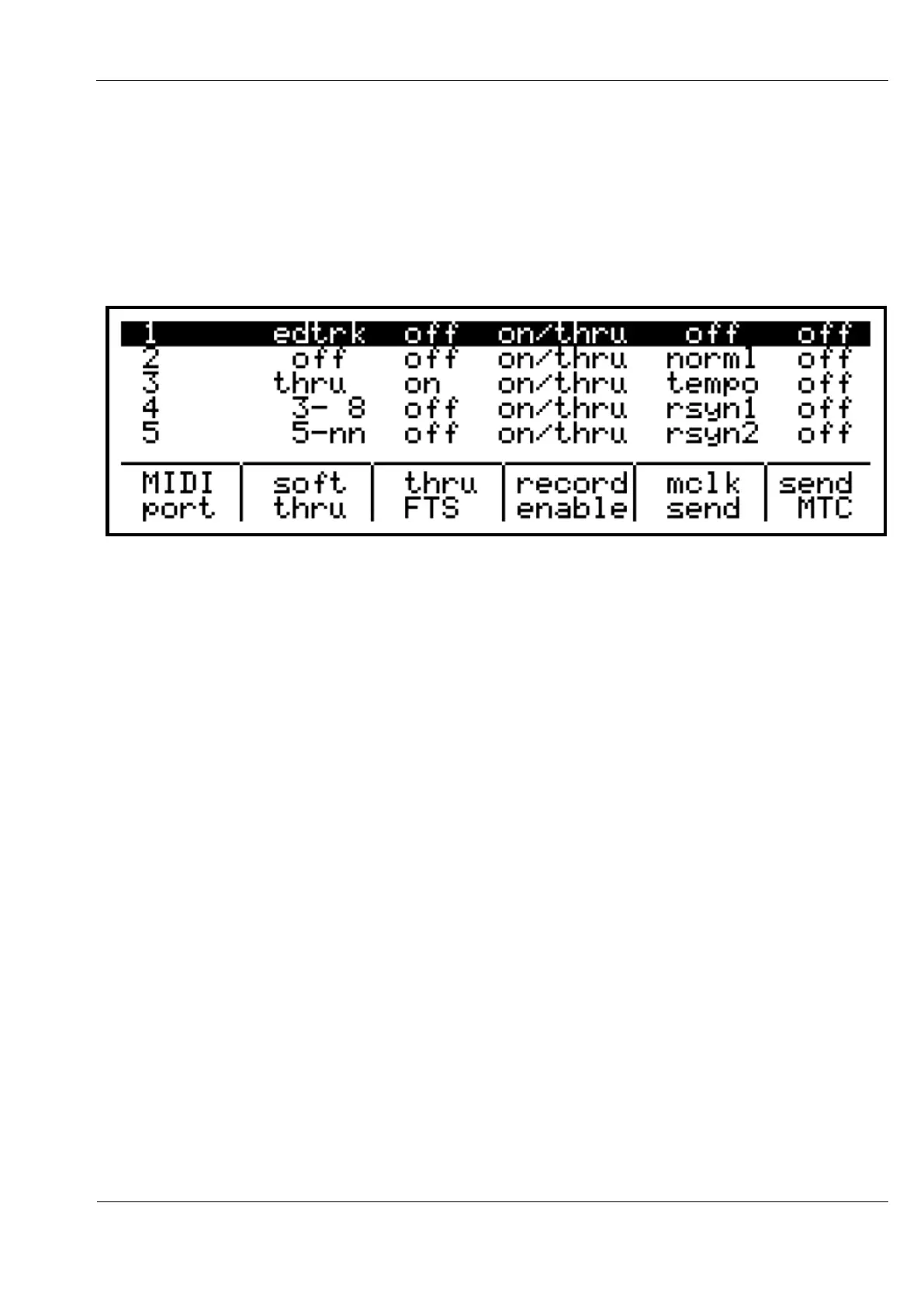
The MIDI port configuration page (accessed via the play mode “more” menu described in the
previous section) looks like this:
There are a total of twelve MIDI ports in Cirklon.
These are 5 standard serial MIDI ports, the CV port for communication with the internal
CVIO option, and 6 virtual ports on the USB port (which acts as a class-compliant USB MIDI
slave device).
The MIDI port configuration page allows you to choose the soft-thru behaviour and
selectively enable real-time recording for each IN port, and to set the MIDI clock and MTC
transmission options for each OUT port.
All options are edited using the encoders below the display.
Encoder 6 selects the port to edit, with the settings for that port highlighted.
Not all ports can be shown at once, so the display will scroll as required.
The purpose of each setting is as follows:
soft thru
This option allows incoming MIDI messages (notes, controllers, etc.) to be re-transmitted at
one of the MIDI OUT ports, on a different MIDI channel if required.
Pressing encoder 7 will step through five main soft-thru options.
Encoder 7 can also be turned to select port and channel numbers where needed.
The options are:



 To Next Page