Cirklon Sequencer User Manual
Whenever you enter song play mode while in the workscene, at the end of the next global bar,
the first scene of the song will be loaded and the pattern assignments and initial active/mute
status of the tracks for the scene recalled.
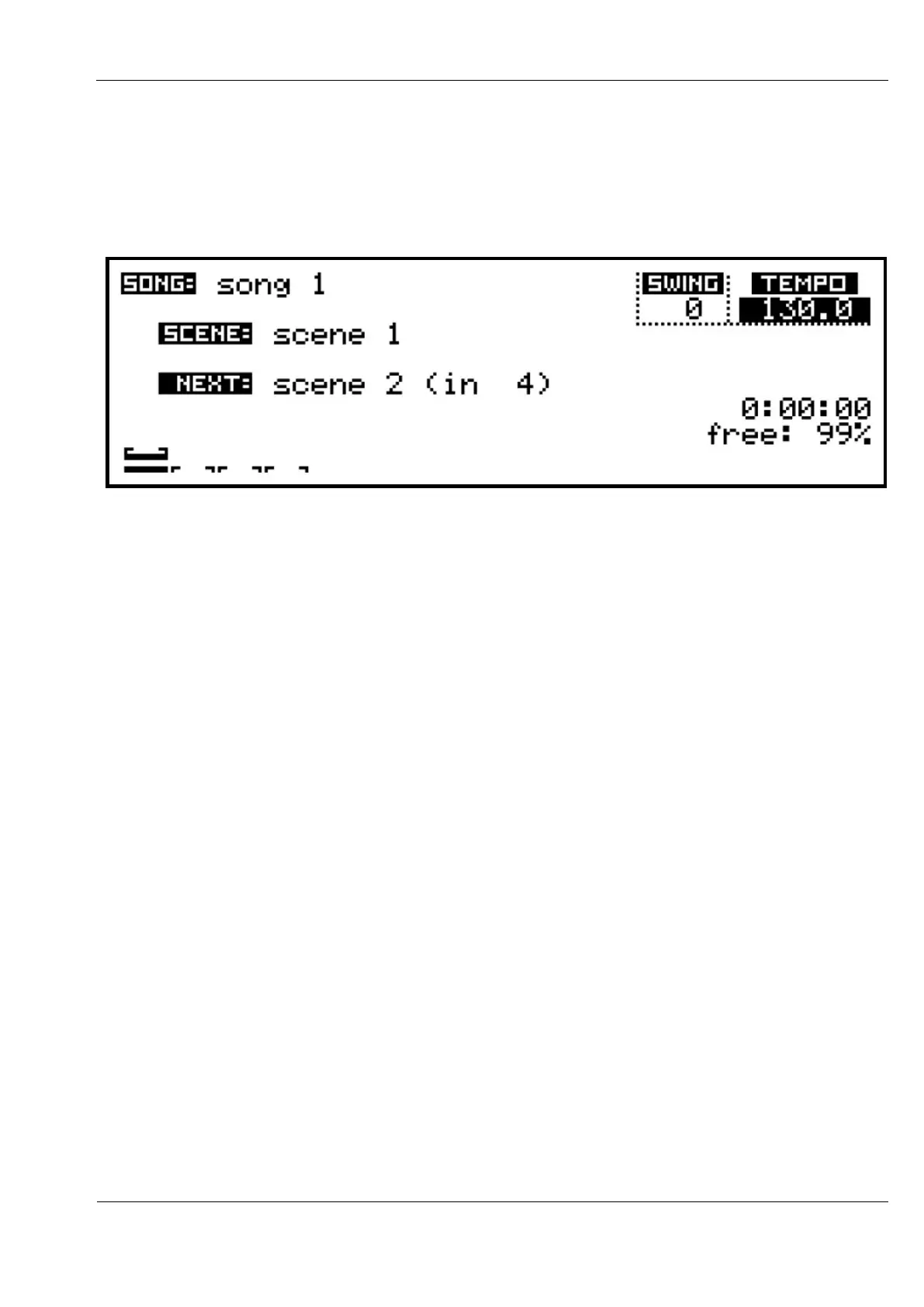
The names of the current and next scenes are shown on the SONG page:
A countdown of bars until the next scene change is shown to the right of the next scene name.
In this example, Scene 1 is the current scene.
Scene 2 is set to follow after 4 bars (4 repeats of the gbar length defined for Scene 1).
The graphic at the very bottom of the display provides a visual indication of the current scene
length, and the playing bar position in the scene.
The single ‘bar’ indicator second from bottom shows the length and current position of the
pattern assigned to the current edit track.
If the Song Adv option for scene 1 was set to manual, it would not advance, and the text
manual would appear in place of the countdown.
A manual scene allows you to have a point in a song where the patterns of a scene will repeat
indefinitely until you manually advance to the next scene.
You do this by holding the NEXT key and pressing the SCENE key.
A brief message will confirm the pending scene change.
Mute Hold
As each scene is recalled during a song, the initial active or muted status for each track is also
recalled.
The Mute Hold feature allows you to over-ride this behaviour if you wish.



 To Next Page