Cirklon Sequencer User Manual
Let’s work through a basic example –
Synth1 has pitch CV, gate and filter CV inputs.
The pitch CV input is connected to CV output 1, the gate input to Gate output 1, and the filter
CV to CV output 2.
First, you must create an instrument definition, as described in the earlier section “Creating
and Assigning an Instrument”.
Name the instrument “synth1”, set the MIDI Port to “CV”, and MIDI channel to 1.
With the instrument assigned to a track, and a pattern playing, MIDI messages will now be
sent to the CVIO on channel 1.
The next step is to configure the CV outputs to respond to those messages.
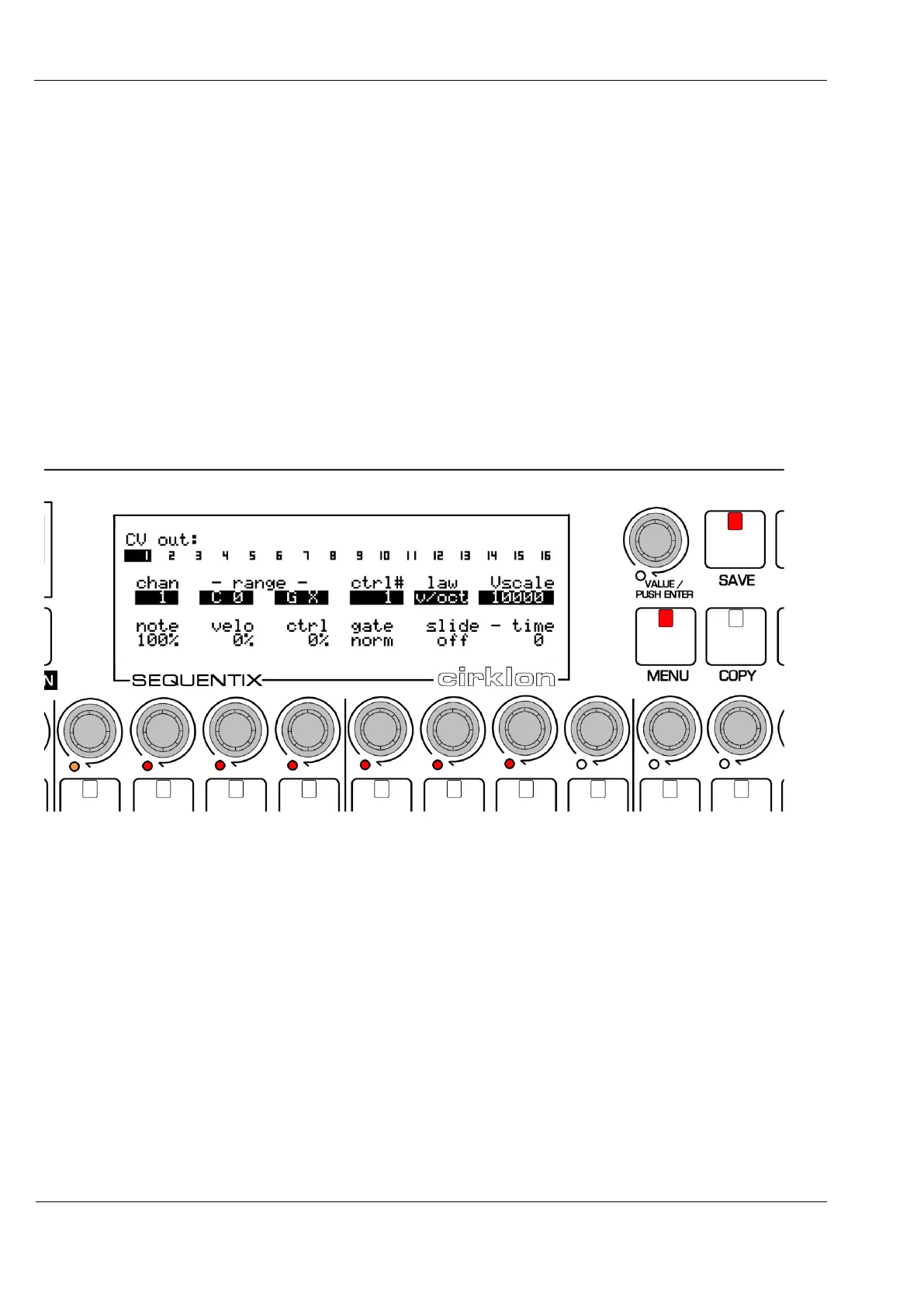
This is done from the CVIO Config page:
At the top of this display, the numbers 1 to 16 show which CV output has been selected for
configuration. As shown, output number 1 is selected.
The other outputs can be selected by turning the VALUE encoder.
CV Output Settings
There are two rows of six settings for each CV output.
The row is selected by turning the ROW encoder (or encoder 5).
All values in the selected row are highlighted, and the six encoders below the display used to
adjust the setting above.



 To Next Page